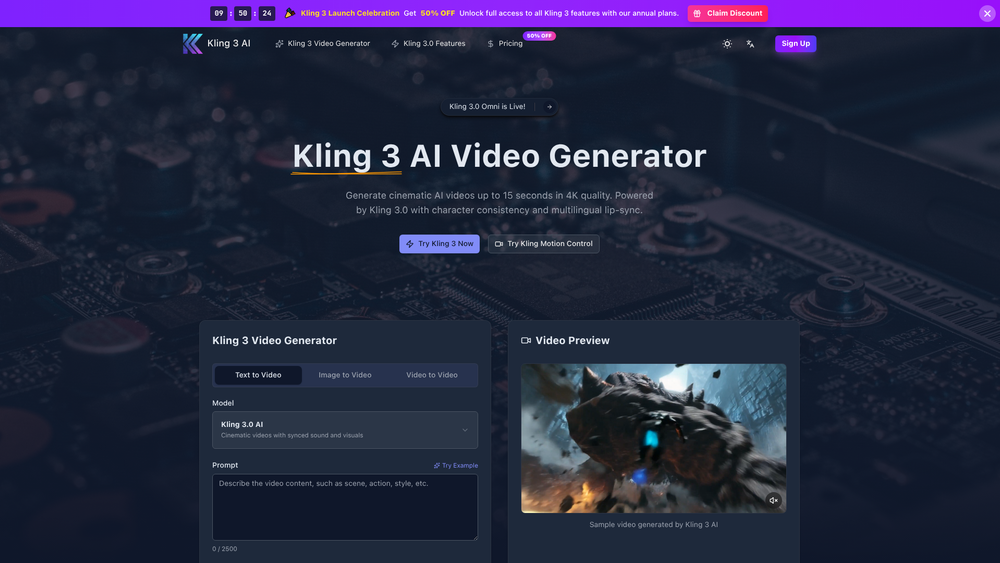
Kling 3.0 represents a significant leap in generative AI, specifically targeting the high-fidelity video production market. Developed by Kuaishou, this third-generation model moves beyond simple clips to offer 4K cinematic outputs that maintain visual integrity across different scenes. It is particularly useful for creators who need professional-grade visuals without the overhead of a full production crew, bridging the gap between hobbyist tools and studio-quality rendering.
In practice, the platform stands out for its Omni model, which addresses one of the biggest hurdles in AI video: character consistency. Whether you are generating a 15-second action sequence or a stylized portrait, the engine ensures that facial features and textures remain stable. This makes it an essential tool for digital storytellers and marketers who require a cohesive narrative flow rather than isolated, flickering clips.
Key Features
- 4K Cinematic Rendering: Produces high-resolution video content with realistic lighting, shadows, and textures that rival professional cinematography.
- Omni Character Consistency: Utilizes a specialized subject library to maintain the same face, clothing, and style across multiple generated clips.
- Multilingual Lip-Sync: Features synchronized audio capabilities for both Chinese and English, allowing characters to speak naturally with matching mouth movements.
- Extended Video Duration: Generates continuous cinematic sequences up to 15 seconds long, providing more room for complex storytelling.
- Advanced Motion Control: Offers precise camera movement settings and physics simulations to ensure realistic object interaction and environmental dynamics.
- Versatile Input Modes: Supports Text-to-Video, Image-to-Video, and Video-to-Video workflows, giving users flexibility in how they start their creative process.
- Integrated Sound Design: Automatically generates synchronized soundscapes and visuals to create a more immersive viewing experience.
- Aspect Ratio Customization: Allows users to tailor outputs for different platforms, from widescreen cinematic formats to vertical social media layouts.
How to Use Kling 3.0
- Access the Generator: Navigate to the Kling 3.0 dashboard and select your preferred generation mode, such as Text-to-Video or Image-to-Video.
- Input Your Prompt: Enter a detailed description of the scene you want to create; specify lighting, camera angles, and character actions for better results.
- Configure Settings: Choose the video duration (up to 15 seconds), select the desired aspect ratio, and toggle the "Generate Audio" option for lip-synced dialogue.
- Apply Motion Controls: Use the advanced settings to define specific camera paths or motion intensity to give the scene a more dynamic feel.
- Generate and Refine: Click the generate button and wait for the AI to process; you can then preview the video and make adjustments to the prompt if needed.
- Export Your Content: Once satisfied with the 4K output, download the file directly to your device for use in your projects.
Use Cases
- Film & Animation Pre-visualization: Directors can quickly turn scripts into high-quality visual storyboards to test pacing and lighting before actual production begins.
- Social Media Marketing: Brands can create eye-catching, high-resolution video ads that feature consistent brand mascots or characters across an entire campaign.
- Digital Human Creation: Content creators can use the lip-sync and character consistency features to build virtual influencers or AI-driven presenters.
- Educational Content: Educators can generate realistic historical reenactments or complex scientific simulations to make learning more engaging for students.
Pricing
Kling 3.0 operates on a credit-based system. While there are promotional discounts often available (such as 50% off for certain periods), users typically spend credits per generation. Check the official website for the most current subscription tiers and credit packages.
FAQ
What is Kling 3.0?
It is Kuaishou's third-generation AI video model designed for high-end 4K video generation with a focus on character stability and realistic physics.
Is Kling 3.0 free to use?
The platform usually requires credits for high-quality generations, though new users may find trial options or promotional discounts on the pricing page.
How long can the videos be?
Kling 3.0 can generate continuous cinematic sequences up to 15 seconds in length.
Does it support multiple languages for lip-sync?
Yes, the current model supports synchronized audio and lip-syncing for both English and Chinese.
What is the Omni model?
The Omni model is a specific feature set within Kling 3.0 that focuses on maintaining character consistency across different video files.
Can I use my own images as a starting point?
Absolutely. The Image-to-Video feature allows you to upload a static image and animate it using AI prompts.
What resolution are the videos?
The platform is capable of producing videos in 4K resolution, ensuring high clarity for professional use.