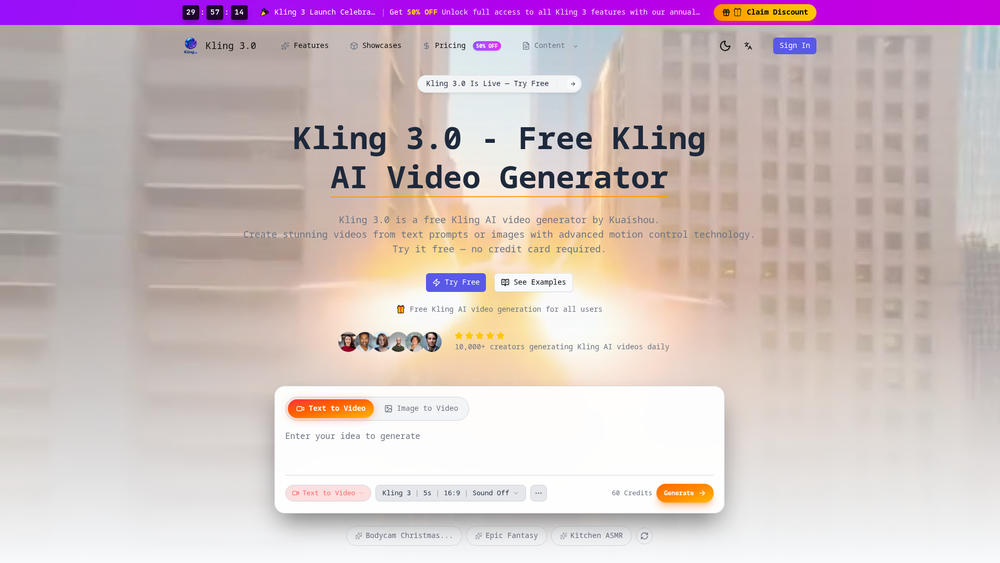
Kling 3.0 represents a significant leap in the AI video generation space, developed by the tech giant Kuaishou. It serves as a sophisticated engine that bridges the gap between static concepts and cinematic motion, allowing users to generate high-fidelity video content simply by providing text descriptions or uploading reference images. Unlike many of its predecessors, this version emphasizes realistic physics and coherent movement, making it a valuable tool for digital creators who need high-quality visual assets without the overhead of traditional production.
That said, what truly sets Kling 3.0 apart is its accessibility. While many high-end video models are locked behind waitlists or expensive enterprise tiers, this platform offers a straightforward web interface and a credit-based system that welcomes casual experimenters and professional marketers alike. It is particularly adept at handling complex prompts that involve human movement and environmental interactions, which are often the 'Achilles heel' of generative AI.
Key Features
- Text-to-Video Synthesis: Transforms natural language descriptions into cinematic sequences with impressive semantic accuracy.
- Image-to-Video Conversion: Breathes life into static photos, allowing for dynamic camera pans or subject movement based on a reference image.
- Granular Motion Control: Offers advanced settings to dictate how objects move within the frame, ensuring the output matches the creator's vision.
- High-Fidelity Rendering: Produces videos with realistic lighting and textures that rival professional-grade stock footage.
- Improved Temporal Consistency: Reduces the 'flickering' effect common in AI videos, maintaining character and background stability over several seconds.
- Flexible Aspect Ratios: Supports standard formats like 16:9, making it ready for various social media and professional platforms.
- Semantic Prompt Understanding: Interprets complex instructions better than previous versions, reducing the need for 'prompt engineering' trial and error.
How to Use Kling 3.0-
- Access the Kling 3.0 dashboard and choose between the 'Text to Video' or 'Image to Video' tabs depending on your starting asset.
- Input your prompt into the generation box; be specific about lighting, camera angles, and subject actions for the best results.
- Upload a source image if you want the AI to use a specific visual reference for its starting point and define the intended motion.
- Adjust the generation settings, such as the duration (e.g., 5 seconds) and the aspect ratio, to fit your specific project requirements.
- Hit the 'Generate' button to process the frames, which will consume a set amount of your available credits.
- Preview the final video in the gallery and use the download option to save it to your device or refine the prompt for a new iteration.
Use Cases
- Social Media Marketing: Quickly generating eye-catching background loops or short-form video ads without the need for a camera crew or expensive stock licenses.
- Visual Storyboarding: Allowing directors and writers to see a rough version of their scenes during the pre-production phase to communicate vision to a team.
- Creative Experimentation: Enabling artists to explore surreal or impossible visual concepts that would be too costly or difficult to animate traditionally.
- Educational Content: Creating visual aids for history or science lessons where historical footage or microscopic views are unavailable or hard to film.
Pricing
Kling 3.0 offers free credits for all users to try the service. For those requiring higher volume or full access to advanced features, annual plans are available, often featuring launch discounts. Check the official website for the most up-to-date pricing and credit packages.
FAQ
What is Kling 3.0-?
It is an advanced AI video generator developed by Kuaishou that creates high-quality video content from text prompts or static images using advanced motion control technology.
Is Kling 3.0- free to use?
Yes, the platform provides free Kling AI video generation credits for all users, allowing you to try the tool without a credit card.
How does it compare to version 2.6?
Kling 3.0 offers superior quality, better coherence, and more realistic physics compared to versions 2.6 and 2.1, making the output significantly more professional.
What is the maximum video length?
While specific limits can vary by plan, the generator is optimized for high-quality short-form clips, typically around 5 seconds per generation, which can then be extended.
Do I need technical skills to use it?
Not at all. The interface is designed for creators of all levels, requiring only natural language prompts or simple image uploads to produce results.
Can I use the videos for commercial purposes?
Users should check the specific terms of service on the Kling website, as commercial rights often depend on the subscription tier used to generate the content.