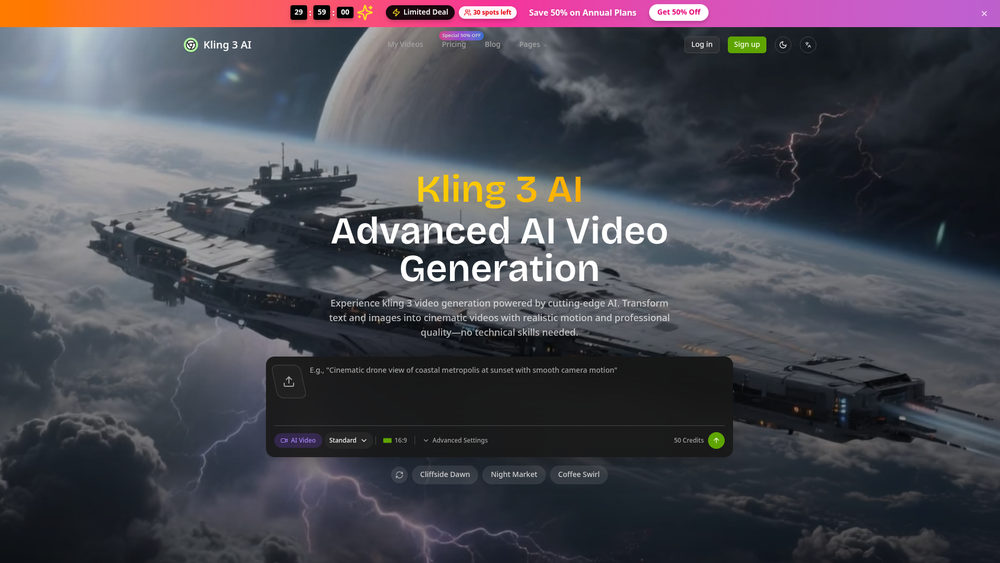
Kling 3 represents a significant leap in generative video technology, moving beyond simple clips into the realm of true cinematic production. It leverages advanced neural networks to interpret text prompts and static images, translating them into high-fidelity 4K video sequences characterized by realistic physics and professional-grade lighting. While many tools in this space struggle with temporal consistency, Kling 3 manages to maintain character and environment stability across complex motions, making it a viable option for those needing more than just a social media gimmick.
In practice, the tool functions as a virtual film crew, allowing users to direct scenes through natural language. It caters specifically to creators who require a high degree of control over visual storytelling without the overhead of traditional production. Whether you are a solo content creator or part of a larger marketing team, the platform streamlines the workflow from conceptual script to finished visual narrative, effectively compressing production timelines from weeks into mere minutes.
Features
- 4K Cinematic Rendering: Delivers high-resolution outputs suitable for professional displays and large-scale presentations.
- Physics-Accurate Motion: Utilizes advanced algorithms to ensure that movement—from flowing water to human gait—respects the laws of physics.
- Granular Camera Control: Offers precise manipulation of camera trajectories, including pans, tilts, and zooms, to mimic professional cinematography.
- Text-to-Video Synthesis: Transforms complex natural language descriptions into detailed visual scenes with high semantic accuracy.
- Image-to-Video Animation: Allows users to upload static images as a foundation, breathing life into photos or digital artwork with realistic motion.
- Temporal Consistency: Maintains the visual identity of objects and characters across the entire duration of the clip to prevent flickering or warping.
- Multi-Format Optimization: Automatically adjusts and exports videos tailored for specific platform requirements, ensuring maximum engagement across channels.
- Localized Content Generation: Facilitates the creation of diverse video variants to cater to global audiences and different demographic segments.
How to Use Kling 3
- Log into the Kling 3 dashboard and navigate to the creation interface to select your primary generation mode.
- Enter a descriptive text prompt in the input field, specifying details about the environment, lighting, and desired action.
- Optional: Upload a reference image to provide the AI with a specific visual style, character design, or starting frame.
- Configure your technical parameters, such as the aspect ratio, video duration, and the toggle for 4K resolution.
- Click the 'Generate' button to initiate the rendering process, which typically takes a few minutes depending on complexity.
- Review the generated sequence and use the built-in editing tools to refine the motion or re-roll specific segments if needed.
Use Cases
- Marketing & Advertising: Rapidly produce multiple ad variations for A/B testing to identify which visual styles resonate best with target audiences.
- Independent Filmmaking: Generate high-quality B-roll, concept visualizations, or atmospheric sequences to supplement traditional footage on a budget.
- Educational Content: Create engaging animated visualizations for complex scientific theories or historical events that are difficult to film in reality.
- Startup Product Launches: Develop professional-grade product demos and investor pitch videos that create a strong first impression without a creative agency.
- Social Media Strategy: Maintain a consistent posting schedule with high-production-value content that stands out in crowded algorithmic feeds.
Pricing
Kling 3 typically operates on a credit-based system. New users may receive a starting balance of credits to test the service, but for high-volume or professional 4K output, you should check the official website for current subscription tiers and credit packages.
FAQ
What is Kling 3?
Kling 3 is a next-generation AI video generator designed to create professional-quality 4K cinematic content from simple text prompts or static images using advanced neural networks.
Is Kling 3 free to use?
Kling 3 often provides a limited number of free credits for new users to explore the platform, but continuous professional use generally requires a paid subscription or credit purchase.
Can I control the camera movement in the videos?
Yes, the platform includes specific controls for directing camera trajectories, allowing you to simulate professional cinematography techniques like panning and zooming.
Does it support 4K resolution?
Absolutely. One of the standout features of Kling 3 is its ability to render video in native 4K, ensuring the content is sharp enough for professional use.
How long does it take to generate a video?
While traditional rendering can take hours, Kling 3 usually produces a finished video clip within a few minutes, though this can vary based on server load and clip complexity.
Do I need technical video editing skills?
No, the tool is designed to be accessible. If you can describe a scene in writing, the AI handles the technical aspects of lighting, physics, and rendering.
Can I use the videos for commercial purposes?
Generally, paid subscribers have rights to use the generated content commercially, but you should always review the latest Terms of Service on the official website to confirm current licensing rules.