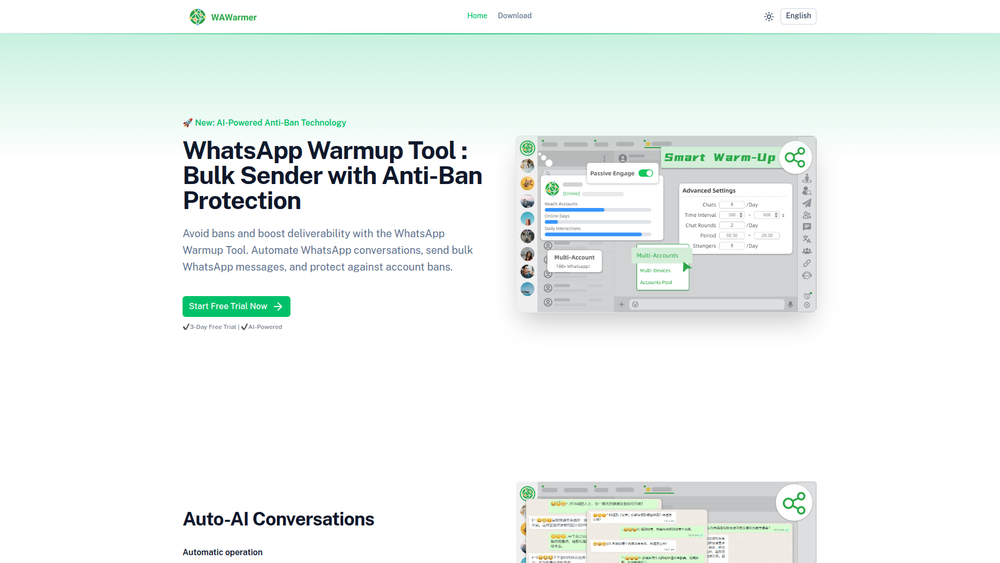
The WhatsApp Warmup Tool by WADesk is an advanced solution designed to prepare WhatsApp accounts for bulk messaging campaigns while minimizing the risk of being banned. It uses AI-powered technology to simulate human-like conversations, automatically warming up new or inactive accounts to build a positive reputation with WhatsApp's algorithms. This process enhances message deliverability and ensures that marketing outreach can be scaled safely and effectively.
This tool is invaluable for marketers, sales teams, agencies, and businesses of all sizes that rely on WhatsApp for customer communication and promotion. By automating the tedious and critical warmup process, it allows teams to focus on their core campaigns. Key benefits include improved account longevity, higher message open rates, and the ability to manage hundreds of accounts from a single, centralized dashboard, making it a cost-effective solution for large-scale operations.
Features
- AI-Powered Anti-Ban Technology: Utilizes advanced AI to generate realistic, human-like conversations on trending topics, moving beyond simple "Hello/Hi" exchanges. This helps build a credible interaction history and significantly reduces the risk of account suspension.
- Automated Multi-Round Conversations: With a single click, the tool initiates automated, multi-round bulk messaging sessions. Users retain manual oversight and can control the process, ensuring the warmup strategy aligns with their goals.
- Personalized Warmup Strategies: Offers two methods for account warming: "In-System Interaction" and "Multi-Devices Interaction." The system automatically matches accounts from a private pool, eliminating the need for users to find interaction partners manually.
- Background Operation: The tool can warm up an account in the background, allowing users to continue their regular client chats and business operations without interruption.
- Multi-Account Management Dashboard: Manage hundreds of WhatsApp accounts from a single console. The dashboard provides a real-time overview of the nurturing progress and "Health Score" for each account, simplifying management for agencies and large teams.
- Customizable Settings: Provides granular control over the warmup process. Users can set custom message intervals, specify online duration, define daily interaction limits, and apply settings across multiple accounts for consistent and stable performance.
How to Use
- Install and Connect: Begin by installing the secure browser extension. Once installed, scan the QR codes to link one or more WhatsApp accounts to the tool. The platform supports multi-account login.
- Configure Warmup Parameters: Navigate to the settings and choose your preferred warmup strategy. Customize parameters such as the conversation topics, the delay interval between messages, and the maximum number of messages to be sent daily.
- Initiate Auto-Warming: Click the "Start" button to begin the automated warmup process. The AI will take over, engaging in conversations based on your configured settings.
- Monitor Account Health: Keep an eye on the "Health Score" for each account on the dashboard. This score indicates the account's reputation and readiness for larger campaigns.
- Scale Your Campaigns: Once an account reaches a satisfactory Health Score, you can confidently begin using it for your bulk marketing, sales outreach, or customer service communications.
Use Cases
- Bulk Marketing Campaigns: Prepare new WhatsApp accounts to send promotional messages, newsletters, and offers to a large audience without getting flagged for spam. The warmup process ensures high deliverability rates.
- Sales Outreach Teams: Equip sales representatives with pre-warmed accounts to conduct cold outreach and follow-ups on WhatsApp, increasing the chances that their initial messages are successfully delivered and seen.
- Digital Marketing Agencies: Efficiently manage and prepare WhatsApp accounts for multiple clients from a single dashboard. Agencies can offer WhatsApp marketing services at scale while ensuring account safety and longevity for each client.
- Customer Support Onboarding: Warm up accounts designated for customer support to handle high volumes of incoming and outgoing messages, ensuring reliable communication channels for new user onboarding and ongoing support.
FAQ
What is WhatsApp account warming?
Account warming is the process of gradually increasing the activity on a new or inactive WhatsApp account to build a positive reputation. It involves simulating natural, human-like conversations to signal to WhatsApp's algorithms that the account is legitimate, thereby reducing the risk of it being banned when used for bulk messaging.
How does the AI-Powered Anti-Ban technology work?
Instead of using repetitive, robotic messages, the AI generates unique and realistic conversations based on trending topics. This mimics genuine human interaction, making it much harder for automated systems to flag the account for suspicious activity.
Can I still use my WhatsApp account while the tool is running?
Yes, the WhatsApp Warmup Tool is designed to operate in the background. You can continue to chat with clients, respond to inquiries, and use your account for normal business activities without any interruption while the warming process is active.
How many accounts can I manage at once?
The tool is built for scalability, allowing you to manage hundreds of WhatsApp accounts from a single, unified dashboard. This is ideal for agencies or large businesses managing multiple campaigns or client accounts.
What is the "Health Score"?
The "Health Score" is a metric provided on the dashboard that represents the reputation and readiness of your WhatsApp account. A higher score indicates that the account is well-warmed and considered "healthy," making it safer to use for larger-scale marketing campaigns.
Do I need to find other users to chat with for the warmup process?
No. The tool features a private account pool and an internal matching system. It automatically pairs your accounts with others in the system to conduct conversations, so you don't need to manually find interaction partners.
What kind of settings can I customize?
You have detailed control over the warmup process. You can set the time intervals between messages, the duration the account stays online, the total number of interactions per day, and the topics for conversation. These settings can be applied uniformly across multiple accounts.