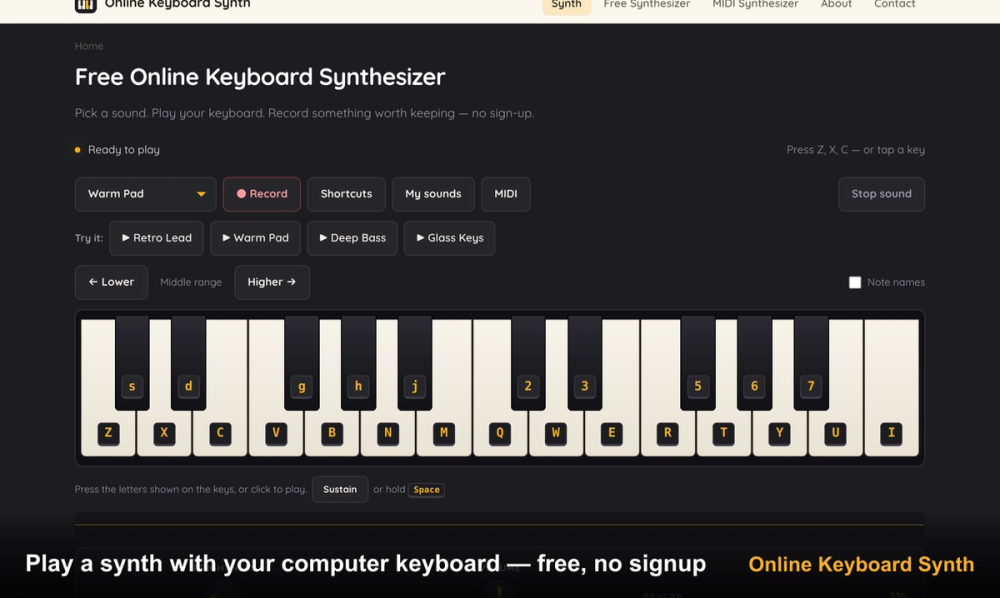
Online Keyboard Synthesizer is a web-based musical instrument that runs directly in your browser without any installation. It allows you to play synth sounds using your QWERTY keyboard, mouse, or a connected MIDI device. The tool works as a standalone sound module that requires no account or sign-up to start making music.
Musicians and hobbyists use this tool to quickly sketch out melodies or learn the basics of sound synthesis. It solves the problem of needing expensive hardware or heavy DAW software just to play a simple synth lead or record a quick riff. Because it runs on Web Audio API, the latency is low enough for real-time performance on most modern computers.
Key Features
- QWERTY mapping lets you use two octaves of white and black keys via your computer keyboard.
- Built-in recording captures your performance and allows for local downloads as WebM or WAV files.
- MIDI controller support works in Chrome and Edge for plug-and-play use with external hardware.
- Adjustable synth parameters include brightness, volume, and reverb to customize the output.
- ADSR envelope controls let you shape the attack, decay, sustain, and release of every note.
- Educational modules explain oscillators, filters, and detuning through interactive steps.
- Polyphonic playback supports multiple simultaneous notes for chords and complex melodies.
How to Use
- Open the website in a modern browser like Chrome or Edge to ensure full compatibility.
- Use the Z through M keys for lower notes and Q through I keys for the upper octave.
- Adjust the Brightness slider to change the filter cutoff frequency and shape the tone.
- Click the Record button at the top of the interface to start capturing your audio.
- Press Stop and select the WAV export option to save the file to your computer.
Use Cases
- A producer needs to test a melody idea quickly while traveling without their full studio setup.
- A student uses the interactive lessons to understand how a filter resonance affects sound.
- A content creator records a short, custom synth transition for a podcast or video project.
- A hobbyist connects an old USB MIDI keyboard to turn a laptop into a portable sound module.
Pricing
This tool is free to use with no sign-up, downloads, or locked features. Check the official website for any future updates.
FAQ
What is Online Keyboard Synthesizer?
It is a browser tool that simulates a hardware synthesizer using web audio technology, allowing for real-time music creation.
Is Online Keyboard Synthesizer free?
Yes, all features including the recorder, MIDI support, and sound design tools are available at no cost.
Can I connect a MIDI keyboard?
Yes, you can plug in any USB MIDI controller, and it will be detected by Chrome or Edge browsers automatically.
Can I record what I play?
Yes, the tool has a built-in recorder that saves your performance as a WebM or WAV file locally.
Does it work on mobile devices?
It works on mobile browsers through touch input, though MIDI support is currently limited to desktop versions of Chrome and Edge.
Do I need to create an account?
No, the synthesizer is fully functional the moment the page loads without any registration required.