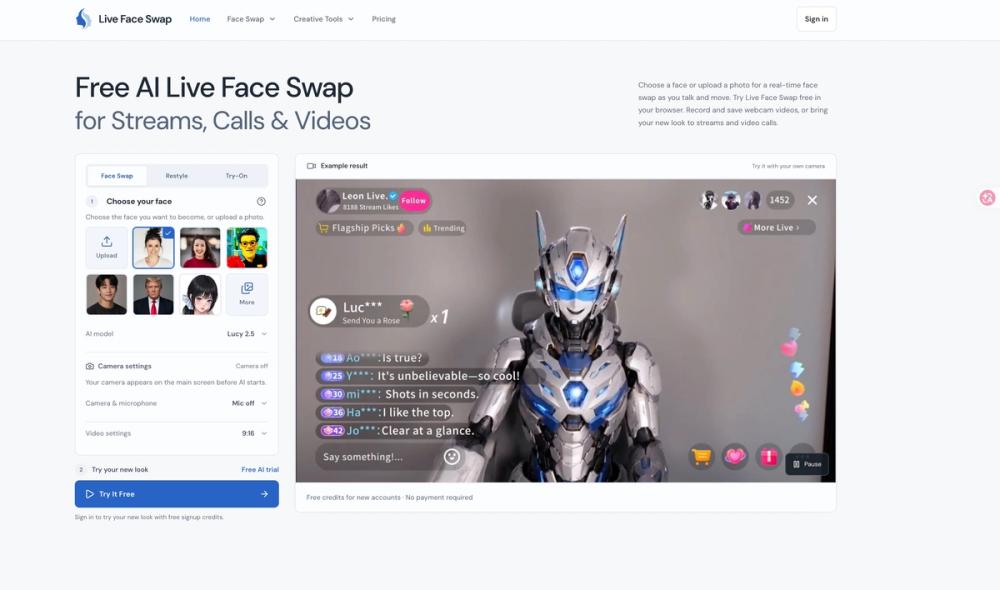
Live Face Swap AI is a web-based application that replaces your face with a different character or person in real-time. It runs directly in your browser, removing the need for high-end local hardware or complex software installations. Content creators and streamers use it to maintain a specific persona or create reaction videos without switching between multiple recording and editing apps.
The platform handles the entire workflow from the initial camera feed to the final MP4 export. You can choose from a library of reference faces or upload your own photo to set the look. Once active, the AI tracks your movements and expressions, mapping them onto the target face. It also includes tools for restyling footage into anime or illustrated looks and a virtual try-on feature for clothes.
Key features
- Real-time face tracking that maps your expressions to a reference photo as you move
- Virtual try-on tool for previewing different outfits or costumes without physical changes
- Restyle filters that turn live webcam footage into anime or illustrated visual styles
- Integrated recording studio to capture clips directly in the browser tab
- Built-in video editor for trimming the start and end of takes before downloading
- Audio synchronization tools to adjust the timing of microphone recordings
- OBS compatibility for bringing the transformed camera feed into live streaming software
- Multiple aspect ratio support including 9:16 for mobile and 16:9 for desktop
How to use
- Select a reference face from the gallery or upload your own image to the studio
- Click the camera preview button and grant the browser permission to access your webcam
- Choose your preferred framing and toggle the microphone recording option if needed
- Press the start button to begin the live AI transformation and check your look
- Hit the record button to capture your performance, then stop when you are finished
- Review your clips in the studio, trim any unwanted parts, and download the MP4 file
Use cases
- A gaming streamer uses a recurring character face to maintain an anonymous persona during live Twitch broadcasts
- A content creator records multiple reaction clips with different reference faces to compare which one fits a script best
- Friends use the virtual camera output in a video call app to act out scenes as different characters
- A fashion blogger previews several costume ideas using the try-on feature to decide on a look for a photoshoot
- An animator uses the restyle filter to generate base footage for an anime-inspired social media post
Pricing
Subscription plans start at $7.50 per month for 650 credits, with higher tiers like Pro at $14.50 and Max at $34.50 offering more minutes of AI time. One-time credit packs are also available starting at $59 for 4,000 credits, which do not expire.
FAQ
What is Live Face Swap AI?
It is a browser-based tool that lets you swap your face in real-time using a webcam for videos and calls.
Is Live Face Swap AI free?
New accounts receive free signup credits to test the features, but continued use requires a subscription or credit pack.
Does this require a powerful GPU?
No, the processing happens on the platform's servers, so you can run it on standard laptops through a web browser.
Can I use this with OBS?
Yes, you can bring the transformed camera feed into OBS for use in live streams on platforms like Twitch or YouTube.
Where are my recorded clips saved?
Clips stay in your current browser tab until you download them; they are deleted if you refresh or close the page.
What video formats can I download?
You can export your recordings as MP4 or WebM files, depending on your browser and device compatibility.