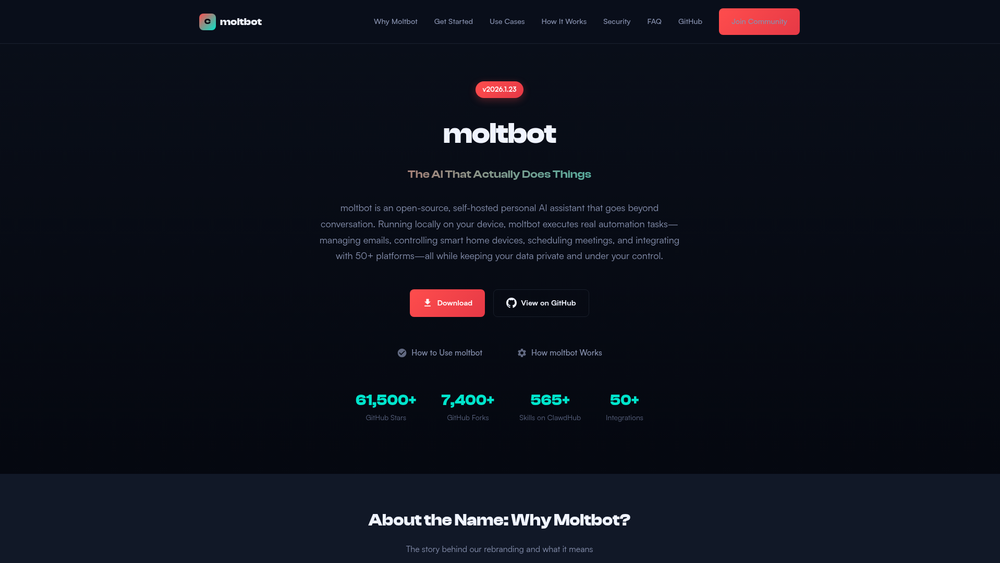
moltbot is an open-source, self-hosted AI assistant designed to bridge the gap between conversational AI and functional automation. Unlike standard chatbots that reside in the cloud, moltbot runs locally on your own hardware, ensuring that your data remains entirely under your control. This "privacy-first" approach makes it an ideal choice for individuals and organizations that need to automate sensitive workflows without exposing internal data to third-party providers.
Originally launched as Clawdbot, the project rebranded to moltbot in early 2026 to establish a unique identity. The name reflects the concept of growth and transformation, much like a lobster shedding its shell. Beyond its philosophical roots, the tool is a powerhouse of utility, boasting over 50 integrations and hundreds of community-contributed "skills" that allow it to interact with everything from smart home devices to professional development environments. That said, its strength lies in its versatility; it isn't just a bot you talk to, but a system that acts on your behalf.
Features
- Local Execution: Processes all commands and data on your own device to ensure maximum privacy.
- 50+ Platform Integrations: Connects seamlessly with tools like WhatsApp, Slack, and various smart home ecosystems.
- ClawdHub Skill Repository: Access a library of over 565 pre-built automation skills created by the community.
- Open-Source Transparency: Distributed under the MIT License, allowing for full auditability and community-driven improvements.
- Cross-Platform Task Management: Capable of managing emails, scheduling meetings, and controlling hardware through a single interface.
- Extensible API: Provides developers with the tools to build and share custom skills tailored to niche requirements.
- No-Token Security: Worth noting, moltbot does not use cryptocurrency or proprietary tokens, maintaining a pure software focus.
How to Use moltbot
- Visit the official GitHub repository and download the latest release specific to your operating system.
- Follow the provided installation guide to set up the local environment and necessary dependencies on your machine.
- Navigate to the settings panel to authenticate your preferred integrations, such as email accounts or messaging applications.
- Browse the ClawdHub marketplace within the app to install specific skills that match your daily workflow.
- Input natural language commands to trigger automations or set up recurring scheduled tasks.
- Monitor the execution logs through the local dashboard to verify that your automated tasks are completing successfully.
Use Cases
- Smart Home Orchestration: Command your local IoT devices through a unified AI interface without relying on external cloud bridges.
- Communication Management: Automate the sorting of incoming emails and the drafting of context-aware responses.
- Developer Productivity: Integrate with coding environments to automate repetitive tasks like environment setup or documentation generation.
- Meeting Coordination: In practice, you can use the AI to check availability across multiple calendars and find optimal times for scheduling appointments.
Pricing
moltbot is a free, open-source project distributed under the MIT License. There are no subscription fees or hidden costs for the software itself.
FAQ
What is moltbot?
moltbot is a self-hosted AI assistant that performs real-world tasks and automations locally on your hardware.
Is moltbot free to use?
Yes, it is a free, open-source project released under the MIT License.
Why did the name change from Clawdbot?
The project was renamed to avoid trademark confusion with Anthropic's Claude AI, symbolizing a "molting" or growth process.
Does moltbot have a cryptocurrency token?
No. Any claims of a moltbot token or cryptocurrency are scams; the project is strictly software-based.
Can I use moltbot to control my smart home?
Yes, with over 50 integrations, it can manage various IoT devices and smart home ecosystems locally.
Where is my data stored?
All data is stored locally on your device, ensuring that your personal information never leaves your control unless you explicitly authorize an integration.