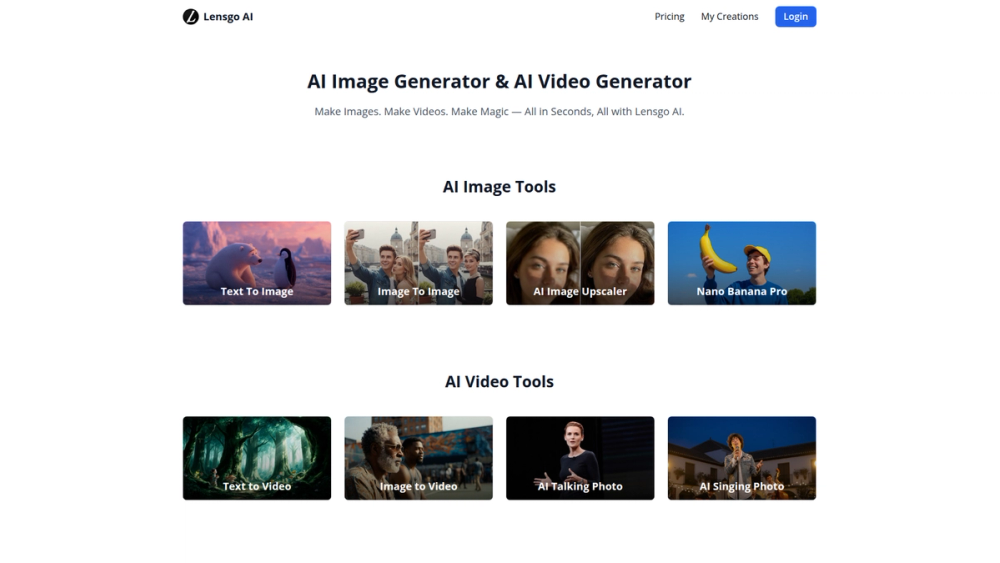
Lensgo AI is a versatile artificial intelligence platform designed for the rapid creation of high-quality images and videos. It provides a suite of intuitive tools that empower users to transform text prompts or existing images into stunning visual content in mere seconds. Whether you're a content creator, marketer, designer, or simply exploring creative possibilities, Lensgo AI streamlines the content generation process, making it accessible to everyone regardless of technical skill.
The primary value of Lensgo AI lies in its speed and simplicity. It eliminates the steep learning curves and time-consuming processes typically associated with traditional video and image editing software. By leveraging advanced AI models, the platform enables users to generate unique visuals for social media, marketing campaigns, presentations, or personal projects with minimal effort. This makes it an invaluable asset for anyone looking to produce engaging content quickly and efficiently, saving both time and resources while unlocking new creative potential.
Features
- Text to Image: Generate unique images from simple text descriptions. Describe what you want to see, and the AI will create a visual representation.
- Image to Image: Transform existing images by applying new styles or modifying elements based on text prompts, allowing for creative reinterpretations of your visuals.
- Text to Video: Create dynamic video clips directly from text prompts. This feature is perfect for bringing stories or concepts to life without needing any video footage.
- Image to Video: Animate static images to create short, engaging video content. This can add motion to photos, logos, or illustrations.
- AI Talking Photo: Bring portraits to life by animating a face and syncing it with provided audio, creating a realistic talking avatar from a single photo.
- AI Singing Photo: Animate a photo to make it appear as if the subject is singing along to an audio track, perfect for creating fun and engaging content.
- AI Image Upscaler: Enhance the resolution and quality of your images, making them sharper and more detailed without losing clarity.
How to Use
- Select a Tool: Navigate to the Lensgo AI website and choose the specific tool you want to use, such as "Text to Image," "Image to Video," or "AI Talking Photo."
- Provide Your Input: Depending on the tool, either type a descriptive text prompt in the input box or upload an image from your device. For text prompts, be as specific as possible to guide the AI.
- Configure Settings (Optional): Some tools may offer advanced settings, such as aspect ratio, style selection, or model choice. Adjust these parameters to fine-tune your desired output.
- Generate the Content: Click the "Generate" or "Create" button to start the AI process. Lensgo AI will process your input and create the image or video in seconds.
- Review and Download: Once the generation is complete, you can preview the result. If you are satisfied, download the final image or video to your device. You can find all your work in the "My Creations" section.
Use Cases
- Social Media Content Creation: Marketers and influencers can quickly generate eye-catching images and short video clips for platforms like Instagram, TikTok, and Facebook. This allows for a consistent stream of fresh, engaging content.
- Marketing and Advertising: Businesses can create custom visuals for digital ads, email campaigns, and website banners. The Text to Video and Image to Video tools are perfect for producing promotional shorts that capture audience attention.
- Prototyping and Design Mockups: Designers can use the Text to Image feature to rapidly visualize concepts and create mockups for clients. This accelerates the creative process and allows for quick iteration on ideas.
- Entertainment and Personal Projects: Create fun, animated content by making photos talk or sing. This is great for creating personalized greetings, memes, or simply experimenting with the creative capabilities of AI.
FAQ
What is Lensgo AI?
Lensgo AI is an online platform that uses artificial intelligence to generate images and videos from text prompts or existing images. It offers a range of tools for creative content production.
Do I need any technical skills to use Lensgo AI?
No, Lensgo AI is designed to be user-friendly. You only need to provide a text description or upload an image to start creating. No design or video editing experience is required.
What kind of content can I create?
You can create a wide variety of visual content, including static images from text, videos from text or images, enhanced high-resolution images, and animated talking or singing photos.
Is there a free version of Lensgo AI?
The website mentions a pricing page, which suggests there are different plans available, potentially including a free or trial tier. It's best to check the "Pricing" section on their website for the most current information.
Where are my creations saved?
All the images and videos you generate are saved in your account under the "My Creations" section, allowing you to access and download them at any time.
Can I use the generated content for commercial purposes?
The ability to use content for commercial purposes typically depends on the subscription plan. You should review the "Terms of Service" on the Lensgo AI website for specific details on usage rights.