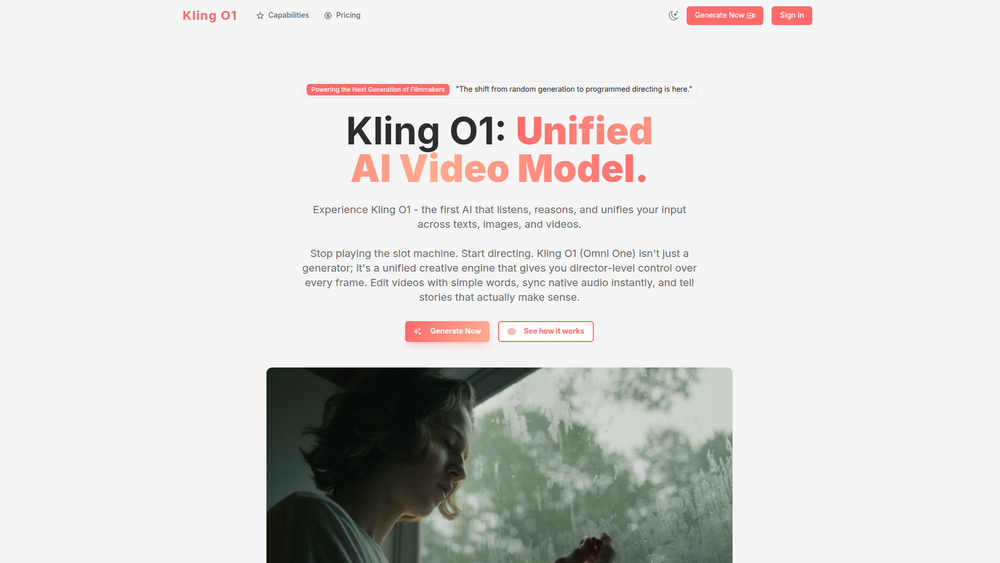
Kling O1 is a unified AI creative engine that revolutionizes video generation and editing. It moves beyond the random, unpredictable results of typical AI generators by providing users with director-level control over every frame. Instead of re-rendering an entire clip to fix one detail, Kling O1 uses a conversational interface to make precise edits, allowing creators to direct the AI like a member of their production team. Its core purpose is to bridge the gap between creative vision and AI execution, making sophisticated video production accessible to everyone from professional filmmakers to social media creators.
The primary benefit of Kling O1 lies in its unified and intuitive workflow. It combines text-to-video, image-to-video, and video-to-video capabilities into a single, cohesive model built on a revolutionary Multimodal Vision-Language (MVL) architecture. This allows the AI to listen, reason, and synthesize inputs across different formats. For filmmakers, marketers, and content creators, this means less time wrestling with prompts and more time focused on storytelling. Kling O1 makes video editing as simple as having a conversation, enabling precise control over elements like weather, objects, and colors without losing the essence of the original footage.
Features
- Unified Creative Engine: Seamlessly switch between Text-to-Video, Image-to-Video, and Video-to-Video modes within the same interface, using a single powerful model for all tasks.
- Conversational Editing: Edit videos using simple, natural language commands. Instruct the AI to "change the weather to rainy" or "remove the passerby," and it will execute the changes precisely.
- MVL (Multimodal Vision-Language) Architecture: Combine different input types for complex creations. For example, use a static image of a character and a text prompt to generate an animated video of that character performing an action.
- Precise Element Control: Modify specific objects or details within a video without regenerating the entire scene. You can change a dress color from blue to red while maintaining its texture and motion.
- Physics-Aware Generation: The AI understands the physics of the world, not just pixels. Changes like adding rain will realistically create wet surfaces, reflections, and appropriate lighting shifts.
- Style Transfer: Apply the artistic style from a reference image onto an entire video clip, transforming its look and feel while preserving the original motion.
- Object Inpainting: Remove unwanted objects or people from a scene, and the AI will intelligently fill in the background for a seamless result.
How to Use
- Select Your Mode: Begin by choosing your starting point: Text-to-Video (generate from a description), Image-to-Video (animate a static image), or Video-to-Video (transform an existing clip).
- Upload Your Assets: If using Image-to-Video or Video-to-Video, upload your source file (supports MP4, MOV, AVI up to 10MB). For Text-to-Video, this step is skipped.
- Write a Descriptive Prompt: Clearly describe the scene you want to create or the transformation you wish to apply. Be specific about actions, styles, and environments.
- Configure Generation Settings: Adjust parameters such as video duration (e.g., 8 seconds), quality (e.g., 720p), and aspect ratio to match your project's requirements.
- Generate the Initial Video: Click the generate button to create the first version of your video based on your inputs.
- Refine with Conversational Edits: Once the video is generated, use the chat-like editing interface to make further changes. Type commands like "make the sky darker" or "add a car in the background" to fine-tune the result.
Use Cases
- Filmmaking & Pre-visualization: Directors can quickly create or alter concept shots to test ideas. For instance, they can take an existing shot and change the time of day or weather conditions instantly.
- Marketing & Advertising: Marketers can transform a static product image into a dynamic video ad or take existing commercial footage and apply a completely new visual style to it for a fresh campaign.
- Social Media Content Creation: Creators can generate unique, eye-catching videos by animating their own illustrations or applying cinematic effects to simple smartphone videos, boosting engagement.
- Animation and Game Development: Animators can use Kling O1 to prototype character movements. They can upload a character design and use a text prompt to see how it performs a specific action, like running or jumping.
FAQ
What is Kling O1?
Kling O1 (Omni One) is a unified AI video model for both generating new videos and editing existing ones. It is designed to provide users with precise, director-level control through a conversational interface.
How is Kling O1 different from other AI video generators?
While most generators require a complete re-roll to make a change, Kling O1 allows for targeted, conversational editing. Its unified MVL architecture understands the relationship between text, images, and video, enabling precise modifications without starting from scratch.
What does "conversational editing" mean?
It means you can edit a video by typing natural language commands. For example, you can tell the AI "make the dress red" or "remove the person on the left," and it will apply only that specific change to the video.
What types of input can I use?
Kling O1 is a multimodal tool that accepts text prompts, source images, and source videos. You can also combine inputs, such as using an image and a text prompt together to animate a static character.
What is the maximum video duration I can generate?
The platform currently generates 8-second videos, which are available in 720p quality.
Can I remove objects from my video?
Yes, a key feature is the ability to remove elements like a person or an object from a scene. The AI will intelligently inpaint the background to create a seamless and realistic result.
Does the AI understand physics?
Yes, the model is built to understand real-world physics. When you ask it to make a scene rainy, it doesn't just overlay a rain effect; it also makes surfaces look wet and adds appropriate reflections, demonstrating a deeper understanding of the environment.