Img Creator AI is a powerful and accessible AI image generator and editor that allows anyone to create and modify high-quality visuals directly in their browser. Powered by Google's advanced Gemini 2.5 Flash AI model, the tool transforms simple text prompts into stunning images in seconds. Its core mission is to democratize creative technology, offering a completely free, no-signup-required platform for instant image creation.
This tool is designed for a wide range of users, including content creators, marketers, designers, students, and hobbyists. The key benefits are its incredible speed, ease of use, and zero-cost barrier to entry. Whether you need to quickly mock up a product, generate a unique graphic for a social media post, or simply bring a creative idea to life, Img Creator AI provides a seamless and powerful solution without the need for complex software or expensive subscriptions.
Features
- Advanced AI Engine: Utilizes Google's Gemini 2.5 Flash model to ensure fast, high-quality, and contextually accurate image generation from complex text prompts.
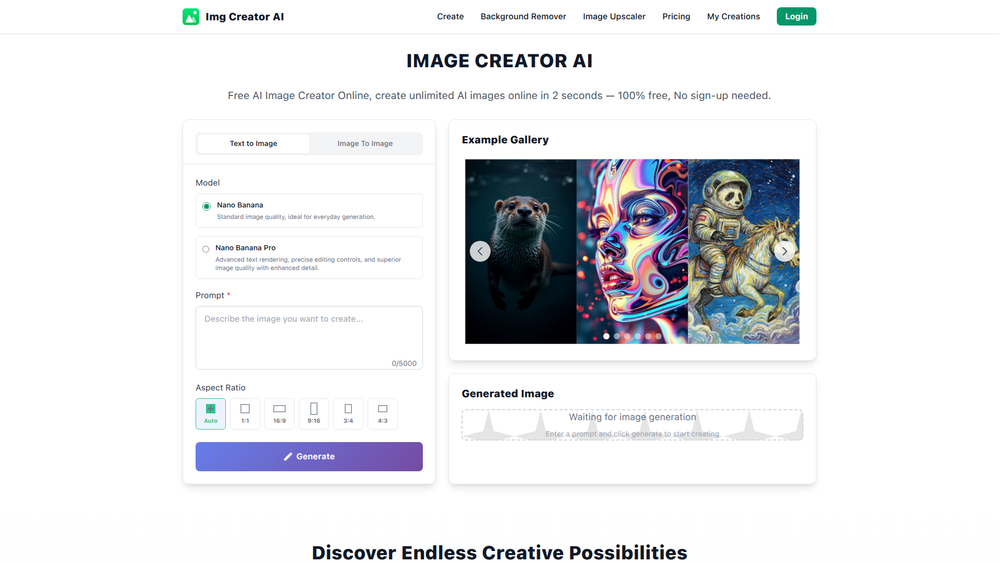
- Dual Generation Models: Users can choose between two distinct models: 'Nano Banana' for standard, rapid image creation, and 'Nano Banana Pro' for superior image quality, enhanced detail, and advanced text rendering.
- Text-to-Image and Image Editing: Functions in two modes. Generate entirely new visuals from a text description or upload an existing photo and use natural language prompts to make precise edits.
- Instant Access, No Signup: Offers a 100% free service with no requirement to create an account or provide personal information, allowing users to start creating immediately.
- Customizable Output Settings: Provides full control over the final image with options to adjust the aspect ratio (1:1, 16:9, 4:3, etc.) and select the output resolution (2K or 4K).
- Multi-Modal Capabilities: Can interpret and combine both text and visual inputs, enabling advanced functions like style transfer, subject consistency across images, and image fusion.
- High-Speed Performance: Optimized to generate images in just a few seconds, making it ideal for rapid prototyping, real-time creativity, and interactive editing sessions.
How to Use
- Choose Your Creation Mode: Decide if you want to generate a new image from scratch ('Text to Image') or edit an existing one. To edit, click the 'Upload Images' button and select your file.
- Write a Detailed Prompt: In the 'Prompt' box, describe the image you want to create or the changes you want to make. Be as specific as possible with details about subjects, style, colors, and mood for the best results.
- Select Your AI Model: Choose between the 'Nano Banana' model for quick results or the 'Nano Banana Pro' model for higher fidelity and more advanced features.
- Configure Image Settings: Select the desired 'Aspect Ratio' from the dropdown menu to match your intended use (e.g., 9:16 for a story, 16:9 for a banner). You can also choose between 2K and 4K 'Resolution'.
- Generate Your Image: Click the 'Generate' button and wait a few seconds for the AI to process your request and create the visual.
- Download and Use: Once the image appears, you can review it and download it directly to your device for use in your projects.
Use Cases
- Marketing and Advertising: Quickly create custom visuals for ad campaigns, social media promotions, and product mockups without the need for a graphic designer, saving time and resources.
- Content Creation: Bloggers, YouTubers, and social media managers can generate unique featured images, thumbnails, and post graphics that are perfectly tailored to their content.
- Digital Art and Inspiration: Artists and designers can use the tool to rapidly prototype concepts, explore different styles, or generate base images for further refinement in other software.
- Personal Projects: Create custom wallpapers, profile pictures, party invitations, or simply have fun bringing imaginative and whimsical ideas to life visually.
FAQ
What is Img Creator AI?
Img Creator AI is an advanced, free-to-use AI image editor and generator powered by Google's Gemini 2.5 Flash AI. It enables you to create, edit, and transform images using simple, natural language prompts, making visual creativity fast and effortless.
How does it work?
Img Creator AI operates in two modes. For 'Text to Image', you describe the image you want to create. For 'Image Edit', you upload a photo and describe the desired changes. The AI processes your text prompt and generates a high-quality image in seconds.
Is Img Creator AI really free to use?
Yes! The platform offers free image generation and editing capabilities. There are generous usage limits, allowing you to experience the full power of the technology without any cost.
Do I need to create an account to use it?
No, one of the key features of Img Creator AI is that it requires no sign-up or registration. You can visit the website and start creating images immediately.
What AI model does Img Creator AI use?
The tool is powered by Google's Gemini 2.5 Flash Image model, which is optimized for speed, quality, and understanding complex prompts.
What is the difference between the 'Nano Banana' and 'Nano Banana Pro' models?
'Nano Banana' is the standard model, ideal for everyday generation and speed. 'Nano Banana Pro' is an advanced model that offers superior image quality, enhanced detail, and more precise text rendering, making it suitable for professional-grade results.
Can I edit my own photos with this tool?
Yes, you can. Simply upload your photo using the 'Upload Images' feature and then provide a text prompt describing the edits you want to make, such as changing the background, adding an object, or altering the style.