
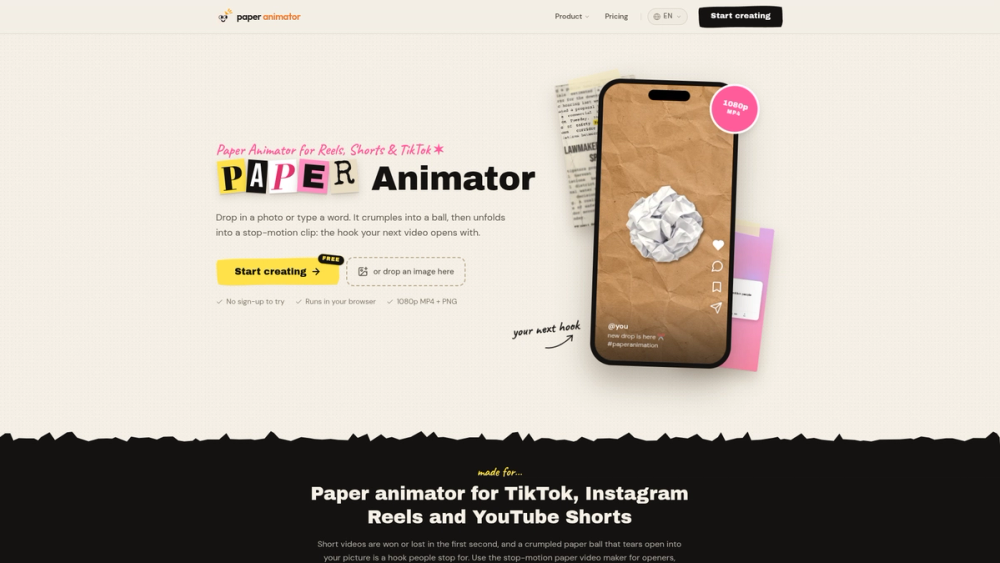
Paper Animator is a browser-based stop-motion paper animation maker built for TikTok, Instagram Reels, and YouTube Shorts. Drop in a photo or type a word—it crumples into a paper ball and unfolds into a stop-motion clip ready to use as your next video hook.
Features
- Photo to Paper Animation: Upload a JPG, PNG, or WebP and watch a crumpled white paper ball tear open and unfold into your picture as a torn-edge sticker.
- Cut-Out Paper Letters: Type a word or phrase to build cut-out paper letters that unfold one by one.
- Newspaper & Magazine Templates: Use Newspaper Highlight, Magazine Letters, Press Coverage, and Text Match Cut templates with your own keywords.
- Customizable Paper Style: Adjust edge style, border thickness, shadow softness, picture size, background (kraft paper, parchment, solid color, or green screen), and stickers.
- Flexible Export Options: Export 720p or 1080p MP4 (with paper-tick sound or silent) in 9:16, 1:1, or 16:9, or download a transparent PNG of the finished sticker.
- Private & Browser-Based: Everything renders locally on your own device with no sign-up required to try.
How to Use
- Visit Paper Animator and choose a Paper Fold or text template.
- Upload a JPG, PNG, or WebP image or enter the text you want to animate.
- Customize the edge style, border thickness, shadow, background, and aspect ratio (9:16, 1:1, or 16:9).
- Export as an MP4 video or transparent PNG sticker and drop it into CapCut, Premiere Pro, or any editor.
Use Cases
- Short-form video hooks for TikTok, Instagram Reels, and YouTube Shorts
- Product reveals and album art reveals
- Lyric videos, podcast clips, and commentary intros
- Memes, thumbnails, and green-screen paper sticker overlays