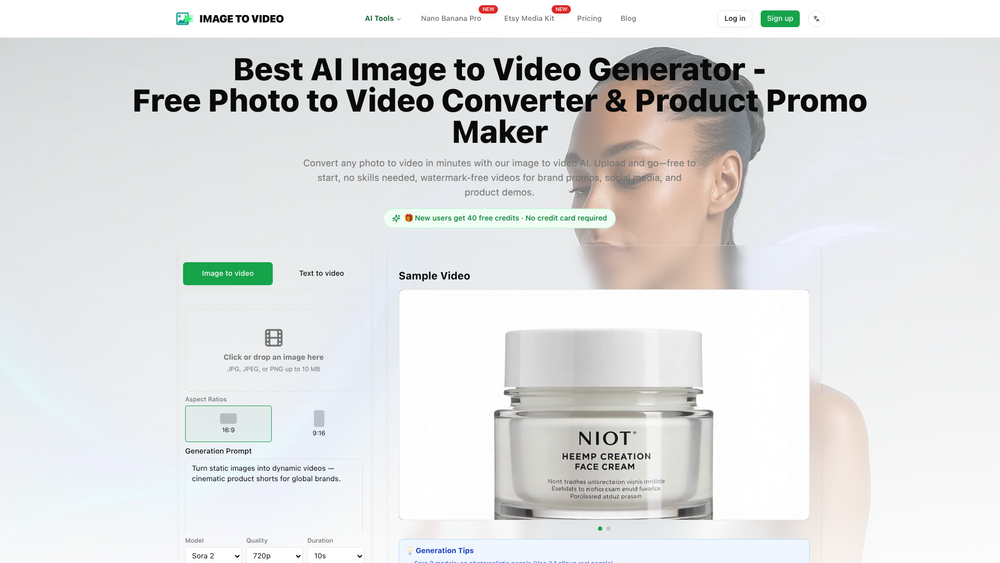
Image to Video AI is an innovative online tool designed to transform any static photo into a dynamic, cinematic video in minutes. Its primary purpose is to provide an accessible and affordable solution for creating professional-quality promotional content. By leveraging state-of-the-art AI models, it animates still images based on simple text descriptions, making video creation faster and more cost-effective than ever before.
The platform is ideal for a wide range of users, including social media managers, digital marketers, small business owners, and content creators who need to produce engaging visual content without a large budget or technical expertise. Key benefits include its remarkable affordability (up to 8x cheaper than competitors), speed, and simplicity. Users can start for free with 40 credits, generate 720p watermark-free videos, and enjoy a risk-free process with automatic refunds for any failed generations, making it a valuable asset for anyone looking to enhance their digital presence with compelling video content.
Features
- Cost-Effective Video Generation: Start with 40 free credits without needing a credit card. The platform is priced to be significantly more affordable than competing services, costing as little as $0.15 per basic video generation.
- High-Speed Processing: Generate videos rapidly with no rendering queues. The Sora 2 Basic model delivers videos in just 2-5 minutes, while the Pro model takes 10-20 minutes for more complex animations.
- Professional Watermark-Free Videos: All videos are rendered in 720p cinematic quality and are completely free of watermarks, making them ready for immediate use in brand promos, social media, and product demos.
- Powered by OpenAI Sora 2: Access OpenAI's latest image-to-video AI models, including both Basic and Pro versions, directly within a single, user-friendly platform.
- Zero Learning Curve: The process is incredibly simple: upload an image, describe the desired motion with a text prompt, and download the resulting video. No video editing skills or tutorials are required.
- Automatic Refunds: To ensure a risk-free user experience, credits are automatically and instantly refunded to your account if a video generation fails for any reason.
- Flexible Video Formats: The tool supports the creation of both horizontal and vertical videos, making it versatile for all types of content, from YouTube shorts to Instagram stories.
How to Use
- Sign Up and Get Free Credits: Create an account on the Image to Video AI website to automatically receive 40 free credits. No credit card is required to get started.
- Upload Your Image: Select and upload the static photo you wish to animate. For best results, use a high-quality image where the subject is clear.
- Describe the Motion: Write a descriptive text prompt detailing the animation you want to see. Be specific about camera movements (e.g., "slowly zoom in," "pan from left to right") and subject actions (e.g., "steam rises from the coffee cup").
- Generate the Video: Choose your desired AI model (Basic for speed or Pro for higher quality) and click the generate button. The AI will process your request and create the video.
- Preview and Download: Once the generation is complete (typically within 2-5 minutes for the Basic model), you can preview the video. If you are satisfied, download the 720p watermark-free MP4 file to your device.
Use Cases
- Engaging Social Media Content: Transform static product shots or brand images into eye-catching video clips for platforms like Instagram, TikTok, and Facebook. This helps increase audience engagement and stop users from scrolling past.
- Cinematic Product Promos: Create dynamic advertisements from a single product photo. Animate features, add subtle motion, or create a dramatic reveal to showcase products in a more compelling way for e-commerce sites and ad campaigns.
- Brand Storytelling: Animate key brand imagery or historical photos to create short, powerful visual narratives for use on websites, in presentations, or as part of a larger marketing campaign.
- Digital Art Animation: Artists and designers can bring their static illustrations, concept art, and digital paintings to life. This provides a new medium to showcase their portfolio and share their creative process.
FAQ
What is Image to Video AI?
It is an online platform that uses artificial intelligence, specifically models like OpenAI's Sora 2, to animate a static image and turn it into a short video clip based on a user's text description.
How much does it cost?
New users receive 40 free credits upon signing up, with no credit card required. Paid plans are designed to be highly affordable, with a Sora 2 Basic generation costing only 40 credits (approximately $0.15).
Do the generated videos have a watermark?
No, all videos created with the platform are completely watermark-free, even for users on the free plan.
What is the quality of the output video?
Videos are generated in a 720p cinematic quality, which is suitable for most professional use cases, including social media, websites, and digital advertising.
How long does it take to create a video?
The generation time is very fast. Using the Sora 2 Basic model, a video is typically ready in 2-5 minutes. The Pro model takes between 10-20 minutes.
What happens if the AI fails to generate my video correctly?
If a video generation fails for any technical reason, the credits used for that attempt are automatically and instantly refunded to your account.
Do I need any special skills to use this tool?
No, not at all. The platform is designed for everyone, regardless of technical skill. The process is a simple three-step flow: upload your image, describe the motion you want, and download the video.