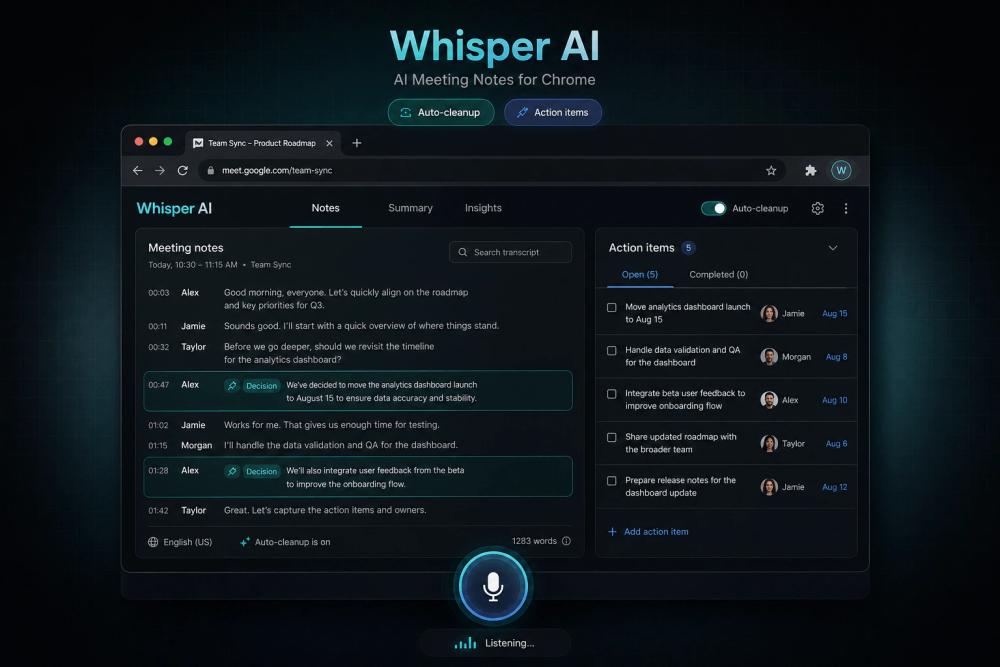
Whisper AI is a Chrome extension for AI voice typing and speech-to-text transcription. Creators, office workers, and anyone who types frequently use it to dictate text directly into browser inputs without needing to copy and paste from external apps. It helps solve the problem of slow typing or the messy output often found in standard browser dictation tools.
The extension uses OpenAI Whisper models to handle the audio processing. It doesn't just transcribe; it also cleans up filler words and adds punctuation automatically. You can use it across any website, from Gmail to Notion, making it part of your existing browser workflow.
Key features
- Support for over 25 languages for transcription and translation
- Automatic removal of filler words like "um" and "uh"
- Custom hotkeys like Ctrl + Shift + L to start and stop recording
- Hold-to-talk mode for quick bursts of dictation
- Built-in modes for email drafting, grammar fixes, and translation
- Site-specific settings to disable the mic on certain pages
- OpenAI Whisper-powered engine for high accuracy
- Privacy-focused processing where audio is not used for model training
How to use
- Add the extension to your Chrome browser from the web store.
- Pin the extension to your toolbar for easy access and visibility.
- Sign in using your Google account to sync settings and credits.
- Click into any text field on a website where you want to type.
- Press the floating microphone icon or use the keyboard shortcut to start talking.
- Release the hotkey or click stop to let the AI process and insert your text.
Use cases
- Dictating long emails in Gmail to save time on manual typing.
- Transcribing quick meeting notes directly into a shared Google Doc.
- Translating spoken thoughts into a different language for international team chats.
- Fixing grammar and punctuation in a messy draft with a single click.
Pricing
New users receive 100 free credits upon signing in with Google, which covers about 17 minutes of transcription. Check the official website for current subscription or top-up pricing.
FAQ
What is Whisper AI?
It is a browser extension that enables voice-to-text functionality on any website you visit. It uses AI to ensure the resulting text is punctuated and free of verbal stumbles.
Is Whisper AI free?
You get 17 minutes of free transcription time (100 credits) when you first sign up. After that, you will need to check their site for paid options.
Which languages does it support?
The tool supports more than 25 languages. You can switch between them for both transcription and translation tasks.
Does it store my audio recordings?
No, the audio is only processed to generate the text transcript. The developers state they do not sell your data or use it to train their models.
Can I use it on any website?
Yes, it works on any site with a text input. You can also disable it on specific sites if you don't want the mic icon to appear.
What is the default shortcut?
The default hotkey is Ctrl + Shift + L. You can change this in the extension settings to fit your preference.