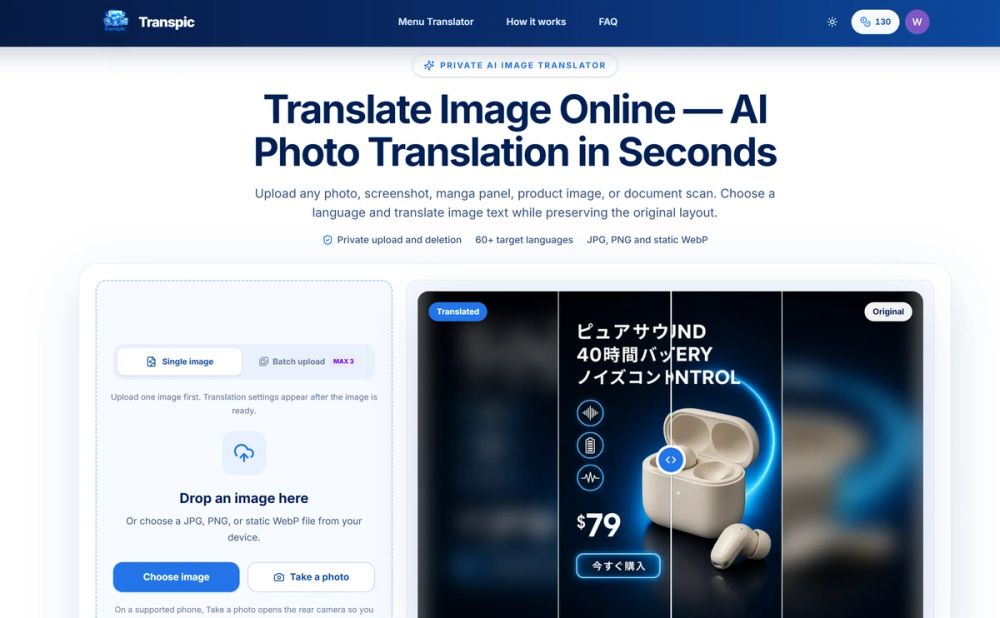
Transpic is a web-based tool that translates text found within images while keeping the original layout intact. It helps e-commerce sellers, manga readers, and international travelers understand visual content without losing the context of where the words are placed. Instead of giving you a raw text file, it replaces the original text with a translation directly on the image.
The tool works with screenshots, product graphics, and scanned documents. You can upload files in JPG, PNG, or static WebP formats. It uses private storage, so your uploads aren't shared publicly. Once the translation is done, you can use an editor to fix any wording or move text blocks that don't fit perfectly.
Key Features
- Support for over 60 target languages including Chinese, Japanese, Arabic, and French
- Layout-aware detection that keeps translated phrases near their original labels or speech bubbles
- Built-in editor to manually adjust text size, color, and position before downloading
- Specialized modes for manga, e-commerce graphics, and document screenshots
- Private processing where images are stored on short-lived access URLs
- Batch processing for Pro and Studio users to handle multiple images at once
- Comparison slider to drag between the original and translated versions
How to Use
- Drag a JPG, PNG, or static WebP file into the upload box on the homepage
- Select the target language you want the text converted into
- Choose a processing mode like Manga or E-commerce to match your content type
- Wait for the AI to detect and translate the text regions
- Open the editor to tweak the placement or wording if the AI missed a nuance
- Download the final graphic at its original dimensions
Use Cases
- Translating a foreign language restaurant menu using a phone camera to see prices next to dishes
- Localizing product posters for international markets without needing to redesign the entire graphic
- Reading raw manga chapters by replacing speech bubble text with your preferred language
- Understanding technical diagrams or tables in document scans while keeping rows and columns aligned
Pricing
Transpic offers a free tier with 10 daily credits and watermarked exports. Paid plans start at $9.90 per month (billed annually) for watermark-free downloads and commercial rights. High-volume users can choose the Pro or Studio plans for batch processing and longer history storage.
FAQ
What is Transpic?
It is an AI tool that translates text inside images while preserving the original background and layout.
Is Transpic free?
Yes, you get 30 signup credits and 10 daily credits for free, though exports will have a watermark.
Can I translate PDFs?
No, the tool currently only supports JPG, PNG, and static WebP image formats.
Does it work on mobile?
Yes, you can use your phone's camera to capture and translate images directly through the browser.
Are my images private?
Yes, uploads are stored privately and are not published as permanent public assets.
Can I edit the translation?
Yes, the tool includes an editor where you can change the text, font size, and color.