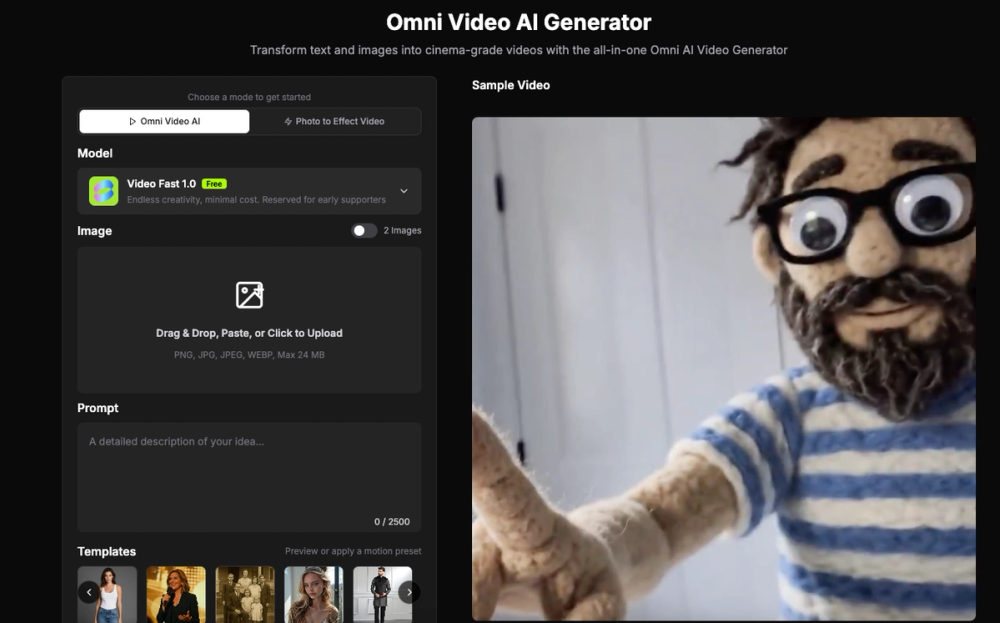
Omni Video is an AI video generator that produces cinematic clips from text descriptions or static images. Content creators and social media managers use it to build visual assets without needing traditional filming or editing equipment. It handles the heavy lifting of animation by interpreting natural language prompts.
The tool addresses the high cost and time requirements of video production. Instead of setting up cameras or hiring animators, users input a prompt to get a 4K video. It works for marketing ads, social media posts, and product demos where quick turnaround is essential.
Key Features
- Text-to-video conversion for creating scenes from scratch
- Image-to-video animation that adds motion to static photos
- Rendering speeds that deliver clips in seconds
- Resolution support up to 4K for professional output
- Style options ranging from anime to photorealistic textures
- Manual motion control for camera movements and transitions
How to Use
- Visit the Omni Video website and access the playground area.
- Upload a reference image if you want to animate a specific photo.
- Enter a text prompt describing the desired action and visual style.
- Adjust the motion settings to control how the camera moves.
- Click generate and wait for the AI to process the video.
- Download the final MP4 file for your project.
Use Cases
- Animating a static product photo for an Instagram advertisement
- Generating background b-roll for a YouTube video using text descriptions
- Creating cinematic intros for presentations without a film crew
- Testing visual concepts for a storyboard before starting full production
Pricing
Check the official website for current pricing.
FAQ
What is Omni Video?
Omni Video is an AI tool that converts text or images into high-resolution video clips. It uses the Omni Video Model to process visual data.
Is Omni Video free?
Check the official website for current pricing or trial availability. Most AI video tools offer a limited free tier or credit-based system.
Can I export in 4K?
Yes, the Omni Video Model supports output resolutions up to 4K. This ensures the video remains clear on large screens.
Does it support different styles?
You can generate videos in various styles, including anime, cinematic, and abstract. The model adapts based on your text prompt.
How long does generation take?
Most clips are rendered within a few seconds. The speed depends on the complexity of the motion and the resolution selected.
Can I control camera movement?
The tool includes settings to fine-tune how the camera moves within the scene. You can specify directions like panning or zooming.