Kling 2.6 AI is a state-of-the-art AI video generator that transforms simple text prompts and static images into high-quality, cinematic video content. Its most revolutionary feature is the native integration of high-fidelity, synchronized audio, allowing it to produce complete audio-visual scenes in seconds. This eliminates the need for separate sound design, as the AI generates and perfectly times speech, sound effects, and ambient beds with the visual elements.
Designed for creators, marketers, and filmmakers, Kling 2.6 AI simplifies the complex process of video production. It delivers stunning 1080p resolution at 60fps, handles complex motion with photorealistic realism, and provides professional-level controls within an intuitive browser-based interface. The platform's value lies in its ability to drastically reduce the time and cost associated with creating engaging video content, making professional-grade production accessible to anyone with an idea.
Features
- Cinematic Video Quality: Generates video in stunning 1080p resolution at up to 60fps, featuring photorealistic textures and the ability to render complex and dynamic motion.
- Native Audio Integration: Uniquely creates videos with fully synchronized, high-fidelity audio, including dialogue, sound effects, and ambient soundscapes that match the on-screen action.
- Text-to-Video & Image-to-Video: Creates dynamic video clips from simple text descriptions or brings static images to life by animating them according to your prompts.
- Professional Camera Controls: Direct your scenes with advanced camera movements like pan, tilt, and zoom, and seamlessly extend clips to create longer sequences.
- Studio-Grade Adjustments: Fine-tune your creations with precision controls for lighting, color palettes, motion overrides, and a layered audio mixer to balance sound elements.
- Accurate Prompt Adherence: The AI model is engineered for high accuracy, ensuring the final video closely matches the vision described in your text prompt.
How to Use
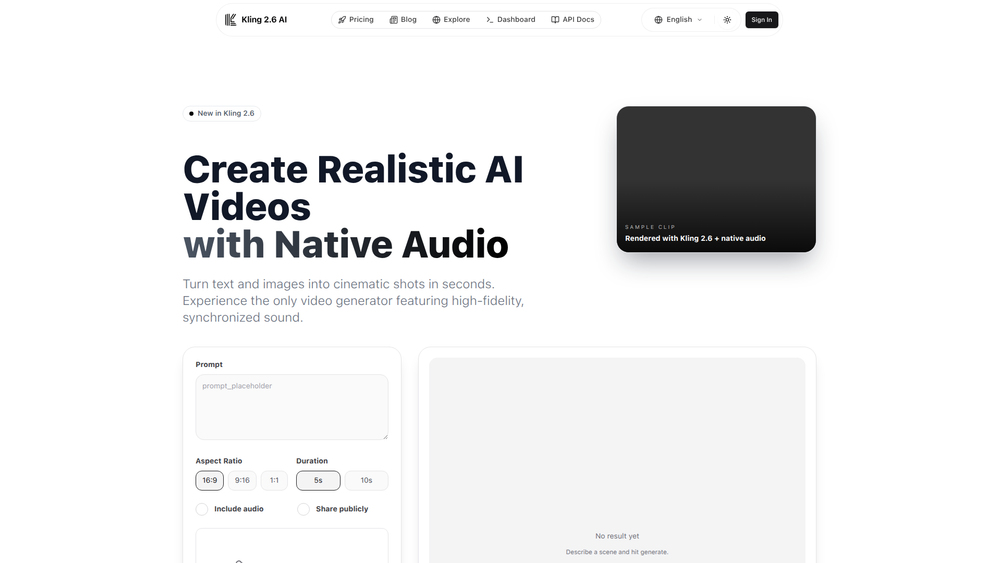
- Provide Your Input: Start by typing a descriptive text prompt in the input field. Alternatively, you can upload a static image (JPG, PNG, WebP) to use as a starting point for your animation.
- Refine Your Prompt: Write a clear and detailed description of the scene you want to create. Include details about the subject, action, environment, and desired mood for the best results.
- Configure Settings: Adjust parameters such as aspect ratio (e.g., 16:9, 9:16), video duration, and ensure the "include_audio" option is enabled for synchronized sound.
- Generate Your Video: Click the generate button to process your input. The AI will render a complete audio-visual clip based on your specifications.
- Review and Download: Preview the generated video. If you are satisfied with the result, download the high-resolution MP4 file directly from the interface.
- Iterate if Needed: If the output isn't perfect, modify your prompt with more specific details, adjust the settings, or use the advanced controls to fine-tune the result.
Use Cases
- Marketing and Advertising: Quickly produce high-quality video ads for social media, product showcase videos, and promotional content that captures audience attention with cinematic visuals and immersive sound.
- Filmmaking and Pre-visualization: Generate concept videos, animate storyboards, and create establishing shots or complex sequences to visualize scenes before production, saving time and resources.
- Social Media Content: Create viral-worthy short-form videos, animate memes, or produce engaging visual stories for platforms like TikTok, Instagram Reels, and YouTube Shorts without needing advanced editing skills.
- Educational Content: Transform dry text or simple diagrams into dynamic and engaging video lessons, complete with narration and sound effects to enhance learning and retention.
FAQ
What is the maximum resolution and frame rate of the videos?
Kling 2.6 AI generates videos in high-definition 1080p resolution and can produce content at a smooth 60 frames per second (fps), ensuring cinematic quality.
Can I turn a static image into a video?
Yes. You can upload a JPG, PNG, or WebP image and provide a text prompt to describe the desired motion. The AI will animate your image to create a dynamic video clip.
How does the native audio generation work?
The AI model generates the audio track (speech, sound effects, ambient noise) simultaneously with the video. This ensures that all audio elements are perfectly synchronized with the visual action, creating a cohesive and immersive experience.
Can I control the camera movements in my video?
Yes, Kling 2.6 offers professional camera controls. You can direct the AI to perform movements such as panning, tilting, and zooming to create more dynamic and professionally styled shots.
Is it possible to edit the audio after it's generated?
The platform includes a layered audio mixer that allows you to balance the levels of dialogue, effects, and ambient sound beds, giving you studio-grade control over the final audio mix.
How long can the generated videos be?
You can set a desired duration for your video clip. Additionally, Kling 2.6 features the ability to seamlessly extend clips, allowing you to create longer and more complex video sequences.