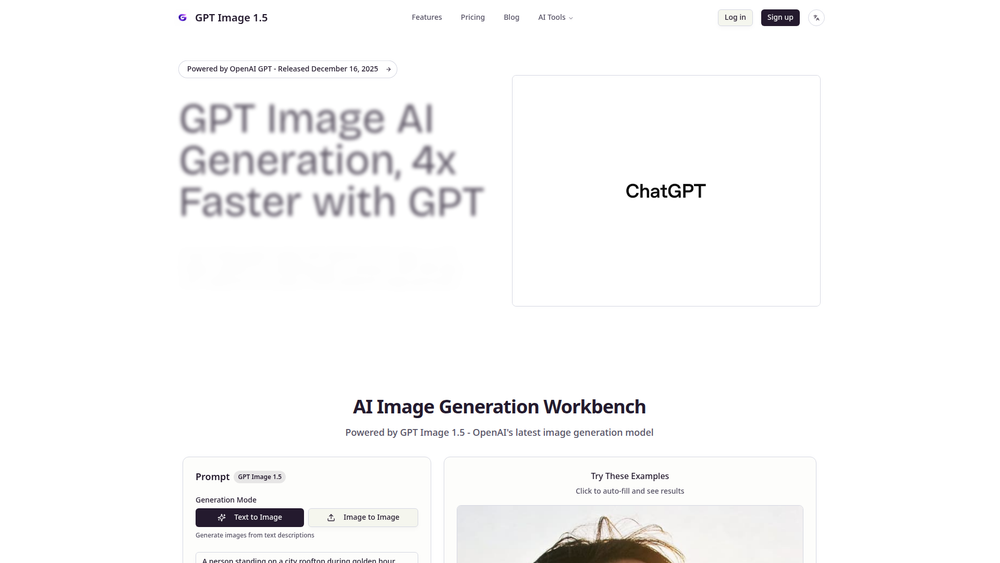
GPT Image 1.5 is a revolutionary AI image generation model from OpenAI, designed to create studio-grade visuals with remarkable speed and efficiency. It empowers users to transform text descriptions or existing images into high-quality, photorealistic graphics. The platform is engineered to be 4 times faster and 20% more cost-effective than previous solutions, making professional-level image creation more accessible than ever before.
This powerful tool is primarily aimed at professionals in marketing, e-commerce, and design who require a steady stream of unique and compelling visual content. By leveraging the advanced capabilities of OpenAI's latest GPT technology, users can produce everything from product mockups and advertising materials to conceptual art and social media posts. The value of GPT Image 1.5 lies in its ability to streamline creative workflows, reduce production costs, and unlock new possibilities for visual storytelling, all within an intuitive and user-friendly interface.
Features
- Advanced AI Model: Powered by OpenAI's GPT Image 1.5, the latest in image generation technology, ensuring high-quality and coherent outputs.
- Dual Generation Modes: Offers both "Text to Image" to create visuals from descriptive text and "Image to Image" to modify and enhance existing pictures based on prompts.
- High-Speed Generation: Delivers images up to 4x faster than comparable models, significantly accelerating creative workflows and content production cycles.
- Cost-Effective Solution: Provides a 20% reduction in generation costs, making it an economical choice for businesses and individual creators with high-volume needs.
- Studio-Grade Quality: Capable of producing photorealistic and highly detailed images suitable for professional marketing campaigns, e-commerce listings, and design projects.
- Inspiration and Examples: Includes a gallery of example prompts and generated images to inspire users and help them quickly understand the model's capabilities.
- User-Friendly Workbench: Features a straightforward interface where users can easily input prompts, select generation modes, choose image sizes, and generate visuals with a single click.
How to Use
- Select Generation Mode: Navigate to the AI Image Generation Workbench and choose between "Text to Image" or "Image to Image" mode based on your creative needs.
- Write Your Prompt: In the prompt box, type a detailed description of the image you want to create. For best results, be specific about subjects, styles, colors, lighting, and composition. You can also click on one of the provided examples to auto-fill the prompt.
- Configure Settings: Choose the desired image size from the available options. Note that different settings may affect credit usage.
- Generate the Image: Click the "Generate" button. The AI will process your request and create the image. The cost in credits is displayed on the button.
- Review and Refine: Once generated, review the output. If it's not quite right, you can refine your prompt and generate again. If a generation fails, the platform suggests switching to another tier and retrying.
Use Cases
- E-commerce Product Imagery: E-commerce businesses can generate high-quality, consistent, and creative product photos and lifestyle shots without expensive photoshoots. This is perfect for creating mockups of products in various settings.
- Marketing and Advertising Campaigns: Marketers can quickly create unique and eye-catching visuals for social media posts, ad banners, email newsletters, and blog articles, allowing for rapid iteration and A/B testing of creative concepts.
- Design and Concept Art: Designers and artists can use GPT Image 1.5 as a powerful brainstorming tool to quickly visualize concepts, create mood boards, or generate base images for further refinement in other design software.
- Content Creation: Bloggers and social media managers can generate custom thumbnails, illustrations, and feature images that perfectly match their content, enhancing visual appeal and audience engagement.
FAQ
What is GPT Image 1.5?
GPT Image 1.5 is an advanced AI image generation model developed by OpenAI. It is designed to create high-quality, studio-grade images from text or image inputs, offering significant improvements in speed and cost-efficiency.
Who is the target audience for GPT Image 1.5?
The tool is ideal for marketing professionals, e-commerce store owners, graphic designers, content creators, and any business or individual who needs to produce high-quality visual content quickly and affordably.
How does the pricing work?
The platform operates on a credit-based system. Each image generation consumes a certain number of credits, as indicated on the "Generate" button. Users can purchase credits via the website's pricing page.
What are "Text to Image" and "Image to Image" modes?
"Text to Image" mode allows you to generate a completely new image from a written description (prompt). "Image to Image" mode lets you upload an existing image and use a text prompt to modify or transform it.
What should I do if my image generation fails?
The website advises that if a generation attempt fails, you should try switching to a different generation tier (if available) and then retry the process. This may help resolve temporary processing issues.
How can I write a good prompt for better results?
For optimal results, be as descriptive as possible. Include details about the subject, the setting, the style (e.g., "photorealistic," "technical diagram"), lighting ("soft overcast daylight"), and composition ("wide drone shot"). Analyzing the provided example prompts is a great way to learn.