Gemini Omni is an AI video generation tool that combines text, image, and video processing into a single interface. Filmmakers and content creators use it to produce high-resolution footage without switching between different specialized tools. It addresses the common problem of visual inconsistency between shots by maintaining a persistent world state for characters and environments.
The system runs on Google's underlying models and supports native 4K output. It handles both visual rendering and audio synthesis simultaneously, which means it can generate sound effects or dialogue that matches the action on screen. This helps teams reduce the time spent in post-production for basic Foley and color matching.
Key Features
- Native 4K rendering at 3840x2160 resolution without upscaling.
- High frame rate support up to 120fps for smooth motion.
- In-chat video editing for swapping objects or removing watermarks via text.
- Persistent world-state memory to keep character faces and outfits consistent.
- Integrated audio synthesis for Foley and ambient noise in one pass.
- Director's Mode for manual control over focal lengths and camera paths.
- Continuous takes that last up to 30 seconds per generation.
- Multi-modal processing that accepts text prompts or reference images.
How to Use
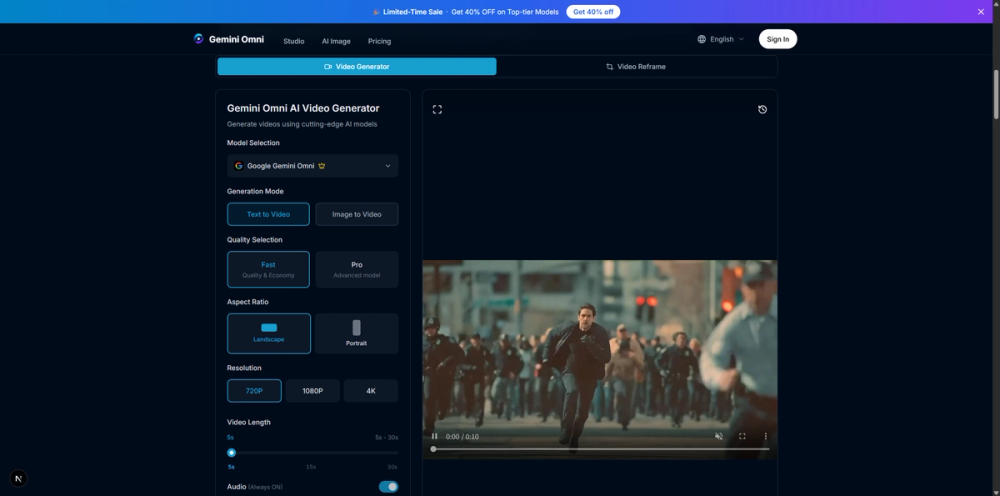
- Sign in to the Gemini Omni studio and select the Video Generator tool.
- Upload a reference image or storyboard frame to lock in visual details.
- Type a detailed prompt describing the action, lighting, and camera movement.
- Select the target aspect ratio and set the resolution to 1080p or 4K.
- Click generate and wait for the model to render the visual and audio tracks.
- Use the chat interface to request specific edits or reframe the shot.
Use Cases
- A social media manager reframes a 16:9 landscape video into a 9:16 portrait clip for mobile platforms.
- An indie game developer generates a cinematic cutscene with synchronized footstep sounds and environmental noise.
- An advertising agency creates a product spot with complex camera pans around a 3D object for a commercial.
- A storyteller produces a sequence with a consistent character across multiple shots for a short film.
Pricing
Paid plans start at $18 per month for the Hobby tier which includes 400 credits. The Pro plan costs $30 for 700 credits, while the Pro Max plan is $60 for 1500 credits. Check the official website for current pricing and credit details.
FAQ
What is Gemini Omni?
It is a unified AI model that generates video, images, and audio from text or image prompts in a single system.
Is Gemini Omni free?
Users can try the tool for free after logging in, but high-resolution exports and commercial use require a paid subscription.
What is the maximum video length?
The tool supports continuous takes up to 30 seconds, though scene stitching can extend a project up to 2 minutes.
Can I edit existing videos?
Yes, the Video Reframe tool lets you change aspect ratios and the in-chat editor allows for object swapping and scene rewriting.
Does it generate sound?
Yes, the model synthesizes ambient noise and dialogue that syncs with the generated visuals in a single diffusion pass.
What resolutions are supported?
Users can choose between 720p, 1080p, and native 4K outputs depending on their subscription tier.