EzEditor AI is a powerful and completely free online photo editor that leverages artificial intelligence to simplify complex editing tasks. Its core purpose is to make advanced photo manipulation accessible to everyone, regardless of their technical skill. Users can remove backgrounds, erase unwanted objects, upscale images to 4K quality, and even transform photos using simple text prompts, all directly within their web browser.
The key benefits of EzEditor AI are its accessibility and power. It's entirely free to use, requires no sign-up, and doesn't add any watermarks to the final images, making it a hassle-free solution for quick edits. This tool is ideal for social media managers, e-commerce store owners, content creators, and casual users who need to enhance their photos quickly and efficiently without investing in expensive software. Its value lies in democratizing professional-grade photo editing, allowing anyone to achieve high-quality results with minimal effort.
Features
- Smart Generative Fill: Edit photos using simple text prompts. Describe what you want to add or change, and the AI intelligently understands the context to place new elements seamlessly without manual selection or masking.
- Magic Replace: Instantly swap elements in your photos. Change a person's outfit, alter the weather from sunny to sunset, or transform a room's decor by simply typing a command.
- AI Background Remover: Effortlessly remove the background from any image with a single click. The AI accurately detects the subject and creates a clean cutout with a transparent background.
- Object & Watermark Remover: Clean up your images by erasing unwanted objects, people, text, or watermarks. The AI intelligently fills in the removed area to match the surrounding background.
- 4K Image Upscaler: Enhance the resolution and quality of your photos. Turn low-resolution images into sharp, clear 4K visuals, ideal for printing or high-quality digital use.
- No Sign-Up & No Watermark: Get started immediately without creating an account. Download your edited images in high quality without any distracting watermarks.
- Quick Actions: Utilize pre-set buttons for common tasks like 'Remove Text', 'Restore Photo', and 'Photo to Sticker' for an even faster editing workflow.
How to Use
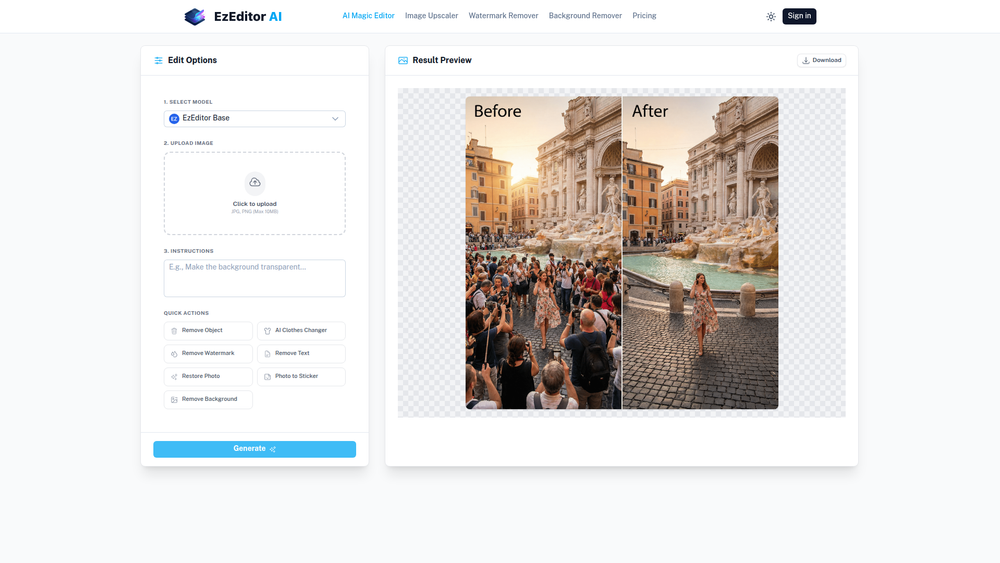
- Upload Your Image: Navigate to the EzEditor AI Magic Editor and click the 'Upload Image' button. You can select a JPG or PNG file up to 10MB from your device.
- Provide Instructions: In the 'Instructions' text box, type a clear and simple command describing the edit you want to make. For example, "add a cat on the sofa" or "change the red shirt to a blue one".
- Use Quick Actions (Optional): For common tasks, you can use the 'Quick Actions' buttons like 'Remove Background' or 'Remove Object' for a more guided experience.
- Generate the Result: Click the 'Generate' button to let the AI process your request. The tool will analyze your image and apply the changes based on your text prompt.
- Preview and Refine: The edited image will appear in the 'Result Preview' window. If you're not satisfied, you can refine your text prompt and generate again.
- Download Your Image: Once you are happy with the result, simply click the 'Download' button to save the edited, watermark-free image to your computer.
Use Cases
- E-commerce Product Shots: Quickly remove backgrounds from product photos to create clean, professional-looking images with a white or transparent background for online stores. Use Magic Replace to change product colors without a new photoshoot.
- Social Media Content Creation: Generate eye-catching visuals for social media posts. Add fun elements to photos, change the scenery, or create unique stickers from your images to boost engagement.
- Personal Photo Enhancement: Easily remove photobombers or distracting objects from your travel and family photos. Restore old, faded pictures or upscale your favorite low-resolution shots to high-quality prints.
- Marketing and Advertising: Create compelling ad creatives by easily modifying stock photos. Use Generative Fill to add branding elements or change the setting of an image to better match your campaign's theme.
FAQ
Is EzEditor AI completely free to use?
Yes, EzEditor AI offers its core features, including the Magic Editor, background remover, and image upscaler, for free and without limitations on the number of uses.
Do I need to create an account or sign up?
No, one of the key advantages of EzEditor AI is that no sign-up is required. You can start editing your photos immediately upon visiting the website.
Will my downloaded images have a watermark?
No, all images edited and downloaded from EzEditor AI are completely free of watermarks, allowing you to use them for any personal or commercial project.
What file formats can I upload?
You can upload images in JPG and PNG formats. The maximum file size for an upload is 10MB.
How does the text-to-image editing (Generative Fill) work?
You simply type a command describing the change you want (e.g., "add a hat on the man"). The AI analyzes the image's context and your text to automatically identify the correct area and apply the edit seamlessly, without needing you to manually select anything.
Can I use EzEditor AI on my mobile device?
Yes, EzEditor AI is a browser-based tool, which means it can be accessed and used on any device with a web browser, including smartphones and tablets.
What is the maximum resolution for the Image Upscaler?
The Image Upscaler can enhance your photos up to 4K resolution, significantly improving their clarity and detail for high-quality use.