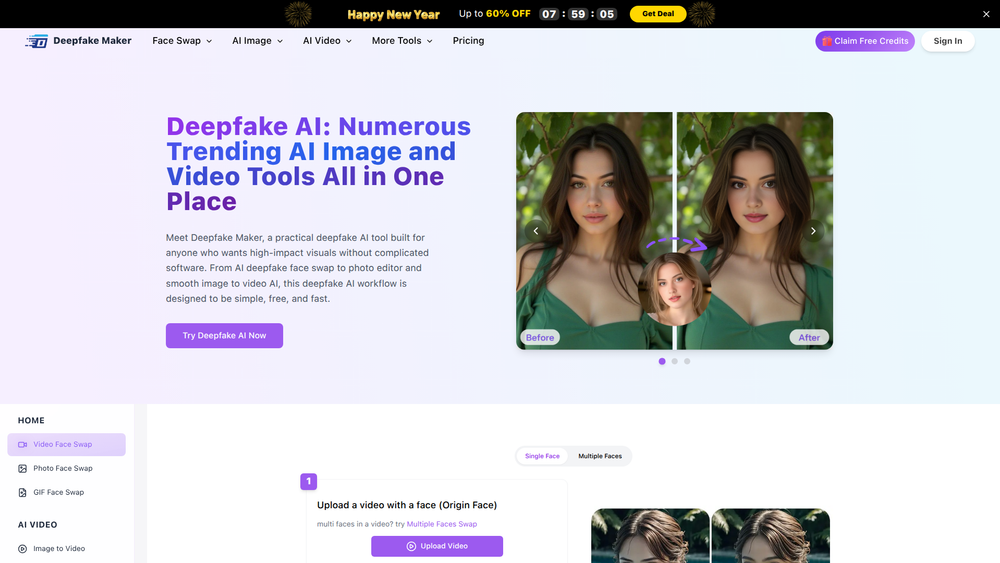
Deepfake AI by Deepfake Maker is a versatile and user-friendly online platform that consolidates a suite of powerful AI-driven tools for visual content creation. It's designed to simplify complex processes like face swapping, photo editing, and generating videos from images, making advanced AI technology accessible to everyone, regardless of technical skill. The platform offers a seamless workflow for producing high-impact visuals without the need for complicated software or extensive training.
The primary benefit of Deepfake AI is its combination of speed, simplicity, and quality, delivering realistic and clear results quickly. It's an ideal solution for content creators, social media enthusiasts, marketers, and anyone looking to create engaging and unique visual content. Whether for entertainment, personal projects, or marketing campaigns, Deepfake AI provides a free and fast way to transform creative ideas into compelling photos and videos, lowering the barrier to entry for high-quality digital media production.
Features
- AI Face Swap: Swap faces in photos, videos, and GIFs with high realism. The tool supports both single and multiple face swaps in a single image, allowing for complex and creative edits.
- Image-to-Video Creation: Transform static images into dynamic video clips. This feature animates photos, adding motion and life to them, perfect for creating engaging social media content.
- HD Enhancement: Improve the quality of your output with an optional HD enhancement feature. This ensures that the final face-swapped images are clearer, sharper, and more realistic.
- Photo Editor: A built-in suite of photo editing tools allows users to refine their images before or after applying AI effects, providing more creative control over the final product.
- Support for Multiple Formats: The platform accepts common image formats like PNG, JPG, JPEG, and WEBP, making it easy to upload and work with existing photos.
- Free Credits and Unlimited Use: Deepfake AI offers free credits to new users and provides free, unlimited face swaps for photos, making it highly accessible for experimentation and regular use.
- Automatic Face Detection: The tool automatically detects faces in uploaded media, streamlining the process for video face swaps and ensuring accurate placement.
How to Use
- Select Your Tool: Navigate to the Deepfake AI website and choose the tool you want to use, such as "Photo Face Swap," "Video/GIF Face Swap," or "AI Video."
- Upload Your Media: For face swapping, upload the source image or video (the one you want to add a face to) and the target image (the one with the face you want to use). The platform supports formats like PNG, JPG, and WEBP.
- Configure Settings: If applicable, choose specific options. For photo face swaps, you can select the "HD Enhance" feature for a higher-quality result. For multiple faces, the tool will guide you through the selection process.
- Process Your Request: Click the "Swap Now" or "Generate" button to start the AI processing. The platform will analyze the media and apply the desired effect.
- Review and Download: Once the processing is complete, your new image or video will be displayed. Review the result and download it to your device to share or use in your projects.
Use Cases
- Social Media Content Creation: Generate funny memes, GIFs, and viral videos by swapping faces with celebrities, friends, or historical figures. This is perfect for engaging followers on platforms like Instagram, TikTok, and Twitter.
- Personalized Entertainment: Create unique birthday cards, holiday greetings, or personalized avatars for gaming profiles by placing your face or a friend's face onto different characters and scenes.
- Marketing and Advertising: Produce eye-catching promotional content by creating short, animated videos from product images or swapping faces in advertisements to create humorous or relatable scenarios that capture audience attention.
- Creative Art and Digital Projects: Artists and designers can use the tool to experiment with digital manipulation, creating surreal portraits or conceptual art by blending different facial features and identities.
FAQ
What is Deepfake AI?
Deepfake AI is an all-in-one online platform that provides a collection of AI tools for creating and editing visual content. Its main features include face swapping for photos and videos, image-to-video generation, and photo editing.
Is Deepfake AI free to use?
Yes, the platform offers free services, including unlimited photo face swaps. New users can also claim free credits to try out premium features like video face swapping, which consumes credits per use.
The tool supports popular image formats including PNG, JPG, JPEG, and WEBP for uploads.
How does the face swap process work?
You upload two images: an "Origin" photo/video where you want the face to appear, and a "Target" photo containing the face you want to use. The AI then intelligently maps the target face onto the origin media.
Can I swap faces in videos and GIFs?
Yes, Deepfake AI supports face swapping in both videos and GIFs, in addition to static photos. The process is similar to photo face swapping but may require credits.
Is there a way to improve the quality of the output?
For photo face swaps, there is an "HD Enhance" option that you can select before processing. This feature uses AI to improve the clarity and realism of the final image.
How long does it take to process a request?
Processing times are generally fast, especially for images. The platform is designed for quick results, though video processing may take slightly longer depending on the length and complexity.