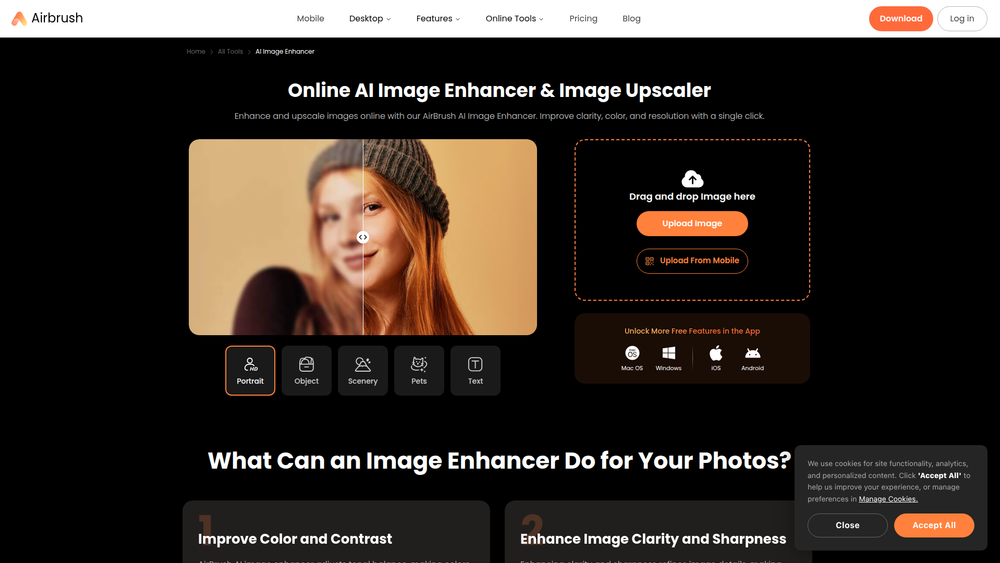
Airbrush AI Image Enhancer is a powerful online tool designed to automatically improve the quality of your digital photos. Leveraging artificial intelligence, it sharpens details, enhances colors, and increases image resolution with just a single click. This makes it an invaluable asset for anyone looking to bring clarity and vibrancy to their images without the complexity of professional editing software.
The tool is ideal for a wide range of users, from social media managers and marketers who need high-quality visuals, to photographers looking for a quick enhancement solution, and individuals wanting to restore old or blurry family photos. By simplifying the process of photo enhancement and upscaling, Airbrush provides a fast, accessible, and effective way to make any image look its best, ready for online sharing, professional use, or printing.
Features
- AI-Powered Enhancement: Automatically analyzes and improves image quality by adjusting sharpness, clarity, color balance, and lighting for a professional look.
- One-Click Image Upscaling: Increases the resolution of photos, allowing you to enlarge them without the typical loss of quality or pixelation.
- Specialized Image Categories: The AI is optimized to enhance various types of subjects, including Portraits, Objects, Scenery, Pets, and even images containing Text, ensuring tailored and superior results.
- Simple Drag-and-Drop Interface: Features a user-friendly web interface where you can upload images simply by dragging and dropping them into the tool.
- Cross-Platform Availability: Use Airbrush on any device. It's available as a web tool, a desktop application for both Mac and Windows, and a mobile app for iOS and Android.
- Before-and-After Comparison: Instantly view the results of the AI enhancement with a clear side-by-side or slider comparison to the original image.
How to Use
- Navigate to the Website: Open your web browser and go to the Airbrush AI Image Enhancer page.
- Upload Your Image: Drag and drop your image file directly onto the designated area, or click the "Upload Image" button to browse and select a file from your computer.
- Automatic Enhancement: The tool will immediately begin processing your photo. The AI automatically enhances and upscales the image in seconds.
- Review the Result: Compare the enhanced photo with the original to see the improvements in clarity, color, and detail.
- Download the Image: Once you are satisfied with the result, click the download button to save the high-quality image to your device.
Use Cases
- Social Media Content Creation: Quickly enhance photos to make them look more polished and eye-catching, helping to boost engagement on platforms like Instagram, Facebook, and X (formerly Twitter).
- E-commerce Product Photography: Improve the clarity and color accuracy of product photos for online stores. Sharper images can help increase customer trust and conversion rates.
- Restoring Old or Low-Quality Photos: Revitalize old, scanned family photos or fix digital pictures that are blurry or pixelated. This is perfect for preserving precious memories in high fidelity.
- Preparing Images for Print: Upscale the resolution of images to meet the requirements for high-quality printing, whether for personal photo albums, professional flyers, or large posters.
FAQ
What types of images work best with the Airbrush AI Image Enhancer?
Airbrush is optimized for a variety of image types. The tool has specific modes for enhancing portraits, objects, scenery, pets, and even images with text to ensure the best possible outcome for each category.
Is the Airbrush AI Image Enhancer free to use?
The online tool allows for free enhancements. For access to more features and unlimited use, Airbrush offers mobile and desktop applications which come with a 7-day free trial.
What file formats can I upload?
You can typically upload standard image formats such as JPG, PNG, and WEBP. The tool is designed to be compatible with the most common photo file types.
How does the AI image upscaling work?
The AI upscaler intelligently adds new pixels and details to the image rather than just stretching it. It analyzes the content of the photo to predict and create a natural-looking, higher-resolution version.
Can I use this tool on my mobile device?
Yes, Airbrush offers dedicated mobile apps for both iOS and Android devices, allowing you to enhance and upscale photos directly from your phone.
What is the difference between the online tool and the app?
The online tool provides quick and easy access to the core enhancement features. The dedicated desktop and mobile apps often include additional features, batch processing, and more advanced editing capabilities for subscribed users.