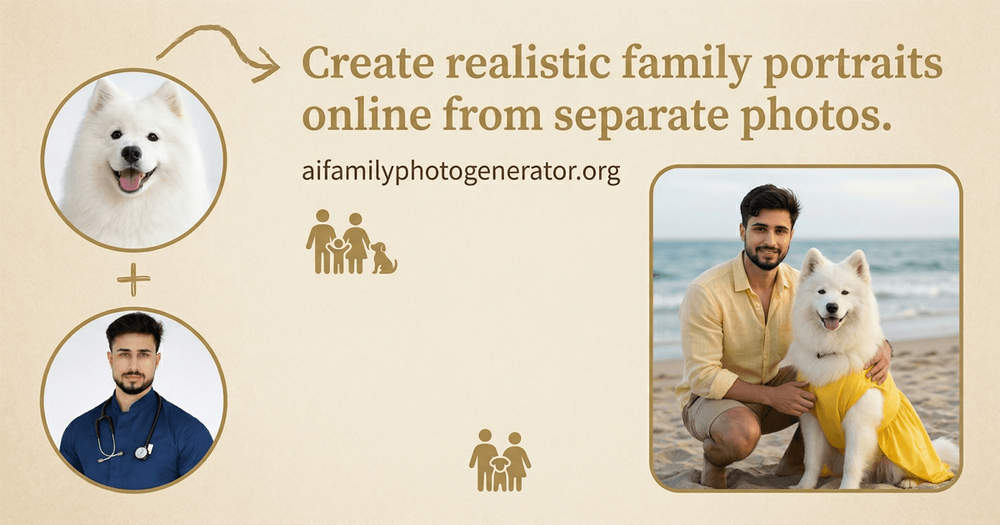
AI Family Photo Generator is a web-based tool that merges individual portraits into a single, cohesive family image. It helps families who live apart or have busy schedules create group photos without needing everyone in the same room at once. This tool is particularly useful for people who want to include relatives from different locations in a single frame.
The process works by analyzing the lighting and features of separate uploads and then generating a new scene where everyone appears together. It removes the need for physical studio visits or coordinating multiple schedules for a single photoshoot. The output is a high-resolution image suitable for digital sharing or physical printing.
Features
- Uploads for up to 4 separate family members at once
- Support for JPG, PNG, WEBP, and JPEG file formats
- Maximum file size of 10MB per image for high-quality processing
- Preset visual styles for studio portraits and holiday themes
- Adjustable aspect ratios for different print and digital needs
- Automated lighting adjustment for natural-looking composites
- Preview system to check results before the final download
How to use
- Upload individual photos of the people you want in the group shot
- Select an AI model from the available options to handle the generation
- Choose a visual style that matches the occasion, such as a home or studio setting
- Set the aspect ratio based on whether you want a landscape or portrait result
- Review the generated preview and download the high-resolution file
Use cases
- Create a holiday card when family members are in different cities
- Build a memorial photo that brings a late relative into a current family group
- Generate a professional-looking portrait for a gift or framed wall art
- Combine pictures of pets and children who won't sit still together
Pricing
Check the official website for current pricing.
FAQ
What is AI Family Photo Generator?
It is an online service that uses AI to blend separate individual photos into one realistic group portrait.
Is AI Family Photo Generator free?
The site provides free access, though there may be limits on the number of photos or specific styles available.
How many people can I add to one photo?
The current system allows you to upload and combine up to four individual images.
What image formats can I upload?
You can use JPG, JPEG, PNG, and WEBP files as long as they are under 10MB each.
Can I change the background?
Yes, the tool offers different styles and scenes that determine the background and overall mood.
Do the photos need to be high quality?
Clear and well-lit portraits generally produce the most realistic and natural-looking results.