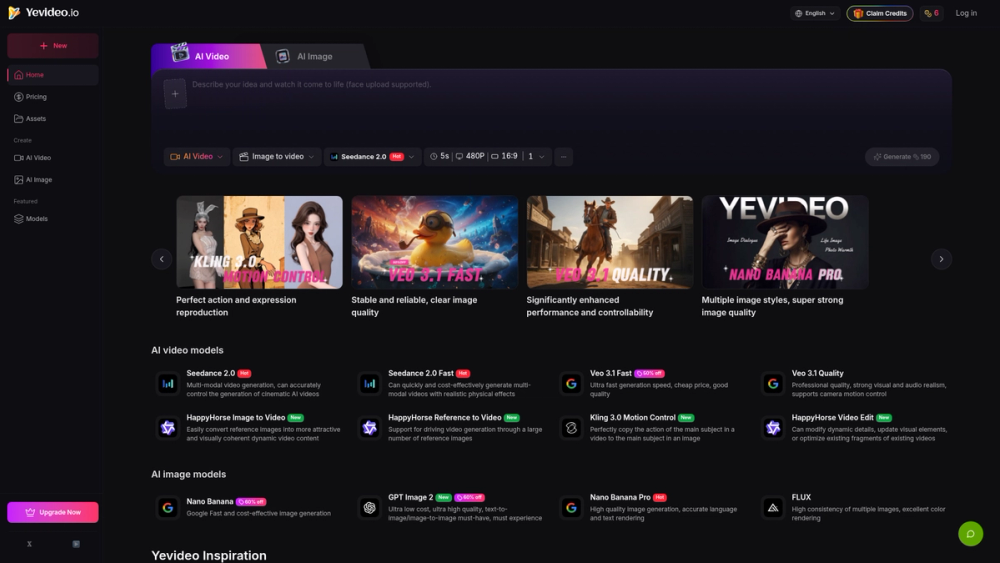
Yevideo AI is a web-based creative platform that brings together several specialized artificial intelligence models for video and image generation. It works as a central hub where users can access high-end engines like Kling 3.0, Google Veo 3.1, and Seedance 2.0 through a single interface. Creators use it to turn static photos into motion clips or generate entire scenes from text prompts without managing multiple separate subscriptions.
The platform solves the fragmentation problem in the AI creative space. Instead of jumping between different developer sites, you get a unified dashboard to compare outputs from different models. It supports specific technical workflows like Video-to-Video for character consistency and Motion Control for directing specific camera movements. This makes it a practical choice for social media managers and digital artists who need to test different AI styles quickly.
Key Features
- Access to Kling 3.0 Motion Control for replicating human actions from a source video onto a static image subject.
- Support for Google Veo 3.1 Quality which provides professional realism and advanced camera motion settings.
- Multiple video generation modes including 5-second clips with 480P resolution and 16:9 aspect ratios.
- Integrated AI Video Editor via the HappyHorse model to modify dynamic details or optimize existing video fragments.
- Nano Banana and FLUX image models for high-resolution generation with accurate text rendering and color consistency.
- Seedance 2.0 Fast option for quick multimodal video production with realistic physical effects at a lower credit cost.
How to Use
- Sign up for an account on the Yevideo website and claim your initial credits to start testing.
- Select either the AI Video or AI Image tab from the top navigation bar based on your project needs.
- Choose a specific model provider from the list, such as Google Veo for quality or Seedance for speed.
- Upload a reference image for Image-to-Video tasks or type a detailed text prompt in the description box.
- Adjust technical parameters like aspect ratio and motion intensity before hitting the Generate button.
- Preview the generated asset in your dashboard and download it or send it to the AI Video Editor for further refinement.
Use Cases
- A social media manager converts a static product photo into a 5-second cinematic clip for a promotional advertisement.
- An indie filmmaker uses the Video-to-Video tool to apply a consistent animation style to a live-action character sequence.
- A graphic designer generates high-resolution background images with readable text overlays using the Nano Banana Pro model.
- A marketing team tests different AI models side-by-side to find the most realistic physics for a specific visual effect.
Pricing
Yevideo operates on a credit-based system where different models cost different amounts of credits per generation. New users can claim free credits to test the service, while higher limits require a paid upgrade. Check the official website for current pricing tiers and credit packages.
FAQ
What is Yevideo AI?
It is a multi-model platform that allows users to generate and edit AI videos and images using various specialized AI engines.
Is Yevideo AI free?
You can claim free credits to try the service, but continued use and access to high-end models require purchasing more credits.
Which video models are available?
The platform includes Kling 3.0, Veo 3.1, Seedance 2.0, and specialized HappyHorse video editing models.
Can I edit existing videos on the platform?
Yes, the AI Video Editor tool lets you modify dynamic details, update visual elements, and optimize fragments of existing videos.
Does it support image-to-video generation?
Yes, several models on the platform are specifically designed to convert reference images into visually coherent dynamic video content.
Can the image models render text correctly?
The Nano Banana Pro model is specifically optimized for accurate language and text rendering within generated images.