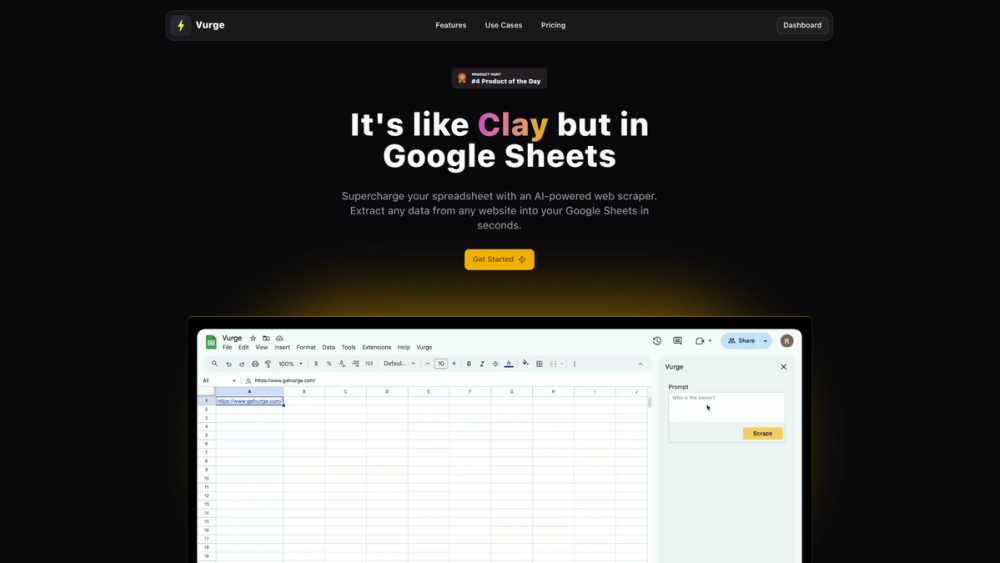
Vurge is a powerful AI-driven web scraper designed to integrate seamlessly with Google Sheets. Its primary purpose is to automate the extraction of clean, structured data from any website directly into your spreadsheet, eliminating the tedious and error-prone process of manual data collection. This tool transforms your standard spreadsheet into a dynamic and intelligent data-gathering hub, making web scraping accessible to everyone, regardless of their technical skills.
The key benefit of Vurge lies in its simplicity and efficiency. It saves users countless hours by automating the collection of large datasets, from sales leads to competitor pricing. It is designed for a wide range of users, including sales professionals building prospect lists, marketers conducting competitive analysis, researchers compiling data, and anyone who relies on web data for their work. By providing real-time, ready-to-use data without ever leaving the familiar Google Sheets environment, Vurge empowers users to make smarter, data-driven decisions faster.
Features
- Direct-to-Sheet Data Extraction: Pull clean, structured, and ready-to-use data directly into your Google Sheets cells, bypassing the need for manual copy-pasting and data formatting.
- Bulk Scraping Capability: Scrape entire websites or multiple pages simultaneously to efficiently gather large datasets, saving hours of manual labor.
- Real-Time Data Refresh: Keep your spreadsheets consistently up-to-date by scheduling automated pulls of the latest information directly from the source websites.
- Seamless Google Sheets Integration: Operates as a native Google Sheets add-on, requiring no external applications, coding knowledge, or complex API configurations.
- AI-Powered Data Selection: Utilizes artificial intelligence to intelligently identify and extract specific data points from web pages, even from complex layouts.
- Scalable Research and Analysis: Effortlessly scale your data collection projects for sales, marketing, or research without being limited by manual processes.
How to Use
- Install the Add-on: Find and install the Vurge add-on from the Google Workspace Marketplace.
- Launch Vurge: Open a new or existing Google Sheet, navigate to the 'Extensions' menu, and launch the Vurge sidebar.
- Enter Target URL: In the Vurge sidebar, input the URL of the website from which you want to extract data.
- Select Data Points: Use the intuitive AI-powered selector to click on the specific pieces of information you want to capture, such as product names, prices, or contact details.
- Execute the Scrape: Run the extraction process and watch as the selected data is automatically populated into your spreadsheet in a structured format.
- Schedule Refreshes (Optional): For ongoing projects, set up a schedule to have Vurge automatically refresh the data at your chosen interval to ensure it's always current.
Use Cases
- Sales Lead Generation: Automate the process of gathering company information, contact emails, and social media profiles from business directories and corporate websites to rapidly build targeted prospect lists.
- Competitive Analysis: Track competitors' product pricing, new feature launches, and marketing campaigns by regularly scraping their websites directly into a single sheet for easy comparison and analysis.
- Content Curation and Market Research: Aggregate blog posts, news articles, customer reviews, and industry reports from multiple sources to create rich datasets for content strategy or market trend analysis.
- E-commerce Product Monitoring: For online retailers, monitor product availability, pricing changes, and customer ratings across various e-commerce platforms or competitor stores to inform pricing and inventory strategies.
FAQ
What is Vurge?
Vurge is an AI-powered web scraper that functions as a Google Sheets add-on. It allows you to extract data from any website and import it directly into your spreadsheet without any coding.
Do I need to know how to code to use Vurge?
No, not at all. Vurge is a no-code tool designed for simplicity. It works entirely within the Google Sheets interface, so you don't need any programming skills or API keys.
Can Vurge extract data from any website?
Vurge is capable of scraping data from most public websites. However, sites with advanced anti-scraping technologies or those that require a login may present challenges.
How does the real-time data feature work?
You can configure Vurge to automatically re-run your scraping tasks on a set schedule (e.g., daily or weekly). This ensures the data in your Google Sheet is always updated with the latest information from the source website.
Is it legal to scrape websites?
Web scraping is generally legal for publicly available data, but it's crucial to respect the terms of service of the website you are scraping and to avoid collecting personal or copyrighted information without permission.
What kind of data can I extract?
You can extract virtually any text-based data you can see on a webpage, including prices, product descriptions, contact information, article content, social media links, and more.
Is there a limit to how much data I can scrape?
The pricing plans are based on requests, but the website mentions the ability to scrape unlimited data points. It is best to consult their official pricing page for the most current details on usage limits and plans.