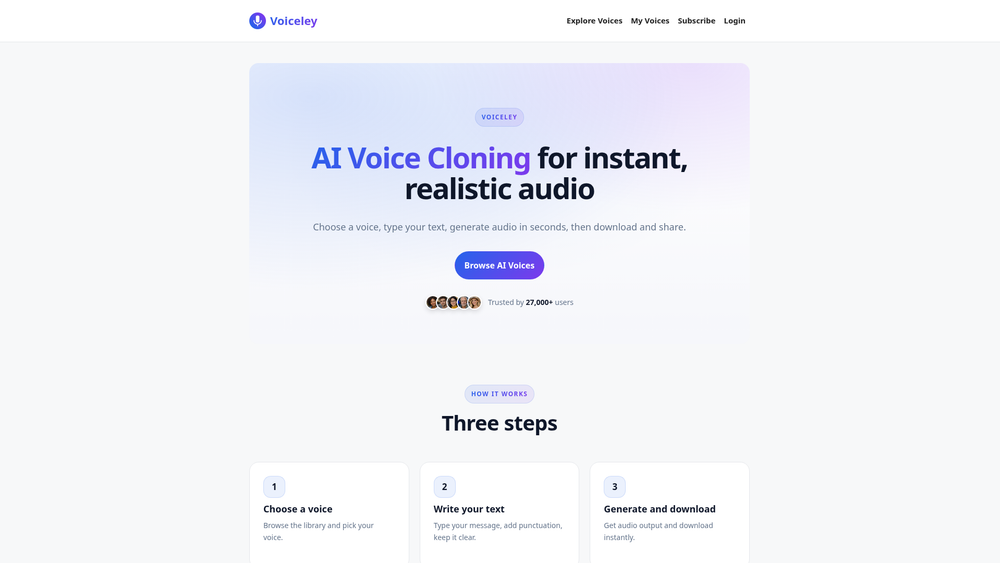
Voiceley is a specialized AI voice synthesis platform designed to bridge the gap between static text and lifelike spoken audio. By leveraging advanced voice cloning technology, it allows users to either select from a diverse library of pre-set voices or generate a digital replica of their own voice from a simple audio upload. This makes it an efficient solution for creators who need consistent, high-quality narration without the overhead of professional recording studios.
What sets this tool apart is its focus on speed and accessibility. Whether you are looking to create a quick voiceover for a social media clip or need a recurring custom voice for a long-term project, the interface is streamlined to handle the conversion in seconds. In practice, the system handles the nuances of speech—like inflection and clarity—remarkably well, provided the input text is formatted correctly. It serves as a practical bridge for developers, marketers, and educators who require scalable audio production.
Features
- Custom Voice Cloning: Users can upload a clean audio sample to create a unique digital voice that can be saved and reused for any future text-to-speech needs.
- Extensive Voice Library: A curated collection of pre-set voices is available for those who need immediate results without setting up their own clones.
- Natural Language Processing: The engine is optimized for expressive speech, ensuring that the generated audio sounds less like a robot and more like a human speaker.
- Instant Audio Downloads: Once the generation is complete, the platform provides direct download links for the audio files, making integration into other projects seamless.
- Priority Processing: Paid tiers offer faster generation times, ensuring that high-volume users aren't left waiting in a queue during peak hours.
- High Character Capacity: Each generation supports up to 1,000 characters, allowing for substantial paragraphs to be converted in a single pass.
- Voice Management Dashboard: Depending on the subscription level, users can store and manage between 10 to 50 custom-cloned voices simultaneously.
How to Use Voiceley
- Select Your Voice: Start by browsing the internal library or navigate to the cloning section to upload a high-quality sample of the voice you wish to replicate.
- Input Your Script: Type or paste your content into the text editor, ensuring you keep the total length under the 1,000-character limit per generation.
- Refine with Punctuation: Add commas, periods, and question marks strategically to guide the AI's pacing and intonation for a more natural result.
- Generate the Audio: Click the generate button to process the text; the AI will synthesize the speech based on your selected voice profile.
- Preview and Download: Listen to the output directly in the browser to ensure it meets your standards, then download the file for your specific use case.
Use Cases
- Content Creation: YouTubers and TikTokers can use cloned voices to maintain a consistent brand identity across all their video narrations.
- E-Learning Modules: Educators can quickly turn written lesson plans into audio guides, making learning materials more accessible for students who prefer auditory input.
- Personalized Marketing: Businesses can generate custom audio messages for clients, adding a human touch to automated interactions.
- Prototyping: Game developers or filmmakers can use the tool to create temporary 'scratch tracks' for dialogue before committing to final recordings.
Pricing
Voiceley offers three main tiers: the Starter plan at $5.99/month for casual use, the Pro plan at $9.99/month for more frequent creators, and the Studio plan at $19.99/month for heavy users requiring up to 1,000 generations. Check the official website for the most current pricing and feature breakdowns.
FAQ
What is Voiceley?
Voiceley is an AI-powered voice cloning and text-to-speech tool that generates realistic audio from written text using either pre-made or custom-cloned voices.
Is Voiceley free to use?
While Voiceley primarily operates on a subscription model (Starter, Pro, and Studio), users should check the landing page for any current trial offers or free generation credits.
How do I get the best audio quality?
For cloning, use a clean audio sample with no background noise. For text-to-speech, use clear punctuation and avoid overly long, complex sentences that might confuse the AI's natural flow.
Can I use the audio for commercial projects?
Yes, once you generate and download the audio, it is yours to use. However, you must ensure you have the rights to any voice you choose to clone.
What file formats are supported for downloads?
Voiceley typically provides standard, high-quality audio formats that are compatible with most video editing and playback software.
Can I cancel my subscription at any time?
Yes, you can manage your subscription through the account dashboard. If you cancel, your plan remains active until the end of the current billing cycle.