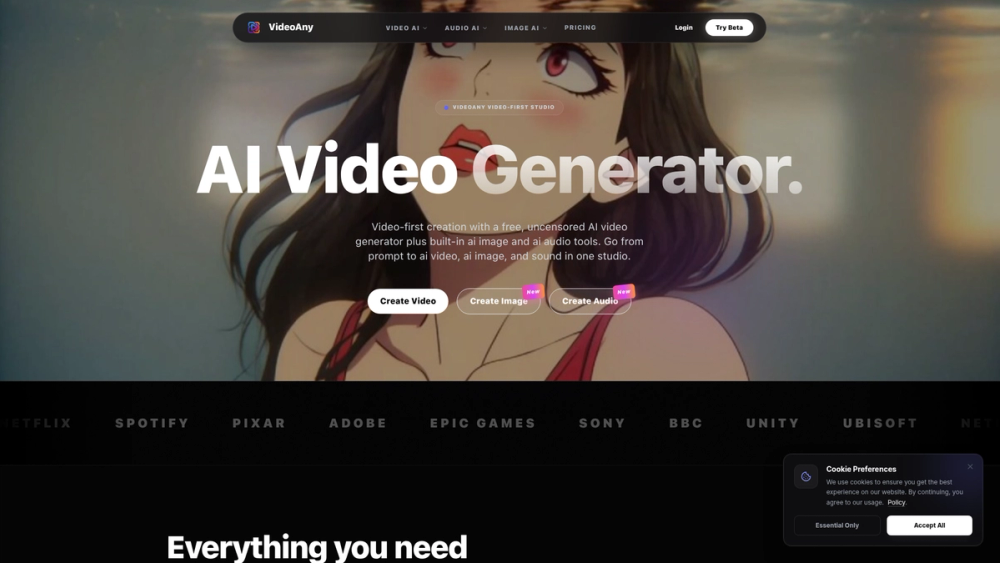
VideoAny is a free, uncensored, all-in-one AI creative studio designed to streamline content generation. It integrates powerful tools for creating video, images, and audio within a single, unified platform. Instead of juggling multiple applications, users can go from a simple text prompt to a complete multimedia project, making it a comprehensive solution for digital creation.
The primary benefit of VideoAny is its consolidation of the entire creative stack into one intelligent system. It is built for a wide range of users, from social media marketers and content creators to filmmakers, artists, and musicians. By offering a "video-first" approach with built-in support for high-fidelity images and custom audio, the platform removes technical barriers. Its value lies in accelerating the creative workflow, providing access to cutting-edge AI models like Sora 2 and Suno for free, and enabling uncensored artistic expression to produce unique, potentially viral content.
Features
- All-in-One Creative Studio: Seamlessly generate video, images, and audio without leaving the platform. It supports workflows like Text-to-Video, Image-to-Video, Text-to-Image, and Text-to-Music.
- Advanced AI Video Generation: Turn text prompts or still images into high-definition, fluid videos using state-of-the-art models like Sora 2, Veo 3.1, and Wan 2.6. It also includes a dedicated Face Swap feature.
- Comprehensive Audio Suite: Create custom music tracks from text with the Suno model, generate sound effects (SFX), or extract audio directly from video files. This allows for full audio-visual project creation.
- High-Fidelity Image Engine: Generate and edit images using Text-to-Image and Image-to-Image tools powered by models like Nano Banana Pro. The platform supports high-resolution upscaling and fine-grained style control.
- Uncensored Creative Freedom: The platform promotes itself as "uncensored," offering creators more flexibility and freedom in the type of content they can produce compared to more restrictive AI services.
- Banana Prompt Assistant: An integrated tool designed to help users write more effective and descriptive prompts, enabling them to achieve more accurate and imaginative results from the AI generators.
How to Use
- Select a Generation Tool: Start by choosing your main creative task from the Video AI, Audio AI, or Image AI sections on the dashboard.
- Choose a Specific AI Model: Each tool offers multiple AI models. Select one that fits your desired style and output, such as 'Sora 2' for cinematic video or 'Nano Banana Pro' for detailed images.
- Provide Your Input: Enter a clear and descriptive text prompt. For media-based generation (like Image-to-Video), upload your source file. Use the 'Banana Prompt' tool for help crafting better descriptions.
- Configure Settings: Before generating, adjust any available parameters such as aspect ratio, motion level, or style to tailor the output to your needs.
- Generate and Review: Click the generate button to process your request. Once the AI completes the task, review the output. If it's not perfect, refine your prompt or settings and try again.
- Download Your Creation: Once you are satisfied with the generated video, image, or audio file, you can download it directly from the studio to use in your projects.
Use Cases
- Social Media Marketing: Marketers can rapidly produce a high volume of unique video ads, promotional images, and background music for campaigns on platforms like TikTok, Instagram, and Facebook.
- Filmmaking and Animation Pre-Production: Directors and animators can use VideoAny to quickly create animated storyboards, concept art, and character mockups from scripts or ideas, significantly speeding up the visualization process.
- Music and Podcast Creation: Musicians and podcasters can generate royalty-free background music, custom theme songs, or specific sound effects (SFX) from text prompts, enhancing the production value of their audio content.
- Digital Art and Storytelling: Artists and writers can bring their stories to life by generating character portraits, scenic backgrounds, and short animated clips that match their narrative vision.
FAQ
Is VideoAny completely free to use?
Yes, VideoAny offers a free-to-use platform that provides access to its suite of AI generation tools. The website mentions a 'Pricing' page, which suggests there may be premium tiers with higher limits, advanced features, or faster processing in the future.
What does "uncensored" AI generation mean?
"Uncensored" implies that the platform has fewer content filters and restrictions than many mainstream AI tools. This allows for a wider range of artistic and creative expression, though users are still expected to comply with the platform's terms of service.
What kind of AI models are available on VideoAny?
VideoAny integrates a diverse range of leading AI models, including Sora 2 and Veo 3.1 for video, Suno and MMaudio for audio and music, and Nano Banana Pro and GPT Image 1.5 for image generation.
How do I create a video from a single image?
Navigate to the 'Video AI' section and choose the 'Image to Video' tool. Upload your image, select an AI animation model, and add an optional text prompt to describe the desired motion or transformation. Then, click to generate the video.
What is the 'Banana Prompt' feature?
'Banana Prompt' is an AI-powered assistant that helps you write better, more detailed prompts for the image generator. It suggests keywords and structures to help you get results that more closely match your creative vision.
Can I extract music or sound from an existing video?
Yes, the 'Audio AI' section includes a 'Video to Audio' tool. You can upload a video file, and the platform will extract the audio track, which you can then download or use in other projects.