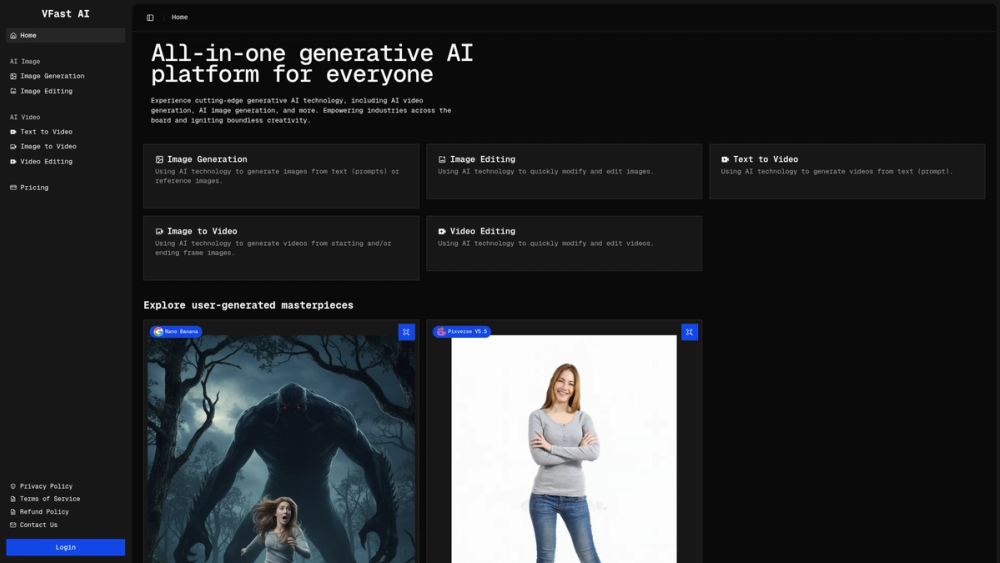
VFast AI functions as a centralized creative suite that brings together the disparate worlds of AI-driven image and video production. In an era where creators often have to jump between various niche tools to complete a single project, this platform offers a streamlined alternative by housing generation and editing features under one roof. It is particularly effective for those who need to maintain visual continuity while transitioning from static concepts to moving media.
In practice, the platform caters to a broad spectrum of users, from digital artists needing to iterate on character designs to marketers looking for high-impact social media assets. By leveraging powerful models like Pixverse, VFast AI ensures that the outputs aren't just fast, but also high-quality. Worth noting is the inclusion of specific "Image to Video" and "Video Editing" modules, which provide a level of control often missing in more basic prompt-to-video tools.
Features
- Text-to-Image Generation: Convert natural language descriptions into vivid, high-resolution images using advanced diffusion logic.
- AI-Powered Image Editing: Modify existing visuals with tools designed to understand the underlying structure of the image for seamless edits.
- Text-to-Video Synthesis: Generate cinematic clips from scratch by simply describing the scene, motion, and atmosphere.
- Image-to-Video Animation: Use static images as the foundation for video, allowing the AI to interpolate motion between starting and ending frames.
- Comprehensive Video Editing: Refine generated content with a built-in editor that handles trimming, adjustments, and stylistic changes.
- Multi-Model Support: Choose from various specialized AI models to achieve specific aesthetic goals, such as the Pixverse V5.5 engine.
- Community Masterpieces: Explore an integrated gallery of user creations to learn from successful prompts and artistic styles.
How to Use VFast AI
- Sign in to the VFast AI dashboard to access the full range of creative modules from the main navigation menu.
- Select either the "AI Image" or "AI Video" category depending on the type of asset you intend to create.
- Enter your descriptive prompt into the generation field, or upload a reference file if you are using the image-to-video or editing tools.
- Fine-tune the output by selecting a specific model and adjusting parameters like resolution or motion intensity.
- Click the generate button to process the request on VFast’s cloud servers and view the initial results in seconds.
- Use the integrated editing tools to polish the final product before downloading it for use in your professional or personal projects.
Use Cases
- Rapid Prototyping: Designers can quickly visualize concepts and storyboards without spending hours on manual drafting.
- Social Media Marketing: Brands can generate a high volume of engaging video snippets and promotional images tailored for different platforms.
- Artistic Exploration: Individual creators can experiment with complex animation styles and visual effects that were previously technically demanding.
- Content Enhancement: Improve existing low-quality assets by running them through the AI editing and upscaling modules.
Pricing
Check the official website at https://vfast.ai/pricing for the most current pricing information and subscription options.
FAQ
What is VFast AI?
VFast AI is an all-in-one generative AI platform designed for creating and editing both images and videos using advanced machine learning models.
Is VFast AI free to use?
While the platform may offer limited trial options or credits, full access to high-resolution generation usually requires a paid subscription.
Can I turn my photos into videos?
Yes, the Image-to-Video feature allows you to upload a starting frame and animate it into a dynamic clip.
Does it support video editing?
Yes, the platform includes a dedicated video editing module powered by AI to help refine and modify clips directly within the browser.
What models are available?
The platform integrates various high-performance models, including Pixverse V5.5, to provide diverse output styles ranging from photorealistic to animated.
How do I contact support?
For any inquiries or technical assistance, you can reach out to the VFast AI team via email at [email protected].