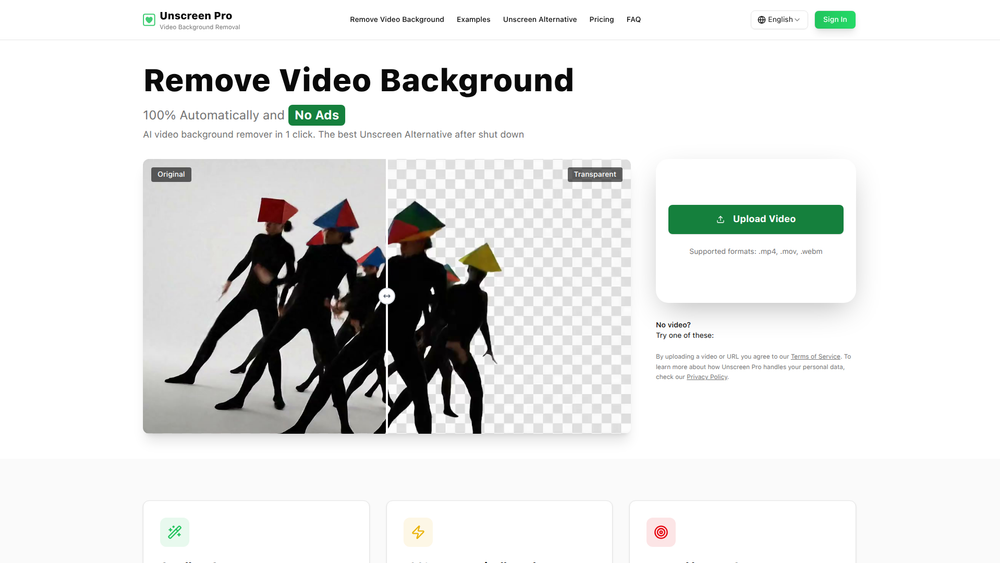
Unscreen is an advanced AI-powered tool designed for the automatic removal of video backgrounds. With just a single click, users can erase the background from any video, eliminating the need for complex editing techniques like rotoscoping or the use of physical green screens. This makes professional-quality video production accessible to everyone, regardless of their technical skill or budget.
The primary benefit of Unscreen is its ability to save creators significant time and resources. It's built for a wide range of users, including social media content creators, professional video editors, marketing teams, and businesses. By automating the tedious process of background removal, Unscreen allows users to focus on the creative aspects of their projects, seamlessly integrating custom backgrounds for everything from YouTube videos and TikTok clips to corporate presentations and product demos.
Features
- AI-Powered Automatic Removal: Utilizes artificial intelligence to automatically detect and remove video backgrounds in one click, with no manual editing required.
- No Green Screen Needed: Works effectively with videos shot in any location or under any lighting conditions, saving users over $200 on studio equipment.
- High-Accuracy Results: Delivers precise and professional-quality background removal for a clean final product, complete with a live preview.
- Multi-Subject Support: The technology is trained to accurately identify and isolate various subjects, including people, pets, and objects.
- Broad Format Compatibility: Supports popular video formats such as .mp4, .mov, and .webm for easy uploading and processing.
- Extended Video Length: Capable of processing longer videos, with support for clips up to 30 minutes, making it ideal for webinars and presentations.
- Developer API: Offers an API for businesses and developers to integrate Unscreen's background removal technology directly into their own applications and workflows.
How to Use
- Navigate to the Website: Open your web browser and go to the Unscreen.pro homepage.
- Upload Your Video: Click the upload button to select a video file from your computer. Supported formats are .mp4, .mov, and .webm.
- Let the AI Work: The tool will automatically begin processing your video to identify and remove the background. No manual input is needed.
- Preview the Result: Once processing is complete, a live preview will be displayed, showing your subject against a transparent background.
- Download Your Video: If you are satisfied with the result, download the new video file to your device to use in your projects.
Use Cases
- Social Media Content: YouTube and TikTok creators can produce professional-looking videos with custom backgrounds without needing an expensive studio setup.
- Efficient Video Editing: Video editors can drastically speed up their post-production workflow by eliminating hours of manual masking and rotoscoping.
- Engaging Marketing Materials: Marketing teams can create compelling product demos, advertisements, and promotional content by placing subjects in any desired environment.
- Corporate and Educational Videos: Businesses and educators can enhance their presentations, training videos, and webinars by removing distracting backgrounds and adding branded or relevant visuals.
FAQ
What is Unscreen.pro?
Unscreen.pro is an online AI tool that automatically removes the background from videos without needing a green screen. It is positioned as a powerful and reliable alternative to the original Unscreen service that has been shut down.
Do I need a green screen to use Unscreen?
No, a green screen is not required. The AI technology is designed to remove backgrounds from videos shot anywhere, under any lighting conditions.
What video formats are supported?
You can upload videos in .mp4, .mov, and .webm formats.
What kind of subjects does Unscreen work with?
The tool works perfectly with a variety of subjects, including people, pets, and inanimate objects.
Who is the target audience for Unscreen?
Unscreen is used by a wide range of professionals and creators, including content creators, video editors, marketing teams, and businesses for various projects.
Can I process long videos?
Yes, Unscreen.pro supports extended video lengths, with testimonials mentioning successful processing of videos up to 30 minutes long, which is ideal for webinars and longer presentations.
Is there an API available?
Yes, Unscreen.pro offers an API that allows for a smooth transition and integration for developers and businesses looking to incorporate video background removal into their own platforms.