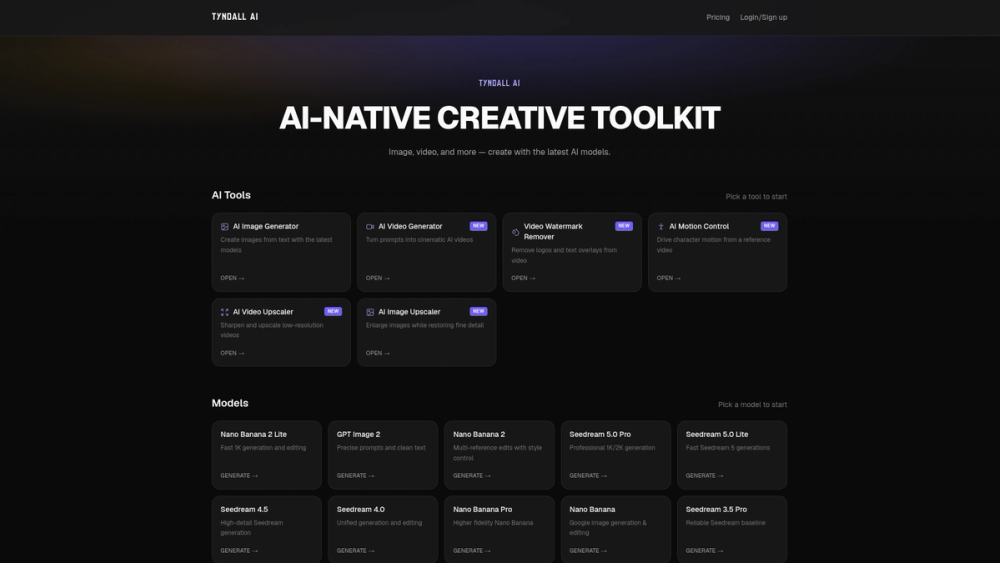
Tyndall AI is a web-based suite of tools for generating and editing visual content with artificial intelligence. It provides a single interface to access various models for image and video production, such as Seedream and Nano Banana. Designers and content creators use it to bypass the need for multiple subscriptions by having several specialized utilities in one place.
The platform acts as a central hub for different creative tasks, from removing watermarks to controlling character movement in videos. It supports specific resolutions like 1K and 2K depending on the model selected. This allows users to experiment with different AI architectures without switching between separate websites.
Key features
- Model variety featuring Seedream 5.0 Pro and Nano Banana 2 Lite
- Video watermark remover for cleaning up logos and text overlays
- Motion control utility that drives character movement from a reference video
- Image generation from text prompts using GPT Image 2 for precise text
- Video upscaler for sharpening low-resolution files into clearer versions
- Image upscaler that restores fine detail while enlarging files
- Multi-reference editing with style control in Nano Banana 2
How to use
- Navigate to the Tyndall AI dashboard and select a specific tool like the Video Generator.
- Choose a model from the list, such as Nano Banana 2 Lite for faster results.
- Input your text prompt or upload the video you want to modify.
- Configure specific parameters like the reference video for motion control.
- Click the generate button and wait for the AI to process the request.
- Preview the output and save it to your local device.
Use cases
- A YouTuber removing an accidental watermark from a background clip
- A graphic designer generating high-resolution 2K textures for a project
- A social media manager turning a simple text prompt into a short video clip
- An animator using a home video of themselves to control a 3D character's walk cycle
Pricing
Check the official website for current pricing.
FAQ
What is Tyndall AI?
It is a platform that hosts different AI models for visual media creation and editing.
Is Tyndall AI free?
There is a pricing section on the site, suggesting a paid or credit-based model for generations.
Can I remove logos from videos?
Yes, the Video Watermark Remover tool is specifically designed to identify and remove text or logos from video files.
What models are available?
The site offers several versions of Seedream and Nano Banana, along with GPT Image 2.
Can I upscale images to higher resolutions?
Yes, the AI Image Upscaler enlarges images while attempting to restore fine details.
How does motion control work?
You provide a reference video of movement, and the AI applies that motion to a character you generate or select.