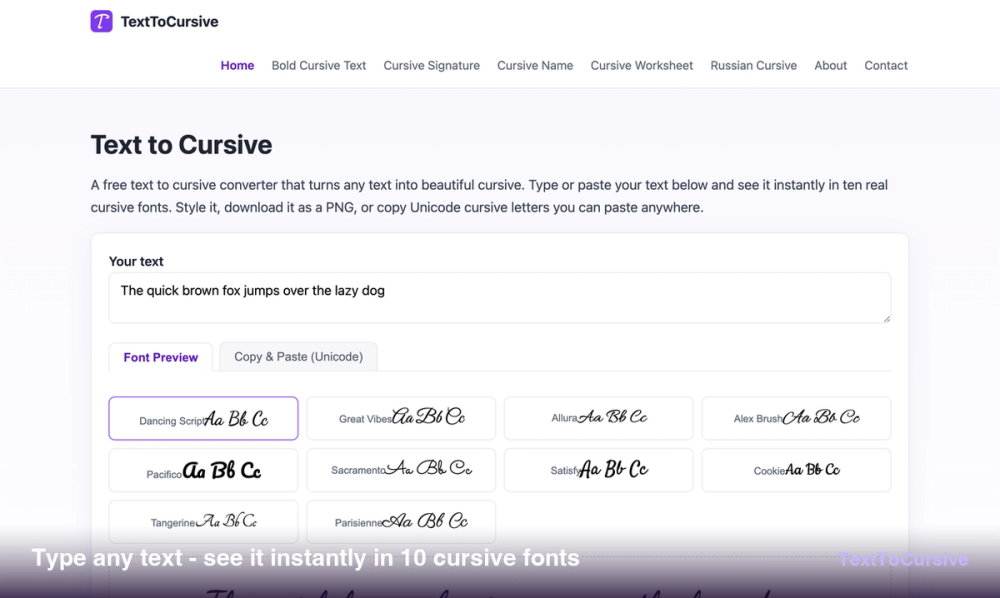
Text to Cursive is a browser-based tool that turns standard keyboard characters into various cursive and script styles. It helps designers, social media users, and teachers who need calligraphic text without installing professional design software. The site offers two distinct ways to work: generating high-resolution images using real fonts or converting letters into Unicode characters that work in text fields.
While standard fonts require installation, the Unicode conversion works by swapping letters with symbols from the Mathematical Alphanumeric block. This means the resulting script can be pasted into places that don't support custom fonts, like Instagram bios or Discord nicknames. For higher quality needs, the font preview mode renders actual typefaces that can be customized and exported as images.
Key features
- Ten open-licensed cursive fonts including Dancing Script, Great Vibes, and Pacifico for diverse aesthetic choices.
- 19 Unicode styles that replace standard letters with symbols for use in social media bios and chats.
- High-resolution PNG export with a 2x resolution multiplier for clear, crisp lettering.
- Transparent background toggle allows you to save text as a clean overlay for logos and stationery.
- Real-time customization controls for font size ranging from 32px to 96px, plus line height and letter spacing.
- Automatic text wrapping with adjustable maximum width to handle long paragraphs or short quotes.
- Privacy-focused processing that runs entirely in your local browser without uploading your text to a server.
- Built-in cursive translator to revert styled Unicode text back into plain, readable letters.
How to use
- Type or paste your words into the main input box at the top of the homepage.
- Choose between the Font Preview tab for image generation or the Copy & Paste tab for social media text.
- Adjust the sliders for font size, line height, and spacing until the script matches your requirements.
- Select a color preset or use the color picker to style the text and background.
- Click the download button to save a PNG file or click a Unicode style to copy it to your clipboard.
Use cases
- Create a transparent signature PNG to insert into digital documents or email signature settings.
- Format names for wedding invitations using formal scripts like Great Vibes or Allura for a professional look.
- Update an Instagram or TikTok bio with script characters that stand out from standard system fonts.
- Generate printable handwriting worksheets for students to practice tracing cursive letters with proper guides.
Pricing
All tools on this website are 100% free to use and do not require a sign-up or account.
FAQ
What is Text to Cursive?
It is a free web tool that converts plain text into cursive images or copyable Unicode characters for digital use.
Is Text to Cursive free?
Yes, every tool on the site is completely free and runs in your browser without requiring a subscription.
Will the cursive text work on Instagram?
Yes, the Unicode styles are designed specifically to work in bios, captions, and comments where custom fonts are not allowed.
Can I download the text as an image?
Yes, you can export your text as a high-resolution PNG with an optional transparent background for design projects.
Does it support other languages?
The tool includes a specific generator for Russian Cyrillic handwriting fonts and supports standard Latin characters.
Why does my text look like boxes on some devices?
Older devices may not support specific Unicode symbols used for script, though most modern smartphones and computers render them correctly.