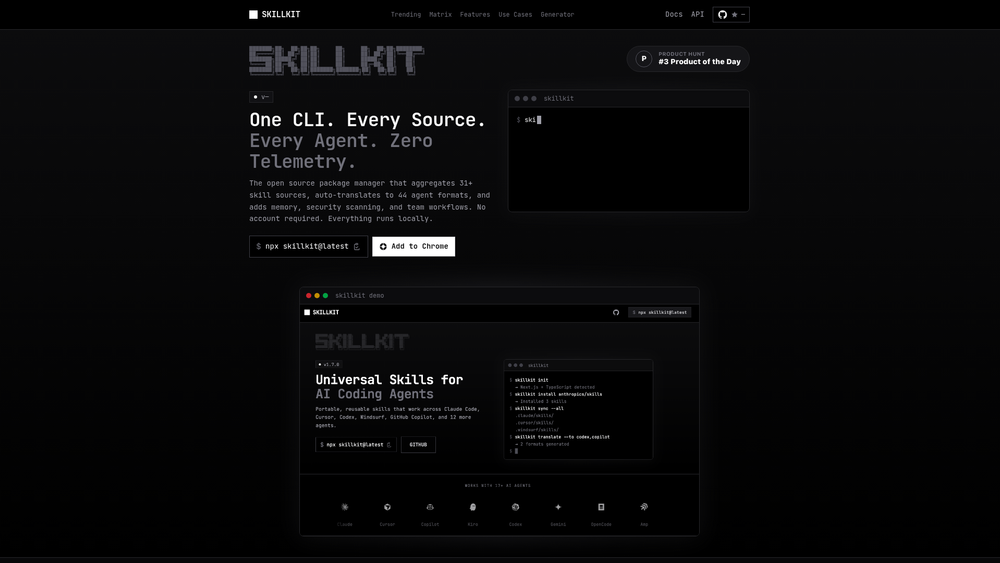
Skillkit functions as a universal, open-source package manager designed specifically for the burgeoning ecosystem of AI coding agents. By providing a centralized layer to deploy and manage capabilities across more than 44 different agent platforms, it solves the fragmentation problem where a skill written for one agent typically won't work on another. Think of it as the 'npm' for the AI agent world, aggregating over 15,000 skills from 31+ distinct sources into a single, searchable registry.
For developers and engineering teams, the tool provides a standardized way to ensure that every agent in their workflow—whether it's a local CLI tool or a cloud-based assistant—has access to the same set of specialized functions and domain knowledge. By abstracting the underlying format, Skillkit allows users to focus on the logic of the skill rather than the specific prompt engineering requirements of individual agent platforms. That said, it isn't just a simple installer; it includes a sophisticated translation engine and a security layer that makes it viable for production environments.
Features
- Universal Auto-Translation: This core engine takes a single skill definition and automatically translates it into the specific formats required by 44 different AI agents, eliminating manual porting.
- 46-Rule Security Scanner: To mitigate risks in automated workflows, Skillkit runs every skill through a scanner designed to detect prompt injection attacks, hardcoded secrets, and malicious patterns.
- Smart Codebase Recommendations: Instead of guessing what tools you need, the AI analyzes your existing codebase to recommend relevant skills from its library of 15,000+ options.
- Persistent Session Memory: Unlike standard stateless agents, Skillkit enables AI learnings and context to persist across different sessions and projects, creating a more cohesive development experience.
- Git-Based Team Sync: Using a
.skillsmanifest file, teams can version control their agent capabilities, ensuring every developer on a project is using the exact same agent toolset. - Extensive API Support: Beyond the CLI, it offers a REST server, an MCP (Model Context Protocol) server, and a Python client for runtime skill discovery and execution.
- Automated Workflows: Users can compose multi-step automated sequences, chaining different skills together to handle complex, repetitive engineering tasks.
- Built-in Testing Framework: The platform includes a dedicated testing environment with assertions to verify that skills perform as expected before they are deployed to a production agent.
How to Use Skillkit
- Initialize the Environment: Start by running the Skillkit CLI in your project root to set up the necessary configuration files and the
.skillsmanifest. - Analyze Your Codebase: Use the recommendation command to let the AI scan your local files and suggest specific skills (like Stripe integration or AWS helpers) that match your stack.
- Install Skills: Browse the marketplace and install skills using a simple command-line interface, which automatically handles the translation for your preferred agent.
- Configure Team Sync: Commit the
.skillsmanifest to your Git repository so that teammates can automatically sync the project's agent capabilities upon cloning. - Integrate with CI/CD: Add Skillkit to your GitHub Actions or GitLab CI pipelines to ensure all skills pass the security scanner and unit tests before merging.
- Publish Custom Skills: If you've built a unique capability, use the publish command to share your GitHub repository with the community registry.
Use Cases
- Standardizing Enterprise AI: Large teams can use Skillkit to ensure that all developers, regardless of which AI agent they prefer, are using approved, secure, and standardized tools.
- Cross-Platform Agent Migration: If a team decides to switch from one AI provider to another, Skillkit handles the migration of all custom tools and skills automatically.
- Automated Documentation & Testing: Developers can use the 'Primer' feature to auto-generate agent instructions and documentation directly from their codebase logic.
- Securing Shadow AI: Organizations can use the security scanner as a gatekeeper to prevent developers from accidentally introducing insecure or unvetted AI prompts into their workflow.
Pricing
Skillkit is an open-source project. Check the official website at https://agenstskills.com/ for the latest updates on enterprise support or hosted registry options.
FAQ
What is Skillkit?
Skillkit is an open-source package manager that allows you to install, manage, and sync skills across 44+ different AI coding agents using a single registry.
Is Skillkit free to use?
Yes, as an open-source tool, the core functionality and the skill marketplace are free for developers to use and contribute to.
Which agents are supported?
Skillkit currently supports 44 agents, including major platforms like Claude, GPT-based agents, and various open-source coding assistants.
How does the auto-translation work?
It takes a standardized skill definition and maps it to the specific schema, prompt structure, and API requirements of the target agent platform automatically.
What is the .skills manifest?
It is a configuration file stored in your project's root directory that lists all the skills required for that project, similar to a package.json file in Node.js.
Does Skillkit collect my data?
According to their documentation, Skillkit has a zero-telemetry policy, meaning it does not track your usage or collect data from your codebase.