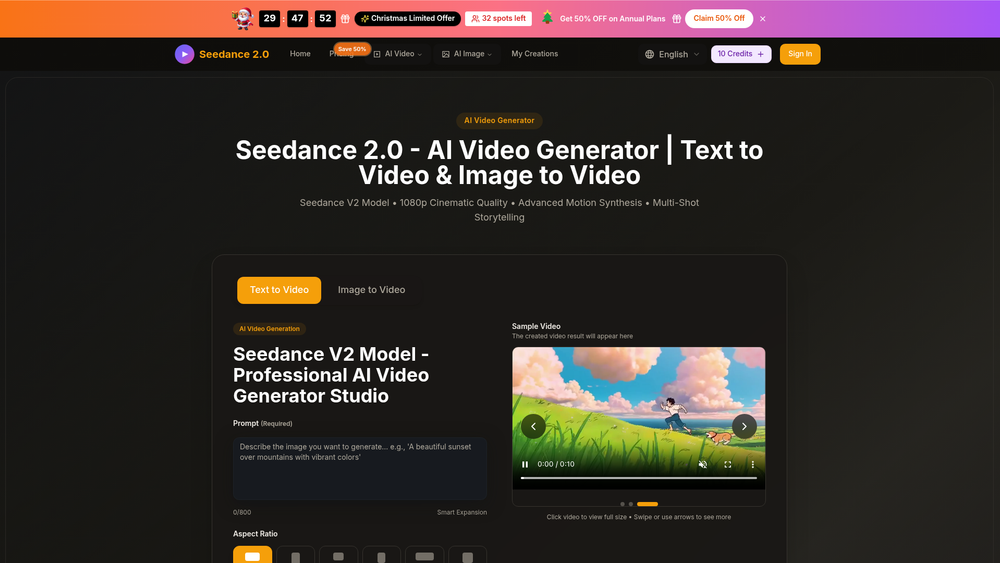
Seedance 2.0-, powered by ByteDance’s Seedance V2 model, represents a significant leap in the generative video space, moving beyond simple clips into the realm of high-definition cinematic production. It allows creators to transform text prompts or static images into 1080p videos that maintain visual consistency and fluid motion. This tool is particularly valuable for filmmakers, marketers, and content creators who need high-fidelity visuals without the overhead of traditional production pipelines.
In practice, the engine excels at understanding complex spatial relationships and lighting, which often trip up lesser models. Whether you are looking to storyboard a feature film or generate eye-catching social media content, Seedance 2.0- provides a robust framework for visual storytelling. That said, the underlying architecture leverages advanced diffusion techniques to ensure that every frame feels intentional and polished, rather than just a sequence of morphing pixels.
Key Features
- 1080p High-Definition Output: Generates crisp, cinematic resolution suitable for professional projects and large screens.
- Text-to-Video Synthesis: Converts descriptive prompts into dynamic scenes with high semantic accuracy and detail.
- Image-to-Video Animation: Animates static images while preserving the original style, character features, and environmental details.
- Temporal Consistency: Ensures that objects and characters remain stable and recognizable across the entire video duration.
- Cinematic Lighting & Textures: Emulates professional camera work with realistic light scattering and high-fidelity material rendering.
- Multi-Aspect Ratio Support: Offers flexible framing options for various platforms, including vertical for TikTok and widescreen for cinema.
- Advanced Motion Control: Allows users to direct the flow and intensity of movement within the frame through specific prompt engineering.
How to Use Seedance 2.0-
- Access the Seedance 2.0- web interface and sign in to your creator workspace.
- Select your primary input method: either type a detailed text description or upload a high-quality reference image.
- Adjust the generation settings, including aspect ratio, duration, and motion intensity sliders to match your creative vision.
- Click the "Generate" button and wait for the AI to process the frames in the cloud environment.
- Preview the rendered video and use the "Refine" or "Upscale" options if the initial output needs more detail or smoother motion.
- Download the final 1080p file in your preferred format for use in your professional editing software.
Use Cases
- Film Storyboarding: Quickly visualize complex scenes and camera angles before committing to a physical shoot or expensive CGI.
- Social Media Marketing: Create high-engagement video ads from static product photography in minutes to boost campaign performance.
- Architectural Visualization: Bring 2D blueprints or static renders to life with realistic walkthroughs and environmental movement.
- Educational Content: Generate illustrative historical or scientific animations to make learning more immersive and visually stimulating.
Pricing
Check the official website for pricing.
FAQ
What is Seedance 2.0-?
Seedance 2.0- is an AI-powered video generation tool based on ByteDance's Seedance V2 model, specifically designed for high-quality cinematic output from text and images.
Is Seedance 2.0- free to use?
Check the official website for current trial offers, credit-based systems, and subscription plans.
What is the maximum resolution supported?
It currently supports up to 1080p high-definition video generation, which is suitable for most professional digital applications.
Can I use my own images as a base?
Yes, the tool features a robust image-to-video mode that animates uploaded files while maintaining the source material's integrity.
How long does it take to generate a video?
Depending on the complexity and length, videos usually render within a few minutes, though high-traffic periods may increase wait times.
Does it support commercial use?
Worth noting is that licensing terms vary by plan; users should refer to the official terms of service to understand their commercial rights.