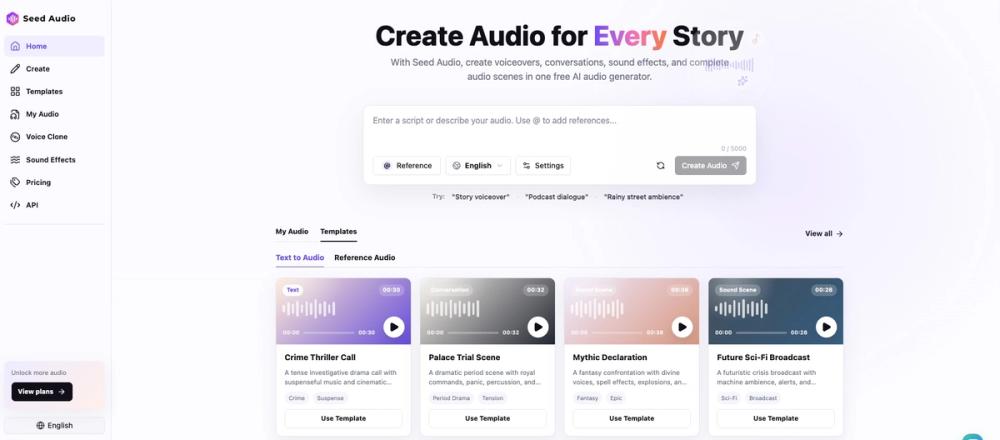
Seed Audio is an AI-powered audio generation platform that creates full soundscapes from text prompts. It is used by podcasters, game developers, and content creators who need more than just a basic text-to-speech voice. Instead of generating a single voice track, it mixes dialogue, background music, and environmental sound effects into a finished audio file. This approach saves time because you don't have to hunt for sound libraries or use a digital audio workstation to layer tracks. You just describe the scene, and the AI handles the timing and levels.
Features
- One prompt creates a full scene with voices and background noise
- Reference audio lets you use your own voice or music as a guide
- Multi-speaker support handles conversations between different characters
- Built-in templates for sci-fi, crime dramas, and podcasts
- Sound effects like rain, explosions, or office ambience are included
- Emotion controls change how the AI narrates the text
- No manual mixing is needed to balance voice and music levels
How to use
- Enter your script or a detailed description of the scene in the text box.
- Choose a template like Two-Host Podcast or Crime Thriller to set the style.
- Upload a reference file if you want the AI to follow a specific voice or music track.
- Click the generate button to start the audio creation process.
- Review the generated audio and tweak the prompt if the atmosphere isn't right.
- Download the final mix once you are satisfied with the result.
Use cases
- Creating an immersive intro for a tabletop roleplaying game with atmospheric rain and character voices.
- Producing a short podcast segment where two people talk without having to record separate audio tracks.
- Generating background soundscapes and dialogue for video game prototypes or storyboards.
- Building realistic voiceovers for marketing videos that require both narration and background music.
FAQ
What is Seed Audio?
Seed Audio is an AI tool that generates complete audio scenes, including voices, sound effects, and music, from a text description.
Is Seed Audio free?
Yes, the tool is currently free to use and does not require a credit card to start.
Can I use my own voice?
You can upload a recording of your voice as a reference to guide the AI's generation style.
Does it handle multiple speakers?
Yes, it can generate natural-sounding conversations between multiple characters in a single output.
Do I need to mix the audio?
No, the system automatically balances the volume of voices, music, and background effects.
What is the character limit?
The generator currently supports inputs up to 5000 characters long.