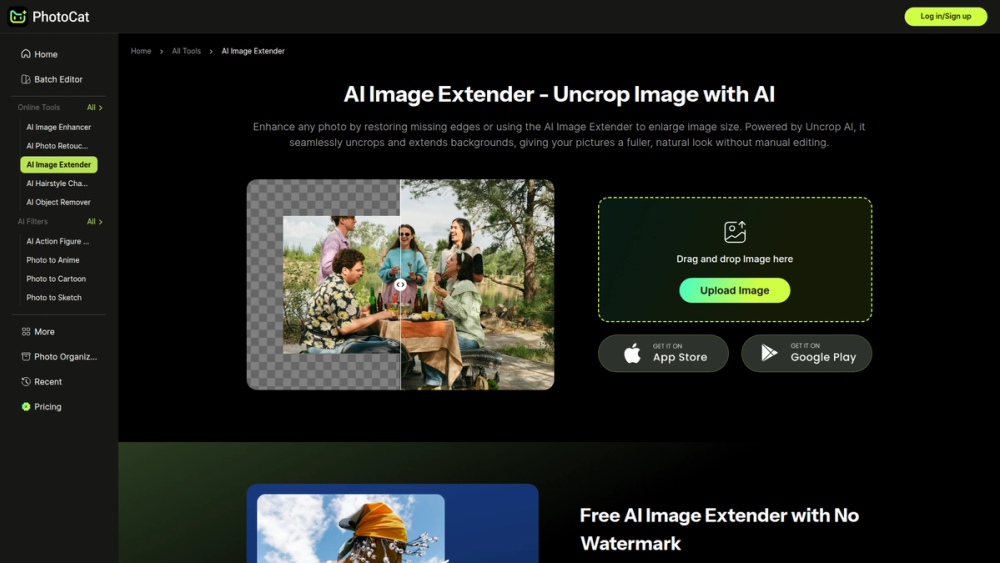
PhotoCat AI Image Extender is a powerful tool that uses generative artificial intelligence to expand and uncrop images. Its primary purpose is to intelligently add new content beyond the original boundaries of a photograph, creating a larger, more complete picture that looks entirely natural. This process, often called "outpainting" or "uncropping," allows users to change aspect ratios, fix awkward framing, or generate more background space without losing any part of the original shot.
The tool is incredibly valuable for a wide range of users, including graphic designers, social media managers, photographers, and content creators. For designers, it provides the flexibility to adapt a single image for various formats, like turning a portrait-oriented photo into a landscape banner. For photographers, it offers a way to salvage shots that were framed too tightly. By seamlessly generating realistic extensions, PhotoCat AI Image Extender saves time, enhances creative possibilities, and unlocks the full potential of any image.
Features
- AI-Powered Content-Aware Fill: The tool analyzes the pixels, textures, lighting, and patterns of your original image to generate new content that seamlessly blends with the existing scene.
- Flexible Aspect Ratio Adjustment: Easily convert images to standard aspect ratios required for social media platforms (e.g., 1:1 for Instagram posts, 9:16 for Stories), websites, or print.
- Custom Canvas Expansion: Manually drag the borders of your image to any desired size. The AI will fill in the newly created space on any or all sides of the photo.
- Natural and Seamless Results: Advanced algorithms ensure that the transition between the original image and the AI-generated extension is virtually undetectable, avoiding awkward seams or artifacts.
- High-Resolution Output: Expands your images while preserving the original quality, allowing you to download a high-resolution version suitable for professional use.
- Simple User Interface: The process is streamlined into a few simple steps: upload an image, define the new canvas size, and let the AI generate the result.
How to Use
- Upload Your Image: Navigate to the PhotoCat AI Image Extender tool and click the upload button to select a photo from your device.
- Choose Expansion Dimensions: Select from a list of preset aspect ratios or choose the custom option to manually define the new canvas size.
- Adjust the Frame: Drag the handles on the editing canvas to extend the image borders outwards to your desired dimensions. You can expand the image from the top, bottom, left, or right.
- Generate the Extended Image: Once you have set the new frame, click the "Extend" or "Generate" button. The AI will process your request and create the new content.
- Review and Download: Preview the final, uncropped image. If you are satisfied with the result, click the download button to save the expanded photo to your computer.
Use Cases
- Fixing Poor Composition: Correct photos that were framed too tightly or where the subject is awkwardly placed near the edge. By extending the background, you can create more breathing room and achieve a more balanced composition.
- Adapting Images for Social Media: Transform a single horizontal photograph into multiple formats, such as a square post for Instagram, a vertical story, or a wide banner for Facebook, without cropping out important details.
- Creating Wallpapers and Banners: Take any image and expand it to fit specific dimensions for desktop wallpapers, mobile backgrounds, or website hero banners, ensuring a perfect fit without stretching or cropping.
- Graphic Design and Advertising: Generate additional background space in product photos or promotional images to add text, logos, or other graphic elements without covering the main subject.
FAQ
What is an AI Image Extender?
An AI Image Extender, also known as an uncrop or outpainting tool, uses generative AI to create new pixels beyond the original borders of an image. It analyzes the context of the photo to add content that looks like it was part of the original scene.
Is the PhotoCat AI Image Extender free to use?
Yes, PhotoCat offers a free version of the AI Image Extender. Free usage may come with certain limitations, such as watermarks or limits on the number of exports, with premium plans available for unrestricted access.
What types of images work best with this tool?
Images with natural textures and patterns, such as landscapes, skies, and simple backgrounds, often yield the most seamless results. However, the AI is sophisticated enough to handle more complex scenes with objects and people.
Will the extended parts of the image look realistic?
The AI is designed to generate highly realistic extensions that match the lighting, shadows, texture, and style of the original photo. In most cases, the generated areas blend in seamlessly.
Can I control what the AI generates in the new areas?
No, you cannot directly control the specific content the AI generates. The tool automatically creates new content based on its analysis of the existing image data. Your control is limited to defining the size and shape of the extension.
What file formats can I upload and download?
The tool typically supports standard image formats like JPG, PNG, and WEBP for uploads. The final extended image can usually be downloaded as a high-quality JPG or PNG file.