Nano Pic AI is a comprehensive creative hub that bridges the gap between static imagery and dynamic video production. By aggregating a suite of top-tier generative models, the platform serves as a centralized workstation for creators who need high-fidelity visual assets without hopping between multiple isolated services. It is particularly effective for those who want to experiment with different "flavors" of AI, from photorealistic cinematic clips to abstract, dreamlike renderings.
The platform distinguishes itself by offering access to heavy hitters like Sora and Kling alongside specialized image models like Flux and Seedream. This versatility means you can draft a concept in a fast-acting image model and then transition to a high-temporal consistency video model within the same ecosystem. Whether you are a solo content creator or part of a larger marketing team, the interface simplifies the often technical process of prompt engineering and parameter tuning.
Key Features
- Multi-Model Video Suite: Access to Kling 2.6, Sora 2, and Veo 3 for varying levels of temporal consistency and photorealism.
- High-Fidelity Image Generation: Utilizes Flux 2 Flex and Gemini 3 Pro for detailed, prompt-adherent static visuals.
- Specialized Artistic Styles: Models like Seedream 4 focus on artistic and dreamlike aesthetics for unique creative projects.
- Rapid Prototyping: The Nano Banana Pro model is optimized for speed, allowing for quick visualization of initial ideas.
- Turbo Processing: Z-Image Turbo provides high-speed generation for users working under tight deadlines.
- Customizable Parameters: Fine-tune outputs with specific model parameters to control the final look and feel of the media.
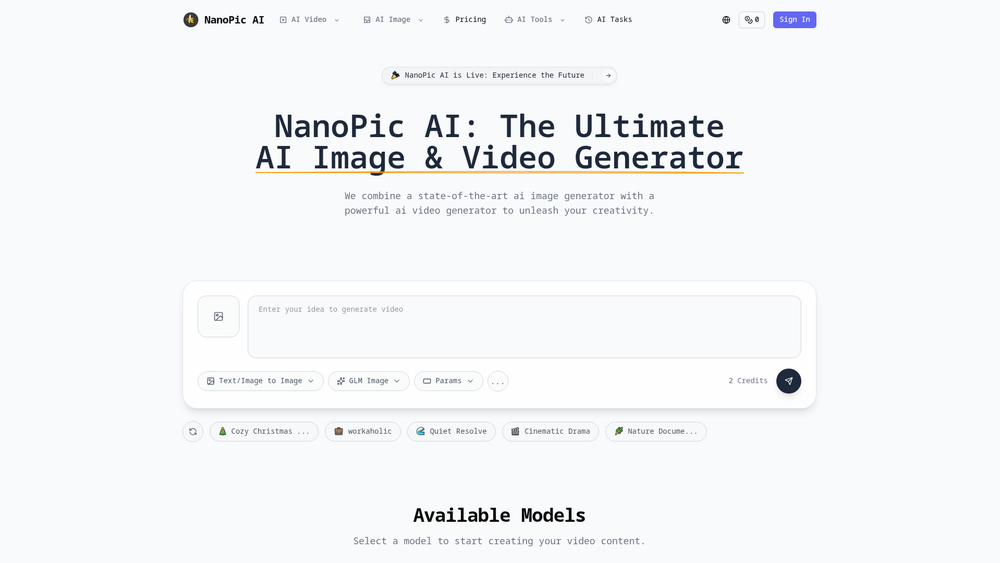
- Cinematic Presets: Pre-defined styles like "Cinematic Drama" or "Nature Document" help guide the AI's aesthetic direction automatically.
- High-Resolution Output: Capable of generating high-quality 1080p video clips suitable for professional use.
How to Use Nano Pic AI
- Log in to the Nano Pic AI dashboard and select whether you want to generate an image or a video.
- Browse the available models and select the one that fits your style, such as Kling 2.6 for video or Flux 2 for images.
- Enter a descriptive text prompt in the input field, detailing the subject, environment, and lighting.
- Select a style preset or adjust the specific parameters to refine how the AI interprets your prompt.
- Click the generate button to start the process, which will consume a set amount of credits from your account.
- Preview the result in your task history and download the final file in high resolution once processing is complete.
Use Cases
- Social Media Marketing: Generate eye-catching video clips for TikTok or Instagram Reels to boost engagement without a camera crew.
- Film & Animation Pre-visualization: Create high-quality concept art and motion storyboards to pitch visual ideas to stakeholders.
- E-commerce Advertising: Produce realistic product imagery and lifestyle shots using Gemini 3 Pro for marketing materials.
- Educational Content: Create immersive visual aids, such as nature documentaries or historical recreations, for digital learning platforms.
- Personal Artistic Expression: Experiment with dreamlike and abstract styles to create unique digital art for galleries or personal projects.
Pricing
Nano Pic AI operates on a credit-based system. Please check the official website for current pricing tiers and subscription options.
FAQ
What is Nano Pic AI?
Nano Pic AI is an advanced platform that combines multiple state-of-the-art AI models for both image and video generation into a single interface.
Is Nano Pic AI free to use?
The platform typically requires credits to generate content. Users can check the pricing page for information on available packages and potential trial credits.
Which video models are available on the platform?
Users can access several leading models, including Kling 2.6, Sora 2 (Pro and Standard), and Google's Veo 3 and Veo 3.1.
Can I generate images and videos from text?
Yes, the platform is designed primarily for text-to-image and text-to-video workflows, allowing you to create visuals simply by describing them.
What is the difference between the "Turbo" and "Pro" models?
Turbo models like Z-Image Turbo are optimized for maximum speed, while Pro models generally focus on higher fidelity and better prompt adherence.
Does Nano Pic AI support 1080p video?
Yes, models like Veo 3 are specifically capable of generating high-quality 1080p video clips for professional applications.
Are there pre-set styles available?
Yes, the platform includes various presets such as Cinematic Drama, Nature Document, and Cozy Christmas to help users achieve specific looks quickly.
How do I track my previous generations?
All completed generations can be found under the "AI Tasks" section of your account dashboard.