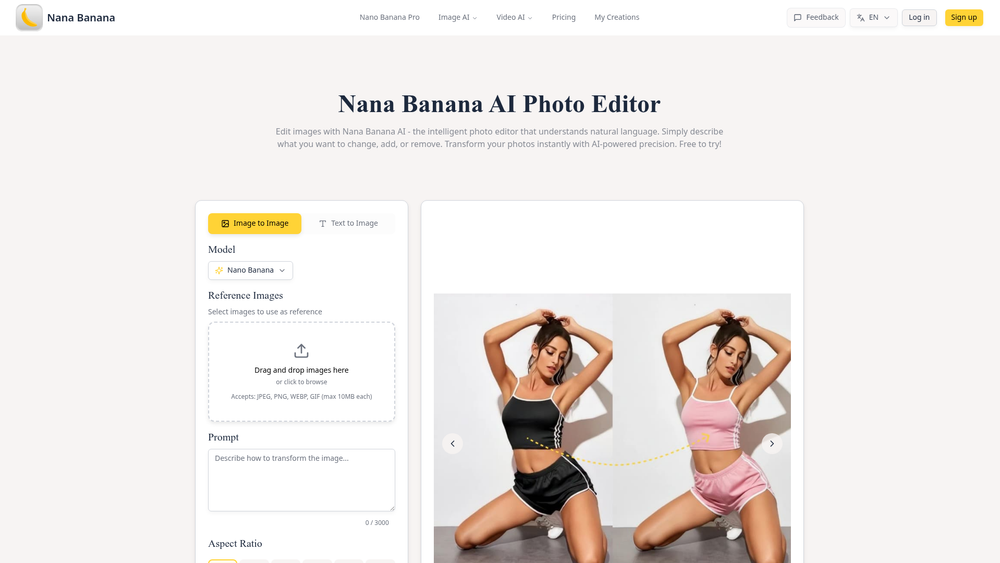
Nana Banana AI Photo Editor is an intelligent image manipulation tool that leverages natural language processing to bridge the gap between complex editing software and casual users. Instead of wrestling with layers, masks, or brushes, users can simply type out their desired modifications, such as changing a subject's clothing or altering the background, and the AI handles the heavy lifting. This approach democratizes high-end photo editing, making it accessible to anyone with a clear vision and a few descriptive words.
The platform is particularly useful for creators who need quick iterations or non-designers who find professional software like Photoshop too daunting. It utilizes the proprietary Nano Banana model to ensure that edits remain contextually aware, preserving the original's lighting, pose, and composition while implementing requested changes. In practice, this allows for a level of creative freedom that was previously restricted to those with significant technical expertise, allowing for rapid prototyping of visual ideas.
Features
- Natural Language Command Processing: Edit photos by typing simple instructions like "change the shirt to blue" instead of using manual selection tools.
- Image-to-Image Transformation: Upload an existing photo and use it as a base for AI-driven modifications or stylistic overhauls.
- Nano Banana Core Model: Leverages a specialized AI model optimized for high-fidelity image generation and precise instruction following.
- Reference Image Integration: Users can upload specific images to guide the AI, ensuring that poses, framing, and facial expressions are replicated accurately.
- Versatile Aspect Ratio Support: Choose from a wide range of formats including 1:1, 16:9, 9:16, 4:3, 3:2, and even 21:9 for cinematic results.
- Clothing and Texture Manipulation: Specifically excels at changing apparel colors and textures while maintaining realistic fabric folds and shadows.
- 3D Style Conversion: Transform standard 2D character designs into realistic 3D-rendered figurine styles with high detail.
- Multi-Format Support: Compatible with common file types including JPEG, PNG, WEBP, and GIF files up to 10MB.
How to Use Nana Banana AI Photo Editor
- Upload Your Source: Start by dragging and dropping your base image into the editor or clicking the browse button to select a file from your device.
- Configure Reference Images: If you have a specific style or pose in mind, upload additional reference images to provide the AI with more context.
- Craft Your Prompt: In the prompt box, describe the changes you want to see in detail, such as "Change the background to a sunset beach" or "Make the character wear a suit."
- Select Aspect Ratio: Choose the output dimensions that best fit your project, ranging from standard square to ultra-wide cinematic ratios.
- Generate and Refine: Click "Generate Now" to process the request; you can then view the results in your "My Creations" tab or refine the prompt for a new iteration.
Use Cases
- E-commerce Prototyping: Quickly visualize how a single clothing item would look in different colors or patterns without reshooting the product.
- Cosplay Planning: Upload an illustration and generate a realistic photo to see how a costume might look in a real-world environment or specific event setting.
- Social Media Content: Enhance personal photos by removing unwanted objects or changing the atmosphere to match a specific aesthetic.
- Character Design: Convert 2D character sketches into high-fidelity 3D models or realistic portraits for gaming and storytelling projects.
Pricing
Nana Banana offers a "Free to try" model, allowing users to experiment with the tool. For extended features and higher generation limits, check the official pricing page on their website.
FAQ
What is Nana Banana AI Photo Editor?
It is an AI-powered tool that allows users to edit and generate images using text-based instructions and reference photos.
Is Nana Banana AI Photo Editor free to use?
Yes, it is free to try, though certain advanced features or higher usage volumes may require a paid subscription.
What file formats are supported?
The platform accepts JPEG, PNG, WEBP, and GIF files, with a maximum size limit of 10MB per file.
Can I change the color of clothes in a photo?
Absolutely. One of its primary features is the ability to swap clothing colors and textures based on text prompts.
Does it support different aspect ratios?
Yes, it supports a variety of ratios including 1:1, 16:9, 4:3, 21:9, and several others to suit different social media and web needs.
How does the reference image feature work?
By uploading a reference image, you tell the AI to replicate specific elements like pose, framing, or character features in the new generation.