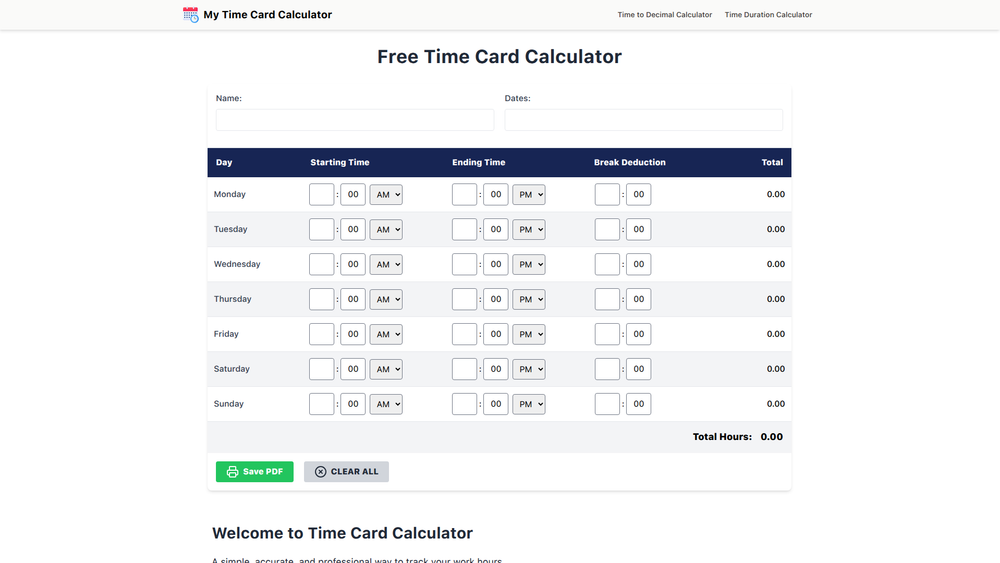
My Time Card Calculator is a free, web-based tool designed to simplify and automate the process of tracking work hours. It provides a simple, accurate, and professional way to calculate your time, eliminating the need for manual calculations, spreadsheets, or handwritten time cards. The tool is perfect for anyone who needs a fast and dependable way to log their work, from hourly employees and freelancers to small business owners managing staff.
With its intuitive design, you can enter start times, end times, and breaks, and the calculator instantly provides daily and weekly totals. A key benefit is its commitment to privacy; all data is processed directly in your browser and is never saved to a server, ensuring your information remains confidential. There's nothing to install and no account needed, making it an accessible and highly valuable tool for anyone needing to generate accurate timesheets quickly.
Features
- Automatic Hour Calculation: Instantly calculates total work hours on a daily and weekly basis as you input your times. This eliminates manual math and prevents common errors.
- Unpaid Break Deduction: Easily input the duration of any unpaid breaks (like lunch), and the calculator will automatically subtract this time from your daily total for accurate net hours.
- Professional PDF Export: Generate a clean, professionally formatted timesheet in PDF format with a single click. The document is ready to be submitted to HR, sent to clients, or kept for personal records.
- Privacy by Design: Your time entries are processed entirely within your browser. No data is ever stored, shared, or uploaded to a server, guaranteeing the confidentiality of your work schedule.
- Overnight Shift Support: The calculator is designed to handle complex schedules, including shifts that start on one day and end on the next, ensuring accurate calculations for all types of work.
- Cross-Device Compatibility: Access and use the calculator seamlessly on any device, whether you are on a desktop computer, tablet, or mobile phone.
- No Sign-Up Required: Get immediate access to all features without the need to create an account, sign up for a newsletter, or provide any personal information.
How to Use
- Enter Your Times: For each day of the week, input your start time and end time using the intuitive time pickers or by typing them in.
- Add Unpaid Breaks: In the 'Break' column, enter the total duration of any unpaid breaks you took that day (e.g., 30 minutes for lunch).
- Review Real-Time Totals: As you enter your data, the calculator automatically updates the 'Total' column for each day and the 'Weekly Total' at the bottom, so you can see your hours add up instantly.
- Make Adjustments: If you need to change an entry, simply click on the time or break field and update it. All totals will recalculate automatically.
- Download Your Timesheet: Once your week is complete and reviewed, click the 'Download' or 'Print' button to generate a professional PDF of your timesheet.
Use Cases
- Employee Timesheet Submission: Hourly employees can quickly and accurately track their work hours, including breaks, and export a polished PDF to submit to their payroll or HR department, ensuring they are paid correctly and on time.
- Freelancer and Contractor Invoicing: Freelancers can use the calculator to log billable hours for various projects. The generated PDF serves as a clear and professional record to attach to invoices sent to clients.
- Small Business Payroll Management: Small business owners can use the tool to calculate hours for their staff, simplifying the payroll process and reducing the risk of payment errors. It provides a standardized format for record-keeping.
- Personal Work Hour Verification: Individuals can maintain a personal log of their hours worked to cross-reference with their official pay stubs, helping to catch any discrepancies and ensure they are being compensated fairly.
FAQ
Is the Time Card Calculator really free to use?
Yes, the tool is completely free. There are no hidden fees, locked features, or subscription requirements. You get full access to all functionalities.
Is my data safe and private?
Absolutely. All calculations are performed in your web browser. Your time entries are never sent to, stored on, or shared from our servers, ensuring your data remains private.
Can the calculator handle shifts that go past midnight?
Yes, the calculator is designed to accurately compute hours for overnight shifts that start on one day and end on the next.
What format can I download my timesheet in?
You can download your completed timesheet as a clean, professionally formatted PDF file, which is ideal for printing or emailing.
Do I need to install any software or app?
No, My Time Card Calculator is a fully browser-based tool. There is nothing to install. It works on any modern web browser on your desktop, tablet, or smartphone.
Can I save my timesheet and come back to it later?
Because the tool is designed for privacy and doesn't save your data on a server, you cannot close the browser and return to a saved state. It's best to complete and download your timesheet in a single session.
How are breaks calculated?
You simply enter the total duration of your unpaid breaks for a given day (e.g., "30m" for 30 minutes or "1h" for 1 hour). The calculator automatically deducts this amount from that day's total work hours.