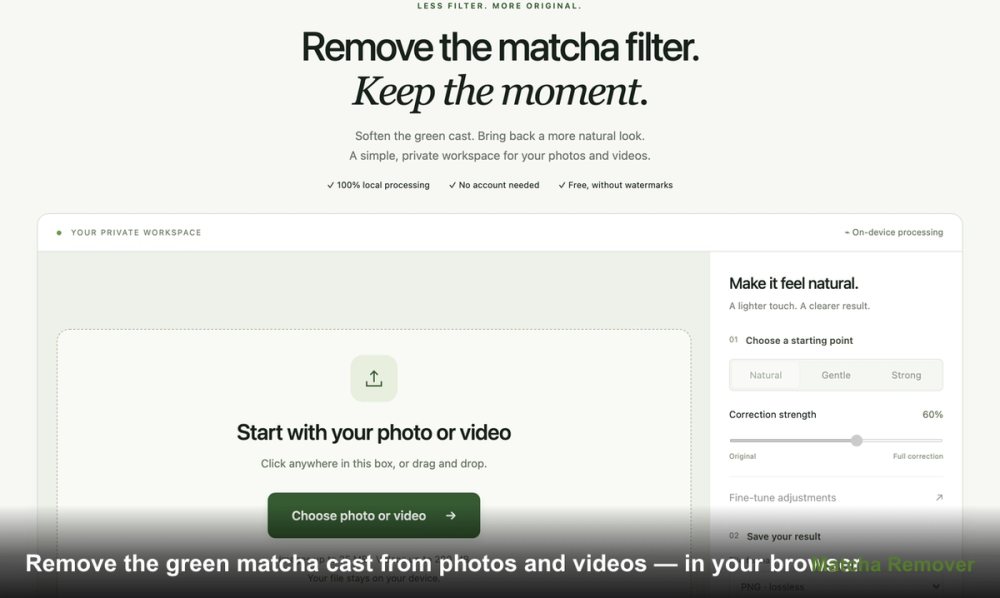
Matcha Filter Remover is a web utility that helps you strip away the heavy green or olive tints commonly found in stylized photo and video filters. It runs entirely within your web browser, meaning your media files never touch a remote server. This setup is ideal for people who want to fix a color-graded image while keeping their data private on their own machine.
In practice, this tool is most useful when you have a finished file but have lost the original, unfiltered version. It allows you to rebalance the colors to find a more natural look, especially for skin tones or white backgrounds that the "matcha" effect has distorted. It doesn't just slap a reverse filter on; it gives you manual controls to fine-tune how much of the original look you want to keep. One thing to keep in mind: while it corrects colors, it cannot bring back fine details that were permanently blurred or blown out by the original filter.
Key features
- Local browser processing keeps your media files private and secure
- Support for JPG, PNG, and WebP images with a 25 MB file limit
- Video compatibility for MP4, MOV, and WebM formats up to 200 MB
- Three adjustable presets including Gentle, Natural, and Strong starting points
- Real-time comparison slider to view before and after results side-by-side
- Manual sliders for green reduction, saturation, contrast, and texture smoothing
- Audio preservation for video files using compatible browser encoders
How to use
- Select a photo or video file from your device to load it into the browser workspace
- Choose the Natural preset to apply a standard baseline correction to the green cast
- Move the comparison divider across the image to inspect how the colors change
- Adjust the correction strength slider if the tint reduction feels too aggressive or too light
- Use the texture smoothing control if the original filter added distracting grain or noise
- Click the export button and save the processed file once the download link appears
Use cases
- Removing the olive tint from a portrait to make skin tones look more natural
- Correcting a landscape video where the green filter made the sky look muddy
- Softening artificial grain on a social media download to improve clarity
- Comparing different levels of color correction on a product photo before reposting
Pricing
The tool is free to use for both photos and videos. There are no accounts to create, no watermarks added to exports, and no hidden fees for high-resolution files.
FAQ
What is Matcha Filter Remover?
It is a browser-based utility that helps remove green or olive color casts from photos and videos. It uses local processing to ensure your files stay on your device.
Is Matcha Filter Remover free?
Yes, the tool is completely free and does not require an account or add watermarks to your files.
Can it restore the exact original photo?
No, it can only adjust the pixels present in the filtered version. While it improves the look, it cannot perfectly reconstruct data lost during the original editing process.
What file formats are supported?
The tool accepts MP4, MOV, and WebM files, provided your browser can decode the specific codec used.
Why does my image look pink after correction?
This happens when the green reduction is too strong for that specific image. Try using the Gentle preset or lowering the strength slider.
Does it work on mobile?
Yes, it works in most modern mobile browsers, though file size limits and processing speeds depend on your specific device hardware.