

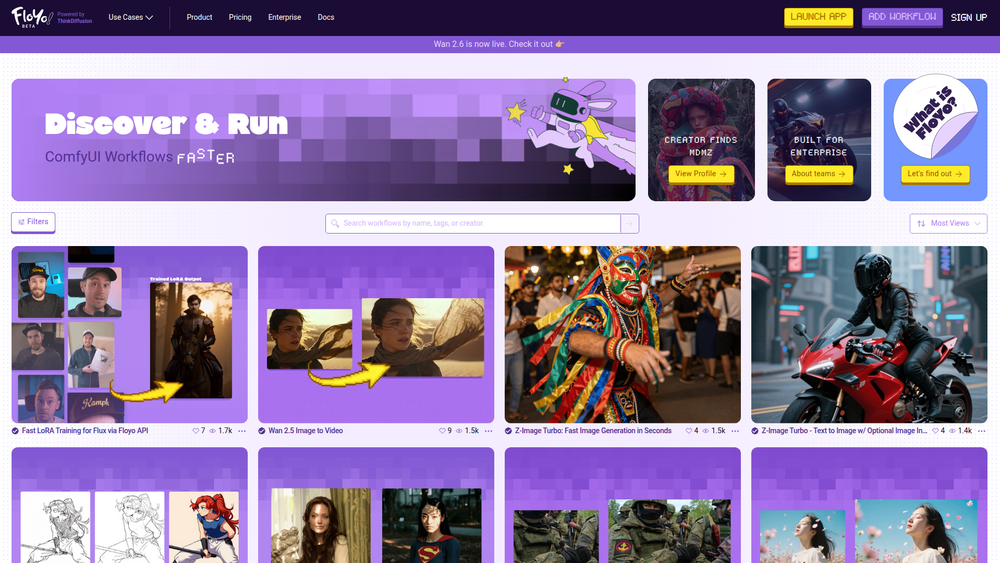
Floyo is a browser-based platform that provides the full power of ComfyUI with zero setup required. It's designed to simplify the process of discovering, building, and running complex AI generation workflows, making advanced tools accessible to a broader audience. By moving the entire ComfyUI environment to the cloud, Floyo eliminates the need for powerful local hardware, complex installations, and dependency management, allowing users to focus purely on creativity and execution.
The primary benefit of Floyo is its accessibility and efficiency. It caters to AI artists, designers, developers, and marketing teams who want to leverage the node-based flexibility of ComfyUI without the steep learning curve and technical overhead. Whether you're a beginner looking to explore pre-built workflows or an expert aiming to build and scale sophisticated generation pipelines, Floyo provides a streamlined, collaborative, and powerful environment to bring your creative ideas to life faster.
Features
- Zero-Setup Cloud Environment: Access a fully-featured ComfyUI instance directly in your browser. No installation, no configuration, and no need for a powerful local GPU.
- Workflow Discovery Hub: Explore a rich library of pre-built ComfyUI workflows created by the community and experts. Find solutions for image generation, video animation, style transfer, and more.
- One-Click Workflow Execution: Run complex, multi-step workflows with a single click. Floyo's cloud infrastructure handles all the processing, delivering results quickly.
- In-Browser Workflow Editor: Modify existing workflows or build entirely new ones from scratch using an intuitive, browser-based version of the ComfyUI interface.
- Enterprise & Team Collaboration: Built for teams, Floyo offers features for sharing workflows, managing assets, and ensuring consistent output across an organization.
- Creator-First Platform: Share your own custom workflows with the community, build a profile, and get recognized for your creations.
- Integrated Model & Node Management: Access a wide array of popular models, LoRAs, and custom nodes without needing to manually download or install them.
How to Use
- Sign Up: Create an account on the Floyo website to get started.
- Discover a Workflow: Browse the workflow library. You can filter by category (e.g., Video, Animation, Character Design) to find a workflow that matches your goal.
- Open the Workflow: Click on a workflow to load it into the editor. You can inspect the node layout to understand how it works.
- Customize Inputs: Modify the input fields. This typically includes changing text prompts, uploading source images or videos, and adjusting settings like seed or CFG scale.
- Run the Generation: Click the 'Run' or 'Queue Prompt' button to execute the workflow on Floyo's cloud servers. You can monitor the progress in real-time as each node executes.
- Download Your Results: Once the workflow is complete, your generated images or videos will appear in the output node. You can then preview and download them directly to your computer.
Use Cases
- Rapid Prototyping for AI Artists: Quickly experiment with different AI models, styles, and complex compositions without waiting for local rendering or managing dependencies. Test dozens of ideas in a fraction of the time.
- Consistent Brand Content for Marketing: Marketing teams can create and share a standardized workflow to generate on-brand images and ad creatives, ensuring consistency across all campaigns.
- Video and Animation Production: Leverage advanced workflows for tasks like reference-to-video, creating animated sequences from text prompts, or applying consistent styles across video frames.
- Learning and Education: Beginners can use Floyo to deconstruct and understand how sophisticated ComfyUI workflows are built, providing a hands-on learning experience without the initial setup frustration.
FAQ
What is ComfyUI?
ComfyUI is a powerful and modular node-based graphical user interface for Stable Diffusion. It allows users to create complex image and video generation pipelines by connecting different nodes (e.g., model loaders, samplers, prompts).
Do I need a powerful computer to use Floyo?
No. Since Floyo is entirely browser-based and runs on cloud infrastructure, all the heavy processing is done on Floyo's servers. You can use it from any modern computer with an internet connection.
Can I use my own custom nodes or models?
Floyo comes pre-loaded with a vast collection of the most popular custom nodes and models. This curated approach ensures stability and performance, removing the need for manual installation.
Is Floyo a free service?
Floyo offers various subscription plans, which may include a free tier with limited usage. Paid plans provide more processing credits, faster performance, and advanced features. Check the 'Pricing' page for current details.
Can I share the workflows I create?
Yes, Floyo is designed for collaboration. You can share your workflows with your team or publish them to the public workflow library for the entire community to use.
What kind of files can I generate?
Depending on the workflow, you can generate a wide variety of files, including high-resolution images (PNG, JPEG), videos (MP4), and animations (GIFs).
How is this different from running ComfyUI locally?
Floyo eliminates the technical barriers of a local installation, such as managing Python dependencies, installing custom nodes, and requiring a high-end GPU. It provides a managed, ready-to-use environment with added features for discovery and collaboration.



