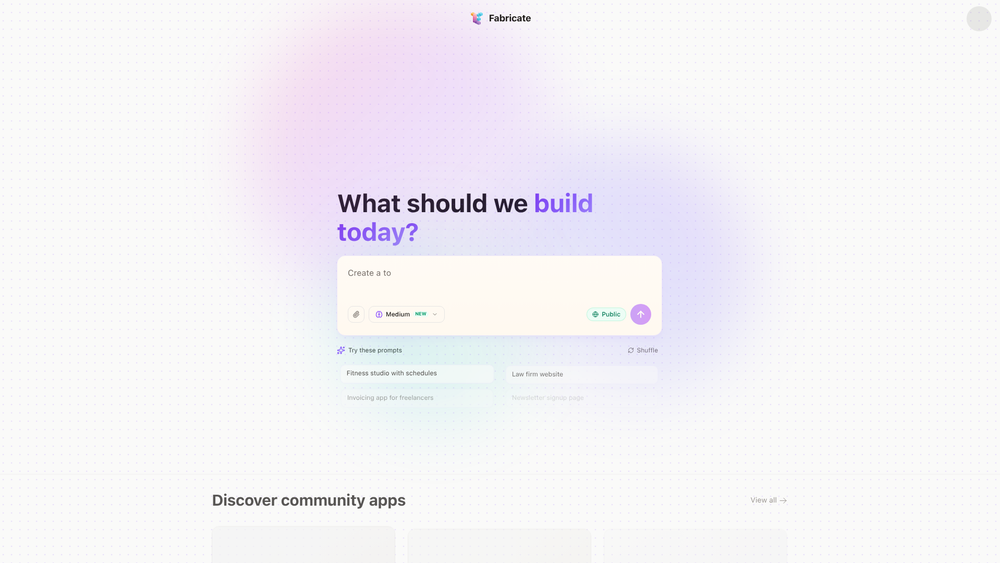
Fabricate is an AI-driven application generator designed to bridge the gap between a conceptual idea and a functional, production-ready React application. By leveraging advanced language models, it interprets natural language prompts to scaffold full-stack architectures, including both front-end components and back-end logic. This tool is particularly valuable for developers looking to accelerate their prototyping phase or non-technical founders who want to see their vision manifested in code without manual boilerplate setup.
In practice, the platform functions as a sophisticated co-pilot that handles the heavy lifting of environment configuration and component structuring. Instead of spending hours setting up routing, state management, or UI libraries, users can focus on the unique business logic of their project. That said, the output isn't just a static template; it is a dynamic codebase capable of handling real-time data and user interactions from the moment it is generated.
Key Features
- Natural Language Scaffolding: Transform simple text descriptions into complex React-based architectures without writing initial code.
- Full-Stack Capability: Generates not only the visual interface but also the underlying logic for data handling and API interactions.
- Production-Ready Output: Delivers code that follows modern best practices, making it suitable for immediate deployment rather than just prototyping.
- Specialized SaaS Logic: Built-in support for complex features like user management, billing dashboards, and analytics tracking.
- AI Integration Modules: Easily incorporate LLM streaming and chatbot interfaces into your apps with pre-configured components.
- Rapid Deployment Pipeline: Move from a text prompt to a live, hosted URL in a matter of minutes through an integrated workflow.
- Versatile UI Components: Supports a wide range of layouts, from data-heavy CRM tables to sleek, responsive landing pages.
How to Use Fabricate
- Visit the Fabricate dashboard and enter a detailed description of the application you want to build in the prompt bar.
- Select from suggested templates like 'SaaS Dashboard' or 'E-Commerce Store' if you need a specific structural starting point.
- Refine your requirements by specifying features such as payment gateways, user roles, or specific database integrations.
- Click the build button and monitor the real-time generation process as the AI constructs your React components.
- Preview the functional application in the browser to ensure the layout and logic meet your expectations.
- Deploy the final product directly to the web or export the source code for further manual customization in your local environment.
Use Cases
- MVP Development: Startup founders can quickly launch a minimum viable product with functional billing and user accounts to validate their business idea.
- Internal Tooling: IT teams can generate custom CRM or project management tools tailored to specific departmental workflows without long development cycles.
- E-Commerce Prototyping: Retailers can build bespoke product catalogs with integrated shopping carts and payment processing for niche markets.
- Portfolio Generation: Creative professionals can describe their work history and projects to generate a high-performance, responsive portfolio site.
- AI Tool Creation: Developers can rapidly build front-end interfaces for their AI models, featuring streaming chat windows and prompt history.
Pricing
Check the official website for pricing.
FAQ
What is Fabricate?
Fabricate is an AI app builder that uses natural language processing to generate full-stack, production-ready React applications from text descriptions.
Is Fabricate free to use?
Information regarding free tiers or trial periods varies; it is best to check the official website for the most current pricing model.
What technology stack does Fabricate use?
Fabricate primarily generates applications using React for the front end, often incorporating modern styling libraries and backend logic suitable for full-stack deployment.
Can I edit the code after it is generated?
Yes, the platform provides production-ready code that can be exported or modified, allowing developers to add custom logic or unique styling beyond the initial AI generation.
Do I need to know how to code to use Fabricate?
While coding knowledge is helpful for advanced customization, the tool is designed to allow anyone to build functional apps using only natural language prompts.
Does it support database integrations?
Yes, Fabricate can scaffold applications that include data management features, such as transaction reports, user profiles, and product catalogs.