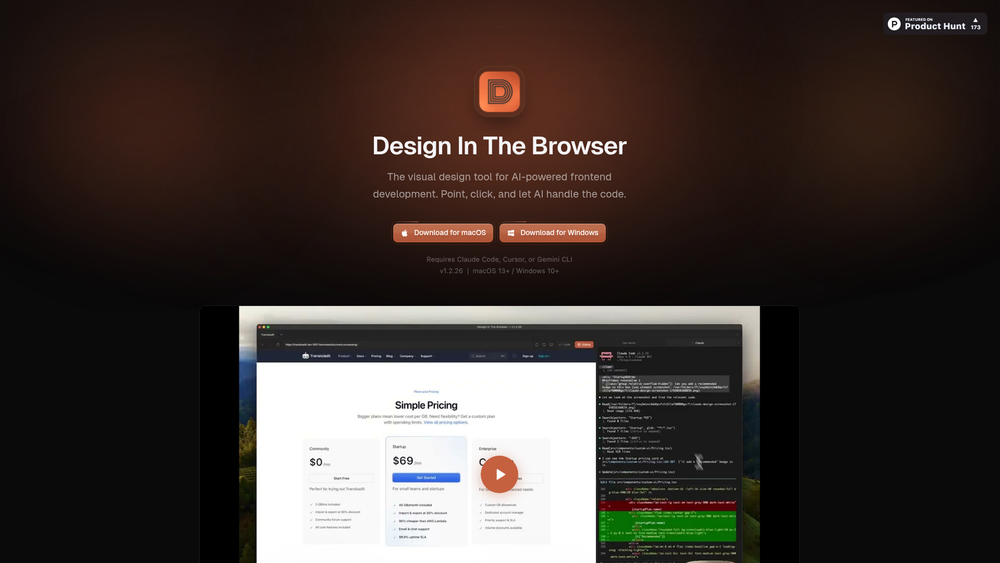
Design In The Browser is a specialized visual development tool designed to streamline the frontend coding process by leveraging AI agents. Unlike traditional browser dev tools that require manual CSS manipulation, this application allows developers to interact with their UI elements directly and pipe those selections into powerful LLM-driven environments like Cursor or Claude Code. It essentially turns the browser into a high-fidelity remote control for your codebase.
For developers who find themselves constantly context-switching between the inspector and their IDE, this tool provides a much-needed bridge. By selecting components visually, you can bypass the tedious task of searching through deeply nested directories or identifying specific class names. It’s particularly effective for teams working on complex React or Vue projects where the relationship between the rendered DOM and the source file can sometimes feel opaque.
Key Features
- Point & Click Editing: Select any element on the page to instantly identify its source and prepare it for AI-driven modifications.
- Deep IDE Integration: One-click jumps from the browser UI directly to the relevant line of code in Cursor or your preferred editor.
- Multi-Edit Selection: Batch-select multiple elements to create a comprehensive to-do list for the AI, allowing for global style updates or component-wide changes.
- Integrated Terminal: View your dev server output and browser side-by-side, maintaining a unified workspace without flipping between windows.
- Responsive Viewport Switcher: Test layouts across customizable breakpoints to ensure your AI-generated styles hold up on mobile and tablet views.
- Reference Image Support: Upload mockups or screenshots to provide the AI with visual context, facilitating pixel-perfect implementation of designs.
- Cross-Platform Compatibility: Native support for both macOS (13+) and Windows (10+), ensuring a consistent experience across different development environments.
How to Use Design In The Browser
- Download the appropriate installer for your OS from the official GitHub releases page and complete the installation process.
- Ensure you have a compatible AI environment set up, such as Claude Code, Cursor, or the Gemini CLI, as the tool relies on these for code generation.
- Launch the application and point the internal browser to your local development URL (e.g., localhost:3000).
- Use the selection tool to click on the UI element you wish to modify; the tool will automatically highlight the corresponding code block.
- Enter your prompt or instructions for the AI, or select multiple elements for a bulk edit, and watch as the code is updated in real-time.
- Review the changes in the integrated terminal and browser preview to confirm the edits meet your requirements.
Use Cases
- Rapid UI Iteration: Quickly testing different layout configurations or color schemes without manually editing CSS files.
- Legacy Code Navigation: Using the point-and-click interface to find where specific components are defined in an unfamiliar or large codebase.
- Responsive Refinement: Identifying and fixing layout shifts on mobile viewports by selecting problematic elements and asking the AI to optimize their flex or grid properties.
- Design-to-Code Implementation: Uploading a reference image and using the AI to match the existing frontend to the designer's original vision.
Pricing
Check the official website for pricing.
FAQ
What is Design In The Browser?
It is a visual development environment that connects browser-based element selection with AI coding agents to automate frontend changes.
Is Design In The Browser free to use?
The tool is currently available for download via GitHub, but users should check the official site for the latest licensing terms and potential subscription requirements.
Which AI tools are supported?
It currently requires Claude Code, Cursor, or Gemini CLI to handle the actual code modifications.
Does it work with any website?
While it can browse any site, its primary power lies in local development where it has access to the underlying source code through its integrations.
Can I edit multiple elements at once?
Yes, the Multi-Edit feature allows you to queue up several elements and apply a single set of instructions to all of them.
Is there a browser extension?
No, this is a standalone desktop application that includes its own integrated browser and terminal environment.