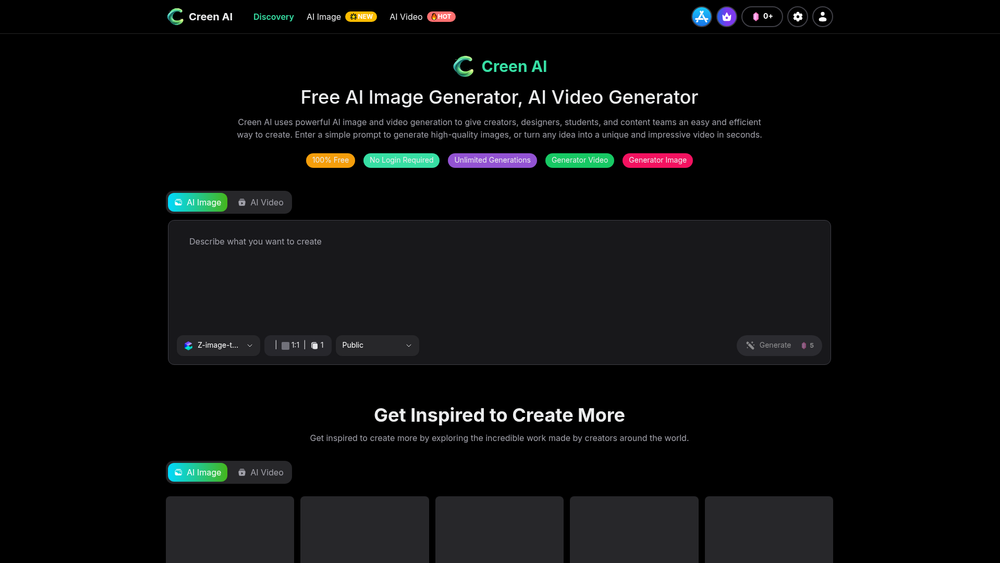
Creen AI is a versatile creative platform designed to democratize access to high-end visual production through artificial intelligence. By removing traditional barriers like subscription fees and mandatory account registration, it allows users to jump directly into the creative process. The tool serves as a bridge between abstract ideas and tangible media, utilizing advanced models to interpret text prompts into high-fidelity visuals.
What sets this platform apart is its commitment to an 'unlimited' philosophy. While many competitors gate their best features behind credit systems or paywalls, Creen AI provides a sandbox for designers, content creators, and hobbyists to experiment without the pressure of resource management. Whether you are looking to generate a static concept piece or a dynamic video clip, the interface remains streamlined to ensure that technical complexity doesn't hinder the artistic flow.
Features
- Unlimited Generations: Users can create as many images and videos as they need without worrying about daily limits or credit exhaustion.
- No Registration Required: The platform offers immediate access to its tools, allowing for total anonymity and a frictionless start for new users.
- Dual-Mode Generation: Seamlessly switch between AI Image and AI Video modules within the same unified dashboard.
- Model Selection: Access a variety of specialized AI models tailored for different artistic styles, ranging from photorealistic to stylized digital art.
- Text-to-Video Engine: Transform simple descriptive prompts into unique video sequences in just a few seconds.
- Inspiration Gallery: A curated feed of community-created content that allows users to explore prompts and styles used by others.
- One-Click Variations: The 'Create Similar' function enables users to iterate on successful designs quickly by generating related visual concepts.
- High-Speed Processing: Optimized infrastructure ensures that even complex video renders are completed with minimal wait times.
How to Use Creen AI: Free AI Image, AI Video
- Navigate to the Creen AI homepage and select either the 'Generator Image' or 'Generator Video' tab based on your project needs.
- Enter a detailed descriptive prompt into the text input area, specifying subjects, lighting, and artistic style for better results.
- Choose your preferred AI model from the dropdown menu to align the output with your specific aesthetic requirements.
- Click the 'Generate' button to initiate the AI rendering process.
- Review the generated output and use the 'Create Similar' button if you want to refine the concept further.
- Download your final high-quality image or video directly to your device without any watermarking hurdles.
Use Cases
- Social Media Content: Marketing teams can rapidly produce unique backgrounds and short video clips for Reels or TikTok without a dedicated production budget.
- Prototyping and Storyboarding: Designers and filmmakers can use the unlimited generation feature to visualize scenes and concepts during the pre-production phase.
- Educational Projects: Students can generate custom illustrations for presentations and reports without navigating complex licensing or copyright issues.
- Personal Branding: Individuals can create unique avatars and digital art pieces for profiles and personal websites without needing professional graphic design skills.
- Creative Exploration: Artists can use the prompt-based system to overcome creative blocks by exploring how different AI models interpret their ideas.
Pricing
Creen AI is currently listed as 100% free to use with no hidden costs or subscription tiers. For any updates regarding future premium features, check the official website.
FAQ
What is Creen AI: Free AI Image, AI Video?
It is an AI-powered creative suite that allows users to generate high-quality images and videos from text prompts for free.
Is Creen AI: Free AI Image, AI Video free to use?
Yes, the platform offers unlimited generations at no cost and does not require a sign-up or login.
Can I use the generated content for commercial purposes?
While the tool is free, users should review the specific terms on the website regarding commercial rights for AI-generated assets.
Do I need a powerful computer to run Creen AI?
No, all processing is handled on Creen AI's cloud servers, so you only need a standard web browser and an internet connection.
How long does it take to generate a video?
Most videos are generated within seconds, though complex prompts or high server traffic may slightly increase wait times.
Are there any watermarks on the free downloads?
Based on the current platform offering, the tool emphasizes high-quality, clean outputs for its users.