

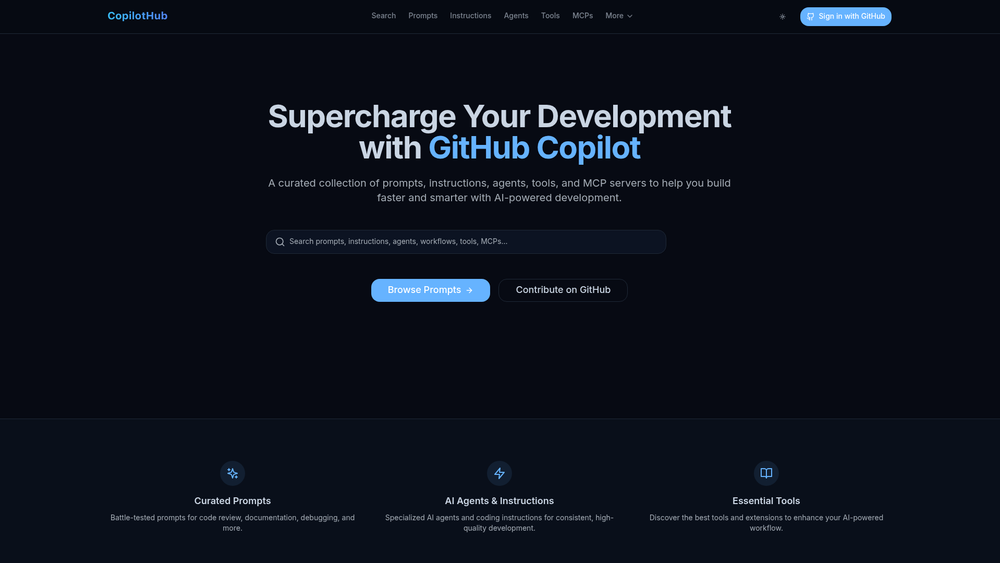
CopilotHub serves as a specialized community repository designed to maximize the utility of GitHub Copilot. While Copilot is powerful out of the box, its true potential is often unlocked through specific, well-crafted prompts and custom instructions that guide the AI toward better architectural decisions and coding standards. This platform acts as a central hub where developers can share and discover battle-tested resources that range from simple snippets to complex Model Context Protocol (MCP) servers.
The directory is particularly valuable for engineering teams looking to standardize their AI-assisted workflows or individual developers seeking to automate repetitive migration tasks. By organizing resources into clear categories like React, TypeScript, and Modernization, CopilotHub reduces the trial-and-error phase of prompt engineering, allowing users to implement proven solutions immediately within their IDE.
Features
- Battle-Tested Prompt Library: Access a wide array of curated prompts specifically designed for code reviews, documentation generation, and complex debugging scenarios.
- Model Context Protocol (MCP) Servers: Discover and integrate MCP servers that allow GitHub Copilot to interact with external data sources and tools more effectively.
- Specialized AI Agents: Explore custom-configured AI agents and coding instructions tailored for specific frameworks and architectural patterns.
- Framework-Specific Modernization: Utilize dedicated prompts for migrating legacy codebases, such as converting React class components to hooks or upgrading Next.js routers.
- Community-Driven Contributions: Benefit from an open-source model where developers can submit their own successful prompts and tools via GitHub.
- Search and Filter Infrastructure: Quickly locate resources using a robust search system and categorized navigation for prompts, instructions, and tools.
- Direct Code Integration: Easily copy prompts and configuration snippets directly from the web interface for immediate use in your development environment.
How to Use CopilotHub
- Navigate to the CopilotHub homepage to view the latest featured prompts and agents.
- Use the top navigation bar to filter by resource type, such as 'Prompts,' 'Instructions,' or 'MCPs.'
- Select a specific category like 'React' or 'TypeScript' to find language-specific optimization tools.
- Click on a resource card to view the full prompt text, its intended category, and associated tags.
- Use the 'Copy' button to grab the content and paste it into your GitHub Copilot Chat window or project instructions.
- If you have a unique prompt that works well, sign in with GitHub to contribute it to the community repository.
Use Cases
- Legacy Code Refactoring: Systematically upgrade older React versions or migrate from Redux to Redux Toolkit using specialized modernization prompts.
- Workflow Standardization: Implement consistent coding instructions across a team by distributing specific AI agent configurations found on the hub.
- Extended IDE Functionality: Use MCP servers to connect your Copilot instance to local databases or specialized APIs for more context-aware suggestions.
- Rapid Documentation: Leverage high-quality documentation prompts to generate README files or API docs that follow industry best practices.
Pricing
CopilotHub is a community-driven project and is currently free to use. Users can browse, copy, and contribute resources without any subscription fees. Check the official website for any future updates regarding premium features.
FAQ
What is CopilotHub?
CopilotHub is a curated directory of prompts, agents, tools, and MCP servers specifically built to enhance the GitHub Copilot experience.
Is CopilotHub free to use?
Yes, the platform is an open-source initiative and all resources listed in the directory are free for the developer community to access.
What are MCP servers?
MCP (Model Context Protocol) servers are tools that allow AI models like Copilot to securely access local or remote data, providing the AI with better context about your specific project.
Can I contribute my own prompts?
Absolutely. CopilotHub encourages community contributions via their GitHub repository, allowing you to share your best-performing prompts with other developers.
Do I need to sign in to use the prompts?
No, you can browse and copy prompts without an account. Signing in with GitHub is primarily required if you wish to contribute or interact with specific community features.
Does this work with VS Code and JetBrains?
Since the resources are primarily text-based prompts and instructions, they can be used with GitHub Copilot across any supported IDE, including VS Code and the JetBrains suite.



