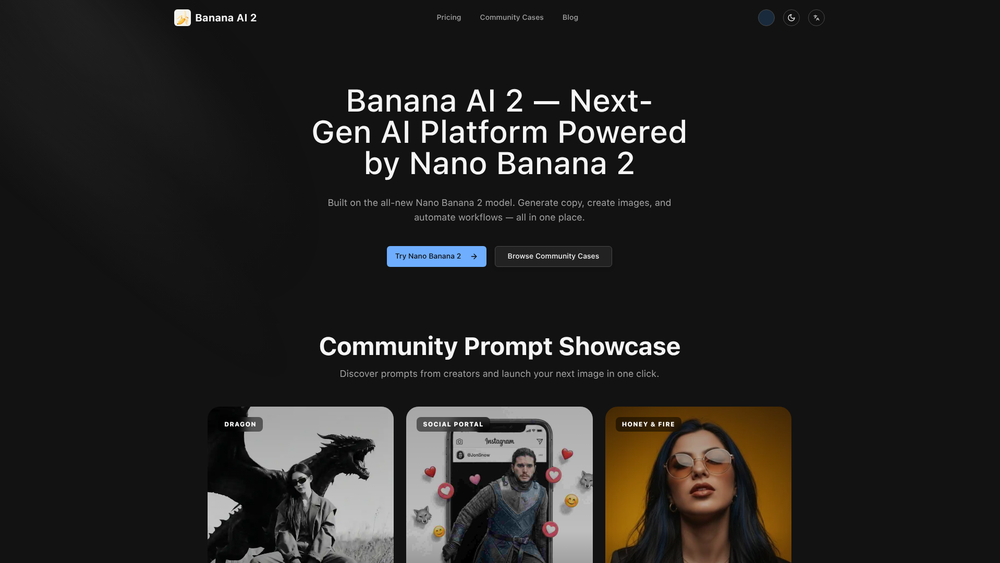
Banana AI 2 is a comprehensive creative workspace built on the proprietary Nano Banana 2 model, designed to bridge the gap between static image generation and complex workflow automation. Unlike standard generators, this platform integrates copy generation, high-fidelity image synthesis, and 3D-aware editing into a unified interface, making it a versatile hub for digital creators and marketing professionals alike.
By focusing on high-contrast rendering and cinematic quality, the tool caters to users who require more than just generic outputs. It offers a sophisticated environment where fine-art editorial portraits and complex trompe l'oeil illusions can be crafted with precision. Whether you are a solo artist looking to automate repetitive design tasks or a developer needing a robust API for visual content, Banana AI 2 provides the infrastructure to scale creative production without sacrificing artistic integrity.
Features
- Nano Banana 2 Model Architecture: Leverages a next-generation engine specifically tuned for high-contrast lighting, matte surface rendering, and organic analog textures that mimic medium-format film.
- Cinematic Image Synthesis: Produces museum-grade visuals with a focus on fine-film grain, subject separation, and professional-grade silhouettes.
- Community Prompt Showcase: A curated library where users can browse high-performing prompts, such as the 'Honey & Fire' or 'Social Portal' setups, and launch them with a single click.
- Intelligent 3D Editing: Allows for advanced spatial adjustments, including tilting subject angles and modifying lighting positions within a 3D-aware context.
- Workflow Automation: Tools designed to streamline the transition from raw copy to final visual assets, reducing the manual overhead in multi-stage creative projects.
- Trompe L'oeil Illusion Tools: Specialized settings for creating forced-perspective visuals, such as subjects appearing to step out of digital screens or social media interfaces.
- Multi-Language Support: A localized interface that allows global teams to collaborate and generate content in their native languages.
- High-Resolution Upscaling: Ensures that generated art maintains detail loss prevention for large-scale prints and high-definition digital displays.
How to Use banana ai 2
- Access the Workspace: Navigate to the Banana AI 2 dashboard and select either the image-to-image or text-to-image module to begin.
- Select a Base Template: Browse the Community Cases section to find a prompt structure that matches your desired aesthetic, then click 'Copy' to load it into your editor.
- Refine Your Parameters: Adjust the specific attributes of your prompt, such as lighting contrast, film grain levels, or subject positioning (e.g., setting a chin lift to 15-20 degrees).
- Execute the Generation: Click the 'Create' button to let the Nano Banana 2 model process your request and generate the initial set of variations.
- Perform Post-Generation Edits: Use the built-in editing tools to tweak specific details like hair highlights or background elements without regenerating the entire image.
- Export and Integrate: Download your final high-resolution assets or use the API to push the content directly into your existing marketing or development pipeline.
Use Cases
- Editorial Photography: Creating fine-art portraits for digital magazines that require a specific monochrome, high-contrast aesthetic typical of luxury brands.
- Social Media Marketing: Designing eye-catching 'out-of-frame' illusions where products or influencers appear to interact with the UI of social platforms.
- Creative Prototyping: Rapidly generating 3D-aware character concepts and environments for game development or film storyboarding.
- Content Automation: Scaling the production of blog headers and social assets by using the platform's copy-to-image workflow to maintain visual consistency.
- Personal Branding: Crafting unique digital avatars and cinematic portraits that stand out in a crowded digital landscape through superior texture and lighting.
Pricing
Please check the official website at bananaai2.com/pricing for the most current subscription tiers and API usage rates.
FAQ
What is banana ai 2?
Banana AI 2 is an advanced AI creation and automation workspace powered by the Nano Banana 2 model, specializing in high-end image generation, 3D editing, and creative workflow efficiency.
Is banana ai 2 free to use?
While there may be trial options or limited access, full features and high-resolution exports typically require a paid plan. Visit the pricing page for specific details.
Can I edit existing images with this tool?
Yes, the platform includes image-to-image capabilities and 3D editing features that allow you to modify existing visuals or refine generated content.
What makes the Nano Banana 2 model different?
It is specifically optimized for cinematic textures, realistic lighting, and complex compositions that standard models often struggle to render accurately, such as fine film grain and specific anatomical angles.
Does it support API integration?
Yes, Banana AI 2 is designed for developers and businesses that need to integrate its generation capabilities into their own applications or automated workflows.
Are the prompts shared by the community reusable?
Absolutely. The Community Cases section is designed for users to copy, modify, and build upon successful prompts shared by other creators.
Can I use the generated images for commercial purposes?
Commercial rights usually depend on your subscription tier. It is recommended to review the terms of service on the official website for specific licensing information.