

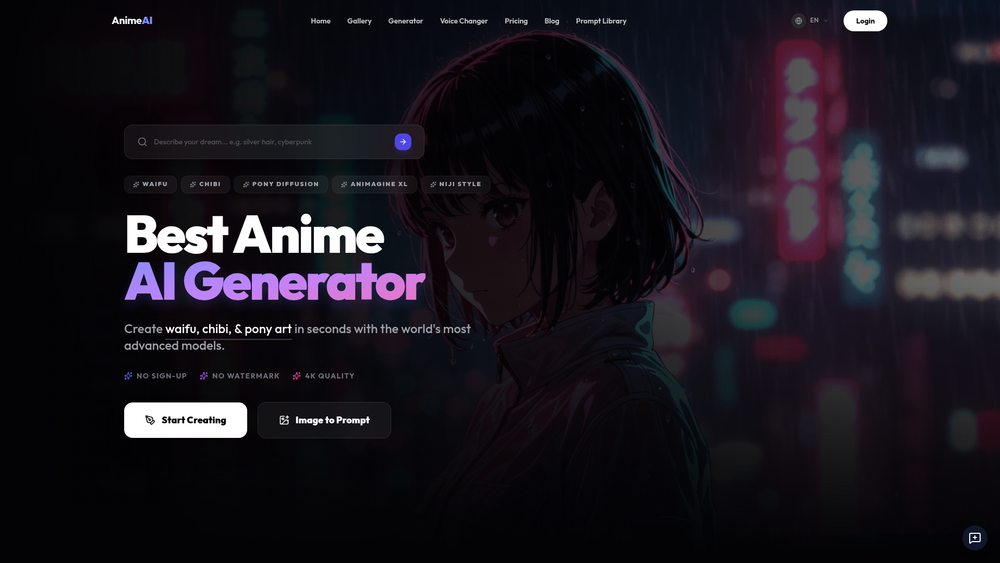
AnimeAI- is a specialized generative platform designed for creators, artists, and anime enthusiasts who need high-fidelity illustrations without the steep learning curve of local Stable Diffusion setups. It bridges the gap between complex prompt engineering and instant creative output, offering a suite of fine-tuned models like Animagine XL and Pony Diffusion to ensure stylistic accuracy. The tool is particularly effective for those looking to replicate specific sub-genres of anime, from the soft, watercolor textures of Studio Ghibli to the high-contrast, neon-soaked aesthetics of Cyberpunk.
By removing the requirement for account registration and watermarks, it provides a frictionless environment for rapid prototyping and artistic experimentation. Whether you are looking to create a single character avatar or an entire set of backgrounds for a visual novel, the platform's diverse model library provides the necessary versatility. That said, the real power lies in its ability to interpret nuanced lighting and atmospheric prompts that many general-purpose AI generators often miss.
Features
- Advanced Model Selection: Users can toggle between cutting-edge models including Pony Diffusion V6, Animagine XL, and Niji styles to achieve specific artistic looks.
- Image-to-Image Transformation: This feature allows for the conversion of real-world photos or rough sketches into polished anime illustrations using the Img2Img tool.
- Zero-Login Access: The platform enables immediate generation, removing the barrier of sign-up forms or email verification for casual users.
- High-Resolution Rendering: Supports 4K quality outputs and 8K resolution prompts, ensuring that fine details like eye glints and fabric textures remain crisp.
- Watermark-Free Downloads: Unlike many competitors, the tool provides clean images ready for use in personal projects or social media without intrusive branding.
- Specialized Chibi Maker: A dedicated mode for creating "kawaii" character designs with exaggerated proportions and sticker-style aesthetics.
- Integrated Voice Changer: Beyond static images, the platform includes tools for modifying audio to match specific anime character archetypes.
- Prompt Library: A built-in repository of successful prompts helps users understand how to manipulate lighting, atmosphere, and character posing effectively.
How to Use AnimeAI-
- Navigate to the generator section and select a specialized model, such as the Animagine XL or Pony V6, depending on your desired style.
- Enter a detailed text prompt in the input field, describing the character's features, clothing, and the surrounding environment.
- Optionally, upload a reference photo to the Img2Img module if you want the AI to follow a specific composition or pose.
- Adjust the output settings to ensure the resolution and quality meet your specific project requirements.
- Click the 'Start Creating' button and wait for the AI to process your request, which usually takes only a few seconds.
- Review the generated artwork and use the download button to save the high-definition, watermark-free file to your device.
Use Cases
- Visual Novel Development: Indie developers can use the Animagine XL model to create consistent character sprites and background art for their games.
- Social Media Avatars: Users can generate unique, high-quality profile pictures that reflect specific anime aesthetics like Cyberpunk or 90s retro styles.
- Concept Prototyping: Writers and artists can quickly visualize characters for light novels or manga before committing to a final hand-drawn design.
- Personalized Gifts: Transform personal photos of friends or pets into hand-drawn watercolor scenes reminiscent of Studio Ghibli films.
Pricing
Check the official website for pricing.
FAQ
What is AnimeAI-?
AnimeAI- is an advanced image generation platform that utilizes specialized AI models to create high-fidelity anime art from text descriptions or existing images.
Is AnimeAI- free to use?
Yes, the platform offers free generation capabilities without requiring a login or account creation, though premium tiers may exist for higher volume or speed.
Does the tool add watermarks to images?
No, the generated images are provided without watermarks, allowing for clean usage in various digital projects.
Can I convert my own photos into anime?
Yes, by using the Img2Img (Image to Prompt) feature, you can upload a photo and the AI will transform it into an anime illustration based on your selected style.
What models does AnimeAI- support?
The platform supports several industry-standard models including Pony Diffusion V6, Animagine XL, and various Niji-inspired styles.
Is there a mobile version available?
While it is a web-based tool, the interface is fully optimized for mobile browsers, allowing you to generate art on the go without a dedicated app.



