
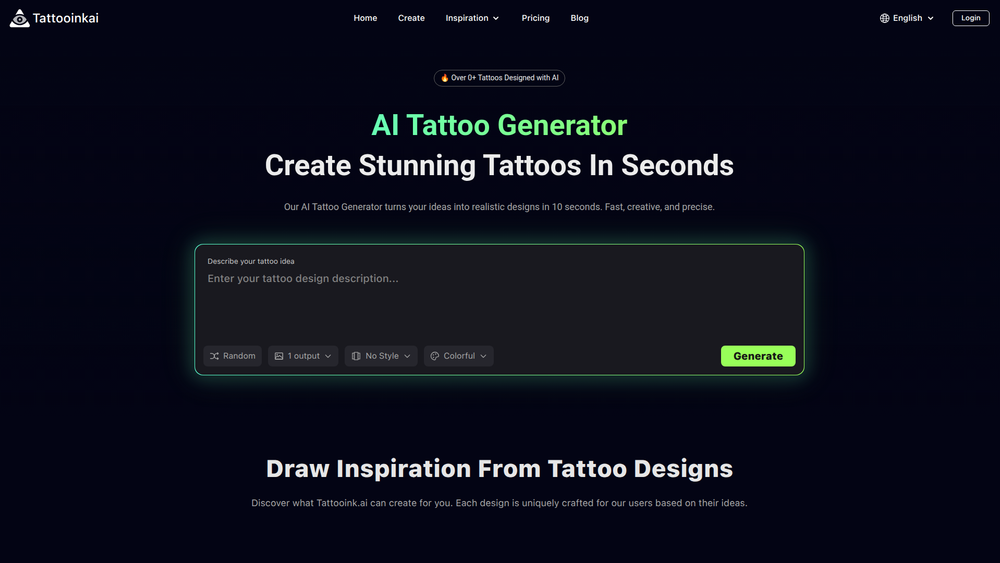
AITattoo.art is an innovative AI-powered design studio that transforms your tattoo ideas into clean, high-quality, and studio-ready designs in mere seconds. By simply describing what you envision, the platform's advanced artificial intelligence generates unique tattoo art tailored to your prompt. It's designed to bridge the creative gap between a conceptual idea and a tangible design, making the tattoo planning process more efficient and imaginative.
This tool is invaluable for anyone considering a new tattoo, from first-timers to seasoned collectors. It empowers users to explore a vast array of styles—such as minimalist fineline, intricate geometric patterns, vibrant anime, and spiritual motifs—without needing any design skills. By providing a clear, visual reference, users can communicate their vision more effectively to their tattoo artist, ensuring the final ink matches their expectations perfectly.
Features
- AI-Powered Idea Generation: Converts simple text descriptions into detailed and artistic tattoo designs in approximately 10 seconds.
- Diverse Style Selection: Offers a wide range of pre-defined styles including Fine Line, Geometric, Anime, Watercolor, Traditional, Spiritual, and Minimalist to guide the AI's output.
- Color Customization: A simple toggle allows users to specify whether they want a full-color or a black-and-white design.
- AR Preview: Use your device's camera to project the generated tattoo onto your skin with Augmented Reality, giving you a realistic preview of how it will look on your body.
- Inspiration Gallery: Browse a vast collection of AI-generated tattoos created by other users to discover new ideas and see the platform's capabilities.
- Studio-Ready Designs: The generated images are clean and well-defined, making them perfect visual references to bring to a professional tattoo artist for consultation and execution.
How to Use
- Describe Your Idea: Navigate to the generator and type a clear and descriptive prompt for your tattoo concept into the text box. Be as specific as you like (e.g., "A minimalist lion head with a geometric crown").
- Select a Style: Choose a specific artistic style from the dropdown menu, such as "Realistic" or "Watercolor," to influence the design's aesthetic. You can also select "No Style" for a more open interpretation by the AI.
- Choose Color: Use the "Colorful" toggle to decide if your design should be in color or monochrome.
- Generate Your Tattoo: Click the "Generate" button. The AI will process your request and create a unique design in seconds.
- Review and Refine: Examine the generated output. If it's not quite right, you can adjust your text prompt, change the style, and generate again to get closer to your vision.
- Save and Share: Once you have a design you love, save the image to use as a reference for your tattoo artist.
Use Cases
- Pre-Consultation Planning: A user can generate several variations of their idea (e.g., a dragon in both Traditional and Neo-Traditional styles) to bring to their tattoo artist. This provides a clear visual direction and makes the consultation more productive.
- Visualizing Abstract Concepts: For ideas that are hard to describe, such as "the feeling of serenity" or "cosmic balance," the AI can create concrete visual interpretations, turning an abstract thought into a potential tattoo.
- Creating Unique Matching Tattoos: Friends or partners can input a shared concept, symbol, or inside joke to generate a set of unique, cohesive, and personalized matching tattoo designs.
- Style Exploration: Someone who knows they want a floral tattoo but is unsure of the style can generate the same flower in Fineline, Watercolor, and Realistic styles to compare and decide which aesthetic they prefer on their body.
FAQ
How does the AI Tattoo Generator work?
It utilizes advanced generative AI models trained on a massive dataset of images and artistic styles. When you enter a text prompt, the AI interprets your words and creates a new, original image that matches your description and selected style.
What styles of tattoos can I create?
AITattoo.art supports a wide variety of popular styles, including Fine Line, Traditional, Neo-Traditional, Watercolor, Geometric, Anime, Spiritual, Realistic, Minimalist, and Dotwork, among others. You can select a style to guide the generation process.
Are the designs generated by the AI unique?
Yes, each tattoo is generated on-demand based on your unique prompt and style combination. While similar prompts may produce thematically similar results, the specific design you receive is a new creation.
Can I take these designs to a real tattoo artist?
Absolutely. The designs are intended to be used as high-quality, studio-ready references. They help eliminate ambiguity and ensure that you and your tattoo artist are on the same page about the final design.
How fast is the generation process?
The AI typically creates and delivers a tattoo design within 10 seconds of you clicking the "Generate" button, allowing for rapid experimentation.
What is the AR Preview feature?
The Augmented Reality (AR) Preview lets you use your smartphone's camera to see how a generated tattoo design would look on your own skin. It helps you visualize placement and size in a realistic way before making a permanent decision.
Is AITattoo.art free to use?
The website includes a "Pricing" section, which indicates that there may be different access tiers. While some features or a limited number of generations might be available for free, unlimited access or advanced features likely require a paid plan.



