

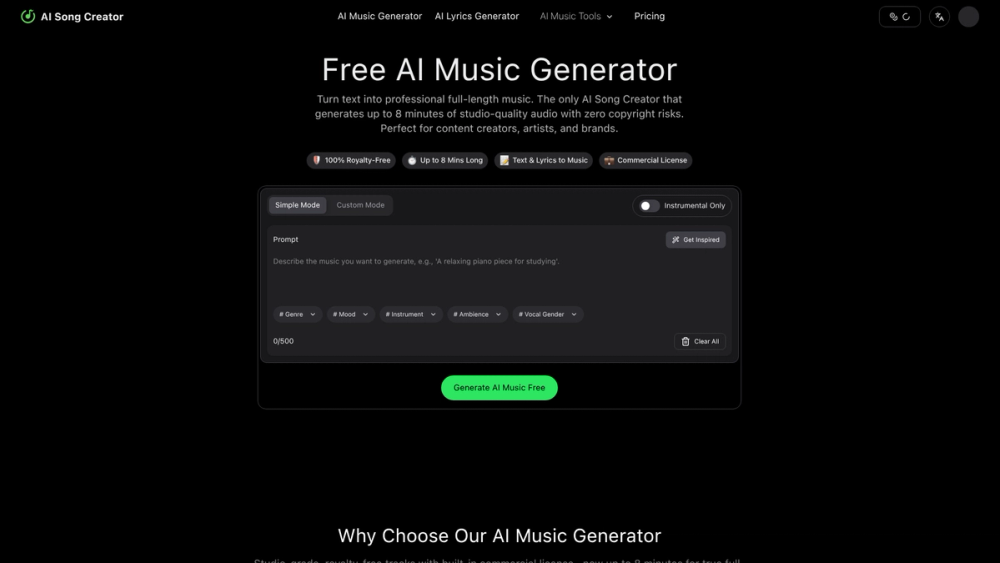
AI Song Creator is an advanced AI music generator designed to transform text into professional, full-length songs. Its primary purpose is to provide an accessible tool for creating studio-quality, royalty-free music up to 8 minutes long, complete with vocals and lyrics. This platform empowers users to generate unique tracks without needing any musical expertise or expensive equipment, making music creation fast, easy, and affordable.
The key value of AI Song Creator lies in its ability to eliminate copyright risks and licensing fees. Every track generated includes a full commercial license, making it ideal for content creators, artists, developers, and brands who need original music for platforms like YouTube, Spotify, TikTok, games, or marketing campaigns. By offering an all-in-one toolkit that includes lyric generation, mastering, and stem downloads, it streamlines the entire music production process from concept to a release-ready track.
Features
- Extended Song Length: Generates complete songs up to 8 minutes long, featuring a proper verse-chorus-bridge structure, unlike other tools that are limited to short loops.
- 100% Royalty-Free with Commercial License: Every generated track is free from copyright claims and includes a full commercial license for unrestricted use on YouTube, Spotify, TikTok, and in client projects.
- Text & Lyrics to Music: Create music from simple text prompts describing a mood or genre, or input your own lyrics to have the AI compose a song around them.
- Studio-Quality Audio: The AI produces crisp, detailed, and professional-grade audio, providing release-ready quality without the need for a recording studio.
- All-in-One Creation Toolkit: A comprehensive suite of tools including an AI lyrics generator, mastering capabilities, and the option to download stems for advanced editing.
- Dual Creation Modes: Features a 'Simple Mode' for quick generation from a text prompt and a 'Custom Mode' for granular control over genre, mood, instruments, and vocal gender.
- Instrumental & Vocal Options: Users can choose to create instrumental-only tracks or complete songs with AI-generated vocals.
How to Use
- Select a Mode: Start by choosing between 'Simple Mode' for a fast, prompt-based experience or 'Custom Mode' to fine-tune your song's attributes.
- Describe Your Song: In the prompt box, type a description of the music you want. For more control, use the tags for Genre, Mood, Instrument, and Ambience to specify your sound.
- Add Lyrics (Optional): You can either provide your own lyrics for the AI to build a song around or use the integrated AI Lyrics Generator to create them from scratch.
- Customize Your Track: Check the 'Instrumental Only' box if you don't want vocals. In Custom Mode, you can also select the desired vocal gender.
- Generate and Review: Click the 'Generate AI Music' button. The AI will process your request and create the track. Listen to the result to ensure it meets your expectations.
- Download and Use: Once satisfied, download the full-length, high-quality audio file. The track is now yours to use commercially, 100% royalty-free.
Use Cases
- Content Creators: YouTube, podcast, and TikTok creators can produce unique background music and theme songs that perfectly match their content's mood, completely avoiding copyright strikes.
- Musicians and Artists: Songwriters can quickly prototype new musical ideas, create backing tracks for practice, or generate a full instrumental arrangement for their lyrics without needing a band.
- Businesses and Brands: Create custom, on-brand music for advertisements, marketing videos, and social media campaigns without the high cost of stock music licenses or hiring a composer.
- Game and App Developers: Produce original soundtracks and ambient audio for games and applications, enhancing the user experience with immersive and fitting music.
FAQ
What does royalty-free mean?
It means you can use the music you create in any personal or commercial project as many times as you like without paying ongoing fees (royalties). Your one-time generation gives you a license to use the track forever.
Can I use the generated music on Spotify or YouTube?
Yes. All music generated includes a full commercial license, which grants you the right to upload it to streaming services like Spotify and use it in monetized videos on YouTube, TikTok, and other platforms.
How long can the songs be?
AI Song Creator can generate songs up to 8 minutes in length, allowing for the creation of full-length tracks with complex structures, not just short loops.
Can I generate music from my own lyrics?
Absolutely. The platform features a text-to-music function that allows you to input your own lyrics and have the AI compose a song based on them.
Is there a free version?
The website has a 'Generate AI Music Free' option, which indicates there is a free plan or trial available for users to test the service and create music at no cost.
What is the difference between Simple Mode and Custom Mode?
Simple Mode allows you to generate a song quickly from a single text description. Custom Mode provides more detailed controls, letting you individually select the genre, mood, instruments, and other parameters for a more tailored result.
Do I need any musical experience to use this tool?
No, you do not need any musical knowledge. The tool is designed to be user-friendly for everyone, enabling you to create professional-sounding music simply by describing what you want in plain text.



