

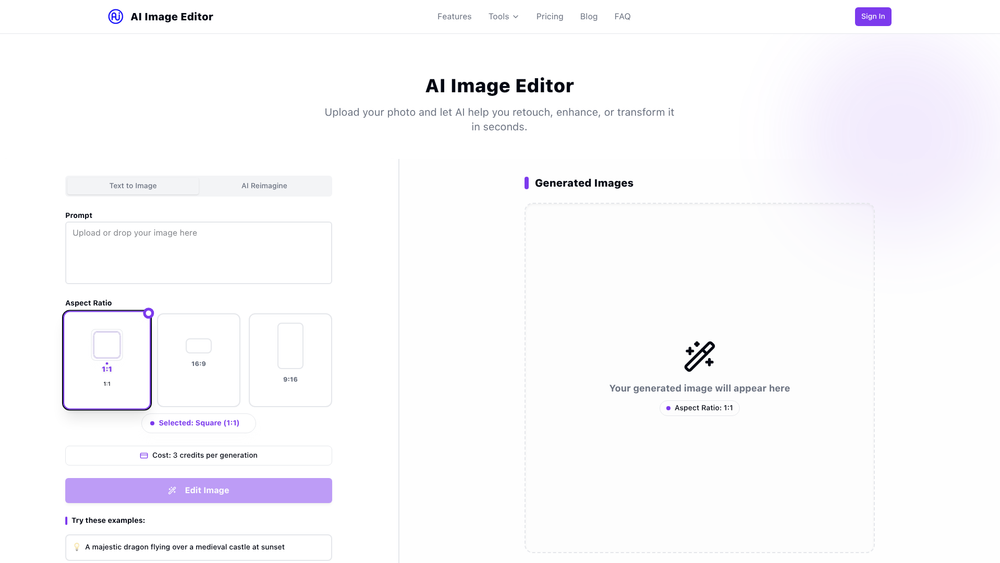
AI Image Editor is a powerful online photo editing tool that leverages artificial intelligence to help users enhance, retouch, and transform their images in seconds. Designed for both simplicity and power, it provides a suite of advanced features, such as background removal, skin enhancement, and AI-powered style application, through an intuitive web interface. This makes professional-grade photo editing accessible to everyone, regardless of their technical skill level.
The primary benefit of AI Image Editor lies in its ability to automate complex editing tasks that would typically require specialized software and expertise. It's an ideal solution for social media enthusiasts looking to perfect their profile pictures, e-commerce store owners needing clean product photos, and digital artists exploring creative transformations. By handling the heavy lifting with smart algorithms, the tool saves users valuable time and effort, allowing them to achieve high-quality results with just a few clicks.
Features
- AI Outfit Generator: Instantly try on different clothing styles and fashion looks by uploading your photo and letting the AI generate new outfits.
- Automatic Background Removal: Remove or replace the background of any image with a single click, perfect for creating clean product shots or profile pictures.
- Instant Photo Retouching: Automatically enhance skin, smooth imperfections, and adjust lighting to create flawless portraits without manual effort.
- Artistic Filters & Effects: Apply a wide range of artistic styles, color grading presets, and modern effects to transform the mood and look of your photos.
- AI Image Upscaling: Increase the resolution and quality of your images without the typical loss of detail, making them suitable for high-resolution displays and printing.
- Prompt-Based Transformation: Use text prompts to guide the AI in transforming your image, giving you creative control over the final output.
How to Use
- Upload Your Image: Begin by dragging and dropping your photo onto the designated area or click the upload button to select a file from your device.
- Provide a Prompt (Optional): If you want to transform your image, enter a descriptive text prompt detailing the changes you want the AI to make.
- Choose an Aspect Ratio: Select the desired aspect ratio for your final image, such as Square (1:1), Portrait, or Landscape.
- Select an Editing Tool: Choose from the available AI tools, including background removal, retouching, filters, or the outfit generator. The AI will process your image based on your selection.
- Review and Refine: Your generated or edited image will appear in the preview area. You can adjust your prompt or try a different tool if needed.
- Download Your Result: Once you are happy with the edit, click the download button to save the enhanced image to your device.
Use Cases
- E-commerce Product Photography: Quickly remove backgrounds from product photos to create clean, professional-looking images with a uniform background for online stores.
- Social Media Enhancement: Retouch portraits and selfies to improve skin tone, fix lighting, and apply trendy filters, ensuring your profile pictures and posts stand out.
- Fashion & Style Exploration: Use the AI Outfit Generator to visualize different clothing styles on yourself without needing to try them on, making it a fun tool for fashion discovery.
- Digital Art & Creativity: Transform ordinary photos into unique works of art by applying artistic styles or using text prompts to generate entirely new visual concepts from a base image.
- Photo Restoration & Upscaling: Improve the quality of old or low-resolution photos by using the AI upscaler to increase their size and clarity for printing or digital archiving.
FAQ
Is AI Image Editor free to use?
Yes, there is a Free plan that includes basic features like standard background removal, limited filters, and 5 free edits per month. For more advanced tools and higher limits, you can upgrade to a Pro or Premium plan.
How do credits work?
Credits are used for AI generation tasks. For example, generating an image based on a prompt costs 3 credits per generation. The Pro plan includes 200 credits per month, and the Premium plan includes 500 credits.
What kind of files can I upload?
You can upload common image formats such as JPG, PNG, and WEBP. The platform is designed to be flexible with standard photo files.
Can I remove the background from my photos?
Absolutely. The tool offers a one-click background removal feature. The Free plan provides basic removal, while paid plans offer higher-quality results.
What is the AI Outfit Generator?
The AI Outfit Generator is a feature that allows you to upload a photo of yourself and see how different outfits and clothing styles would look on you, all generated by AI.
Can I increase the resolution of a small photo?
Yes, the AI Image Upscaling feature is designed to increase the resolution of your photos without losing quality, which is perfect for enhancing smaller images for larger displays or printing.



