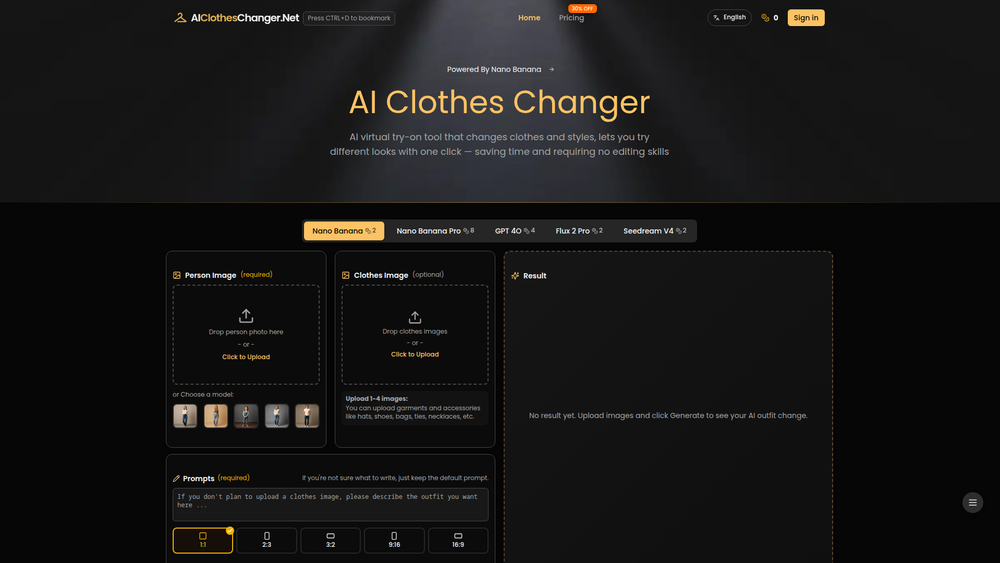
AI Clothes Changer is an innovative virtual try-on tool that uses advanced artificial intelligence to realistically change outfits in your photos. By simply uploading a picture of a person and images of clothing, the tool seamlessly swaps garments, allowing you to visualize new styles, outfits, and accessories with incredible accuracy. It's designed for anyone from fashion enthusiasts and content creators to e-commerce store owners who want a quick, easy, and cost-effective way to experiment with fashion.
The primary value of AI Clothes Changer lies in its flexibility and powerful customization options. Users can explore different fashion trends without purchasing items, plan their wardrobe, or create professional-grade product photos for online stores. By supporting multiple AI models and detailed text prompts, the tool offers a high degree of creative control, making it an indispensable asset for personal styling, digital marketing, and fashion design prototyping.
Features
- Multiple AI Model Support: Choose from a variety of advanced AI engines, including Nano Banana (Pro), GPT-4o, Flux, and Seedream, to achieve different artistic styles and levels of realism in your virtual try-ons.
- Multi-Item Outfit Creation: Upload up to four images at once, combining garments and accessories like hats, shoes, bags, and jewelry to create a complete and cohesive look in a single generation.
- Advanced Prompt Customization: Go beyond just swapping clothes by using editable text prompts to define the background scene, lighting conditions, model poses, and overall artistic style of the final image.
- Flexible Image Sources: Use your own photos for a personalized experience or select from a library of professional models to serve as the base for your outfit creations, ensuring high-quality results every time.
- Commercial Use License: Generated images are cleared for commercial use, making the tool perfect for e-commerce businesses, marketers, and designers who need to create product showcases and promotional content.
- Generation History: Your recently generated images are automatically saved for 14 days, allowing you to easily access, review, compare different styles, and download your favorite creations at your convenience.
How to Use
- Upload or Choose a Model: Begin by either uploading a clear, front-facing photo of yourself or another person, or select one of the provided official models from the library.
- Upload Clothing Images: Add one or more images of the clothing items you want to try on. You can include tops, bottoms, dresses, and accessories like hats, bags, or shoes.
- Refine with a Prompt (Optional): For more specific results, edit the text prompt. Describe the desired background, pose, or style. If you're unsure, you can simply use the default prompt.
- Generate the Outfit: Click the generate button and let the AI process your images. The tool will automatically apply the clothing to the model photo, creating a new, realistic image.
- Download and Share: Once the generation is complete, you can download the final image to your device or share it. If you're not satisfied, you can adjust the prompt and generate again.
Use Cases
- E-commerce Product Visualization: Online store owners can create diverse and high-quality product listings by showcasing their apparel on various models without the need for expensive photoshoots. This helps customers visualize the fit and style better.
- Personal Styling and Wardrobe Planning: Individuals can virtually try on clothes from online stores before buying, experiment with new combinations from their existing wardrobe, or simply explore new fashion trends without any commitment.
- Fashion Content Creation: Social media influencers, bloggers, and designers can quickly generate a wide range of fashion-forward content for their platforms, showcasing different looks and styles in various settings.
- Design Prototyping: Fashion designers can get an early visualization of how their sketches or initial designs will look on a human figure, helping to refine concepts before producing physical samples.
FAQ
What is AI Clothes Changer?
AI Clothes Changer is an AI-powered tool that allows you to virtually try on different outfits. You upload a photo of a person and images of clothes, and the AI generates a new image with the person wearing the selected items.
Do I need to use my own photo?
No. While you can upload your own photo for a personalized experience, the tool also provides a library of official models that you can use as the base for your outfit creations.
Can I try on a full outfit with accessories?
Yes, the tool supports uploading multiple images at once. You can upload garments along with accessories like hats, shoes, bags, and necklaces to generate a complete look in a single step.
What are prompts for?
Prompts are optional text descriptions you can use to give the AI more specific instructions. You can use them to change the background scene, adjust the lighting, specify a pose, or define the overall style of the generated image.
Can I use the generated images for my online store?
Yes, images generated with a personal photo are permitted for commercial use, making it an excellent tool for creating product photos for e-commerce websites and marketing materials.
How long are my generated images saved?
Your recent creations are automatically saved in your history for 14 days, giving you ample time to review, compare, and download them.
What type of photos work best for virtual try-on?
For the best results, use a clear, high-quality photo where the person is facing forward and their body is not significantly obscured. Simple backgrounds also help the AI focus on the person and clothing.